




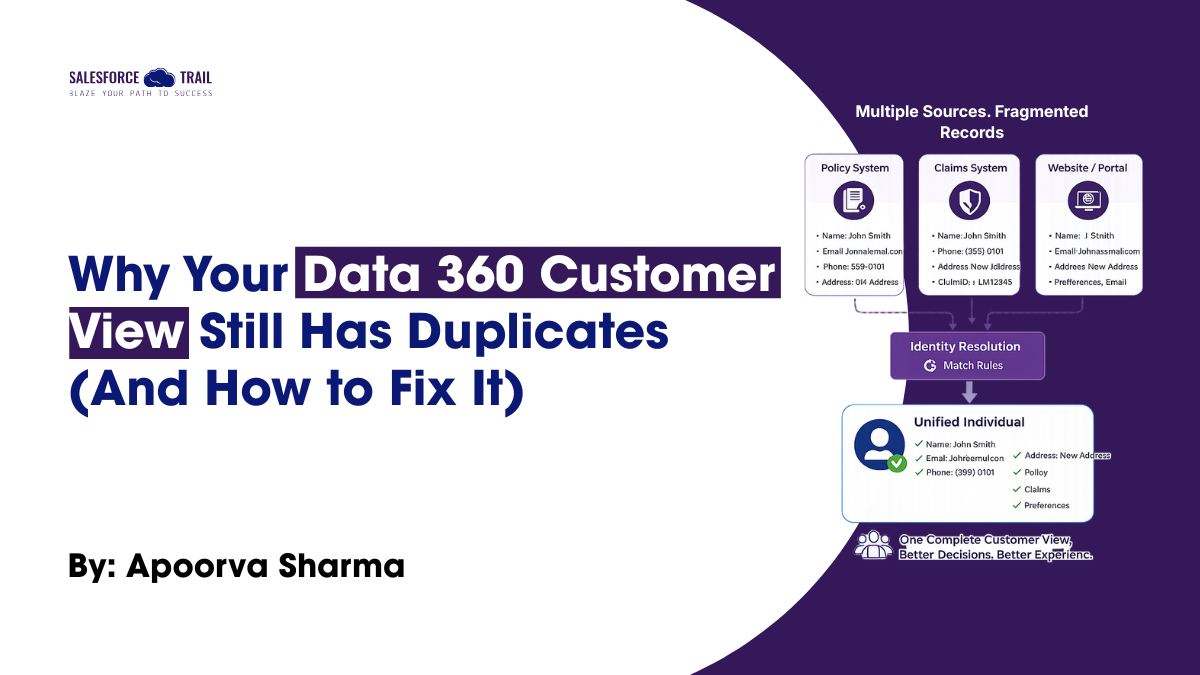
You finally get every source system feeding into Data 360 – the policy admin system, the agent portal, the call center, the website. The data streams are green. The mappings are complete. And then you open Profile Explorer and find three unified profiles for the same customer, two with mismatched addresses and one missing a phone number entirely.
This is a common scenario where a Data 360 implementation stalls, and it is rarely due to the platform itself. The real issue lies in how the ‘identity resolution’ ruleset was designed or, as is often the case, the fact that it wasn’t designed at all, with teams simply proceeding using default matching rules.
This article focuses on a specific aspect: how ‘identity resolution’ actually works under the hood, why the default setup often fails to deliver expected results in regulated sectors like insurance and banking, and how this can be rectified, illustrated by two real-world implementation examples (use cases).
Table of Contents
Key takeaways
- Identity Resolution links and reconciles source records into a Unified Individual – it never deletes or overwrites your source data.
- Match rules that rely on a single field (like email alone) under-match in industries where that field isn’t consistently captured across systems.
- Reconciliation rules should be set deliberately per field, not left on a single default across the whole profile.
- In regulated use cases like lending or insurance, a false match is usually more costly than a missed match – design your rulesets with that asymmetry in mind.
- Monitor the consolidation rate in Processing History regularly; it’s the earliest signal that a ruleset needs adjustment.
What Identity Resolution actually does (it’s not a merge)
It helps to stop thinking of Identity Resolution as “deduplication.” Salesforce Data 360 doesn’t overwrite or delete your source records. Instead, it creates a Unified Individual profile by linking together matching source records through Match Rules, then determines which value appears for each field using Reconciliation Rules.
Two concepts do all the work here:
- Match Rules determine whether two source records represent the same individual by using exact, fuzzy, or normalized matching across fields like email, phone number, or a government-issued ID.
- Reconciliation Rules determine which source’s value appears in the Unified Individual profile once records are linked, based on factors such as recency, frequency, or source priority.
Configure Match Rules too loosely, and you risk linking two different people into a single profile – a serious issue when that profile drives a policy renewal, loan offer, or credit decision. Make them too restrictive, and legitimate records remain separate, creating silent duplicates that never activate together. In practice, that’s often the harder problem to spot because nothing actually breaks or throws an error.
Use case 1: Reconciling policyholders and agents of record in insurance
Insurance companies serve as an excellent stress test for ‘identity resolution,’ as a single individual can appear in vastly different forms across the ‘data 360’ landscape. Records for a policyholder from a legacy policy administration system, a producer or agent-of-record from a commission system, and a claim contact from a claims platform rarely share a common primary key; legacy systems often store names differently and format phone numbers in various ways, while compliance regulations sometimes result in the complete omission of Social Security or national ID numbers from certain data feeds.
A match ruleset built only on email address will under-match here, because commission and claims systems frequently don’t capture email at all. A more resilient pattern combines a fuzzy match on name plus normalized phone as one rule, with an exact match on a government ID field as a second, independent rule — so a match on either rule is enough to link the records. On the reconciliation side, address and phone are set to “most recent by source system update,” while the legal name is reconciled from the policy admin system specifically, since that’s the system of record for legally binding documents.
The benefit extends beyond simply having a superior ‘profile explorer.’ It ensures that a single ‘unified individual’ profile accurately links the customer’s active policies, assigned agent, and any open claims—providing exactly the record that ‘Service Cloud’ and ‘Agentforce’ agents need when a customer calls.
Use case 2: Proactive loan offers without false positives
In banking and lending, a key use case for Data 360 arises when a ‘calculated insight’ (such as an account balance trend or an upcoming loan payment date) crosses a specific threshold, triggering a proactive loan or credit offer. This process relies on ‘identity resolution,’ as insights are calculated at the ‘unified profile’ level.
If two account holders with similar names and addresses are erroneously merged into a single profile, the resulting insight conflates two distinct financial situations. Consequently, this could trigger offers that are inappropriate for both customers, creating issues regarding both the customer experience and regulatory compliance. The solution typically lies not in adding more ‘match rules,’ but in tightening existing ones. By mandating matches based on account-level identifiers (beyond just name and address) while retaining optional ‘fuzzy-name’ rules, one can maintain high ‘recall’ levels while eliminating the risk of ‘false positives’ that might otherwise arise at the household level due to overly lenient rules.
Teams often only discover a matching issue like this after an activation goes out with the wrong offer. It’s worth validating match precision against a sample of known households before a journey goes live, not after.
A quick health check for your own ruleset
Before assuming your unified profiles are accurate, walk through this:
- Open the ruleset’s Processing History and check the consolidation rate – a rate that jumps sharply after a small rule change is worth investigating before you trust it.
- Confirm every required identity field (ID, name, and at least one contact point) is mapped – Identity Resolution won’t run reliably on partial mappings.
- Test match rules against a known set of duplicate and distinct records, not just a spot check of a few familiar names.
- Set reconciliation rules deliberately per field – don’t leave every field on the same default reconciliation method.
- Re-run this check after adding a new data stream – a new source can quietly shift your consolidation rate in either direction.
Start with one ruleset, not a perfect one
You don’t need to solve identity resolution for every object on day one. Pick your highest-value use case the one journey or agent workflow that depends most on an accurate unified profile and build a ruleset specifically for it. Test it against real duplicate pairs from your own data before you trust the consolidation rate on the dashboard.
If you’re setting one up for the first time, start with the ruleset configuration steps in the Trailhead module linked below, then come back and stress-test it against a scenario like the ones above.
Resources
Trailhead module

Apoorva Sharma
Apoorva Sharma is a Salesforce Technical Architect specializing in Data 360, with 9+ years of experience delivering CRM and data unification programs across the insurance and financial services sectors. Apoorva has led Identity Resolution, activation, and Agentforce grounding design for multiple carrier and lender implementations, and is part of a CRM Center of Excellence supporting cross-line-of-business Salesforce delivery. Outside of architecture work, Apoorva writes and speaks about practical Data 360 patterns learned from real client engagements.
- This author does not have any more posts.