


If you have watched TDX 2026 or even caught the keynote replay on Salesforce+, “MCP” came up constantly in keynote, dev sessions, and product demos. TDX 2026 moved fast, and there was a lot to cover. But if you’re still unclear on what the Model Context Protocol is and why Salesforce built an entire platform shift around it.
This article covers the full picture: what MCP is, how it works, why the broader AI industry is moving toward it, and specifically what Salesforce has built on top of it at TDX 2026.
Table of Contents
What Is Model Context Protocol (MCP)?
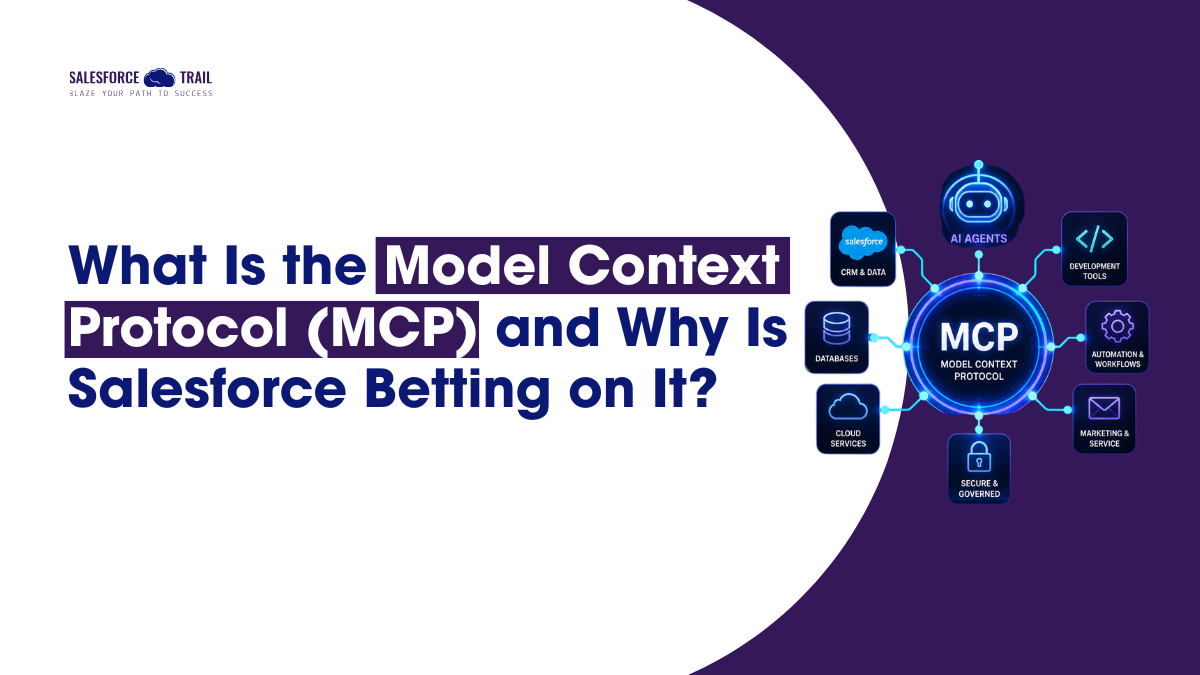
Model Context Protocol is an open standard that enables AI agents to connect to external tools, data sources, and services without requiring a custom integration for each.
The best way to understand it is through USB-C. Before USB-C, every device manufacturer used its own proprietary port. Charging your laptop, your phone, and your wireless earbuds meant carrying three different cables. It was annoying, wasteful, and everyone tolerated it because there was no alternative.
USB-C standardized the port. One connector works across manufacturers, device types, and use cases.
Before MCP, connecting an AI agent to an external tool meant writing bespoke code for each connection, including custom authentication logic, request formats, and error handling—every time, from scratch.
MCP standardizes that connection layer. It gives AI agents a universal interface for communicating with any MCP-compatible tool or data source. One standard replaces a thousand one-off integrations.
The protocol was introduced by Anthropic in late 2024 as an open specification, and since then, its adoption has expanded well beyond Anthropic’s own products.
How MCP Actually Works: Clients, Servers, and Tools
MCP has three components:
- MCP Client — the AI agent making the request. This could be an Agentforce agent, Claude Code, Cursor, Codex, or any MCP-compatible tool.
- MCP Server — the middleware that receives the request and routes it correctly.
- MCP Tool — the specific capability being invoked, such as “query Account records,” “retrieve org metadata,” or “update a Case status.”
A concrete example makes this easier to follow. Let’s say you’re using Claude Code to build a new Salesforce app. Instead of pulling up the Salesforce REST API documentation, writing authentication code, and constructing SOQL queries manually, your coding agent sends a structured request through an MCP tool: fetch the schema for the Account object in my org.
The MCP Server handles the Salesforce API call underneath. The agent receives structured data that it can work with immediately. You skip the integration entirely.
This works at scale because of the standardized request-response format. Any MCP-compatible agent can call any MCP-compatible tool without understanding the native API of the underlying system. One standard, many tools.
Why the Broader AI Industry Is Adopting MCP
This tends to get buried in the Salesforce-specific TDX coverage, so it’s worth being direct: MCP is not a Salesforce invention, and it’s not Salesforce-specific.
MCP is an open specification with growing adoption across the AI industry. Coding agents, including Claude Code, Cursor, Codex, and Windsurf, all support MCP natively. That’s why Salesforce’s MCP tools work with all of them out of the box, not because Salesforce built separate connectors for each one, but because they all speak the same standard.
The adoption makes practical sense. Enterprises today are deploying agents from multiple vendors simultaneously, such as Salesforce, Microsoft, AWS, and Google. Without a shared communication standard, every cross-platform agent connection requires a custom bridge. At scale, that becomes an operational mess.
MCP solves it the same way REST solved the API interoperability problem a decade ago: by giving everyone a common language. Salesforce’s decision to build Headless 360 on top of MCP is a bet on where the industry is going. Given the adoption curve, it looks like a well-placed one.
How Salesforce Implements MCP: 60+ Tools, Free to Use Today
At TDX 2026, Salesforce announced Headless 360 — a re-architecture of the platform that makes the entire Salesforce stack accessible via API, CLI, or the MCP tool, without opening a browser. Central to that launch were more than 60 MCP tools covering the full product surface.
Those tools span the platform’s core layers:
- Data & CRM — query and update Accounts, Contacts, Opportunities, Cases, and custom objects in real time
- Metadata & Dev — access org schema, retrieve field definitions, inspect existing code patterns
- Workflow — trigger Flows, manage approvals, interact with automation processes
- Service & Marketing — surface and act on Service Cloud and Marketing Cloud data
Alongside those 60+ MCP tools, Salesforce released 30 preconfigured coding skills, pre-built packages of Salesforce-specific expertise that give coding agents working knowledge of Apex conventions, LWC patterns, Flow architecture, and metadata best practices.
The access point is Agentforce Vibes 2.0, which ships with Salesforce Hosted MCP Servers included at no cost in every Developer Edition org. No infrastructure setup, no additional licensing. Grab a free Developer Edition, and you can start using Salesforce MCP tools today.
MCP vs. Traditional Salesforce APIs: What’s Actually Different?
If you’ve been building on Salesforce for any length of time, you likely have a reasonable question right now: the platform already has REST APIs, SOAP APIs, Bulk APIs, and Streaming APIs. So what does MCP actually add?
MCP doesn’t replace those APIs. It sits on top of them and makes them accessible to AI agents that don’t speak REST.
Traditional Salesforce APIs work well for developer-written code. The calling system needs to know endpoint structures, SOQL syntax, authentication flows, and Salesforce-specific field naming. Fine for a human developer reading documentation, a real barrier for an AI agent trying to act autonomously.
MCP handles the translation. The agent expresses its intent in a structured format. The MCP tool converts that into the appropriate Salesforce API call, manages authentication, and returns the result in a form the agent can use.
One important caveat: for developers doing complex integrations, bulk data operations, or custom authentication flows, the underlying Salesforce APIs still matter. MCP tools abstract common operations; they don’t replace the full API surface.
What This Means for You — And Where to Go Next
MCP is the communication layer that makes everything else in Headless 360 possible. It’s not a standalone feature; it’s the infrastructure that lets coding agents, Agentforce agents, and third-party tools access the Salesforce platform without bespoke integration code for each connection.
Frequently Asked Questions (FAQ)
MCP (Model Context Protocol) is an open standard that Salesforce adopted as the communication layer for Headless 360. It lets AI agents, including Agentforce agents and third-party coding tools like Claude Code and Cursor, access Salesforce data, workflows, and platform features without custom API integrations.
No. Traditional Salesforce APIs are built for developer-written code. MCP is an abstraction layer designed for AI agents. It translates agent intent into the appropriate API call automatically, removing the need for agent-specific knowledge of Salesforce endpoint structures, SOQL syntax, or authentication patterns.
For most admins and business users, no. Agentforce abstracts MCP entirely; you work with agents through natural language or declarative configuration, and MCP handles platform communication underneath. MCP matters most for developers building custom agents, extending Headless 360, or connecting third-party coding agents to a Salesforce org.
Salesforce launched more than 60 MCP tools at TDX 2026 as part of the Headless 360 announcement, alongside 30 preconfigured coding skills. All are available through Salesforce Hosted MCP Servers in Developer Edition orgs at no cost.

Priya Rastogi
Priya is a 3x Salesforce Certified who believes in the power of continuous learning and collaboration. She’s passionate about exploring how Salesforce can simplify work, boost productivity, and create better user experiences. When she’s not experimenting with new features or automating processes, Priya enjoys connecting with fellow Trailblazers and sharing insights to help others grow in their Salesforce journey.
- Priya Rastogi
 September 16, 2026
 - Priya Rastogi
- Priya Rastogi
- Priya Rastogi