Go-live day usually feels great. The team gathers, someone posts a celebratory message in Slack, the consultants shake hands and start packing up. Everybody exhales.
Then the following Monday hits. When the admin opens their laptop, they find 40 unread messages. Three of them are “quick questions” that aren’t quick at all. Two are bugs nobody caught in testing because real users do things testers never think to try. And somewhere in the sales team, a representative has quietly reverted to the spreadsheet they’ve been using for the past six years, simply because it was “faster” on a busy Tuesday.
There is a name for the challenging phase that follows go-live: hypercare. It is a period most teams go through, yet hardly anyone plans for it in advance. I have observed a recurring pattern across many projects: when the hypercare phase falters, the technology is rarely to blame. In reality, the root causes are unclear responsibilities, a failure to prioritize issues correctly, and the lack of a shared understanding of what constitutes “completion.” Fix those, and the phase mostly takes care of itself.
Let’s walk through how to run it properly: how long it lasts, who owns it, what to watch, how to prioritize the chaos, and how to know when it’s actually over.
Table of Contents
What is Hypercare in Salesforce?
Hypercare is a short, time-bound period of specialized, high-intensity support provided immediately after a Salesforce ‘go-live’ (launch). Its objective is to stabilize both the system and its users before regular support takes over. Salesforce itself describes this as a period of intensive support following major operational changes such as a system launch, and the typical duration is one to four weeks.
The idea isn’t new. It grew out of a concept called Early Life Support, the practice of giving a newly released system extra attention for its first few weeks in the wild. Hypercare widens the lens a bit; it cares about the user’s experience of the change, not only whether the servers are up.
In a Salesforce organization, ‘Hypercare’ typically refers to a collaborative, fast-paced effort involving admins, implementation partners, and select super users. It entails a faster-than-usual response time, where identifying and resolving issues becomes a daily routine. It functions much like a temporary ‘war room.’ It is a way of working, not a specific person you can call upon at any time.
Hypercare vs. BAU support: the difference most teams miss
This is the distinction that often confuses people. Hypercare and business-as-usual (BAU) support are not the same, and blurring the lines between them causes real problems.
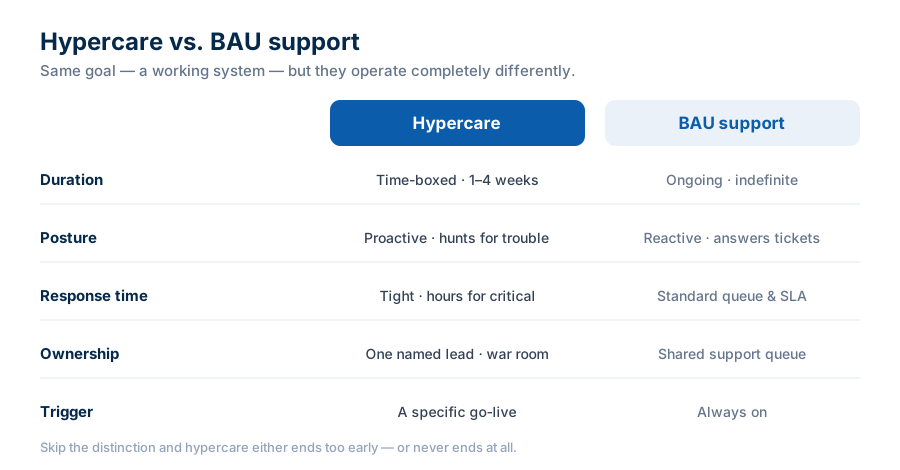
If you never draw this line, one of two things happens. Either hypercare ends too soon and users get abandoned mid-stumble, or it never ends at all — the partner keeps billing, the admin keeps firefighting, and nobody ever formally owns the platform.
Hypercare vs. Early Life Support vs. warranty
It is important to clarify the distinction between them, as they are often conflated. “Early Life Support” is an ITIL term focused on IT-related incidents. “Hypercare” refers to a similar phase but focuses on how people are actually adapting to the new system. “Warranty” is something entirely different – it is a contractual obligation on the part of your partner to rectify defects, and it can run concurrently with Hypercare. Confusing warranty with hypercare is how you end up with two parties pointing at each other while a bug sits unfixed.
Why Hypercare exists and what happens when you skip it
The numbers on CRM projects are sobering. Johnny Grow’s 2025 CRM failure research put the failure rate measured as projects that didn’t hit their planned objectives at around 55%. That’s roughly one in two.
But the more useful question is why they fail. And the answer is rarely the software. David Cockrum, CEO of the consultancy Vantage Point, has estimated that only about 6 to 10 percent of CRM failures trace back to actual technical problems. The overwhelming majority come down to people and process. Adoption research tells a similar story — historically, fewer than 40% of companies ever get more than 90% of their users onto the system.
Here’s how skipping hypercare turns those statistics into your problem. Early friction goes unresolved. Users hit a wall, don’t get help fast enough, and quietly retreat to whatever they used before. Data starts landing in two places, or none. Reports get unreliable. Leadership loses trust in the numbers. And the ROI you built the business case on slowly evaporates — you’re still paying for licenses every month, just not getting the value.
Hypercare is the cheap insurance policy against all of that. A few weeks of intense attention up front is less expensive than re-launching a system people abandoned.
How long should Salesforce hypercare last?
Short answer: one to four weeks for most projects, with two weeks being a common default. Bigger, multi-cloud, or process-heavy rollouts can run longer. That’s Salesforce’s own guidance, and it lines up with what most implementation teams actually do.
One myth worth killing: you’ll see claims floating around that “Salesforce offers a 90-day hypercare period with dedicated support engineers.” That isn’t from Salesforce, and it contradicts their published one-to-four-week guidance. Don’t budget around it.
The more important rule is this: you exit hypercare on criteria, not on the calendar. A date is a planning tool. Readiness is the real gate. We’ll come back to what “ready” looks like near the end.
Who owns Hypercare?
This is precisely where most projects quietly fail. Ask any team who is responsible for hypercare, and you will often get a vague answer: “the team does it” or “the partner is handling it.” Both of these are incorrect answers.
Someone specific needs to own it. Roughly, the roles look like this:
- A single Hypercare Lead. One person accountable for the phase — not a committee. When something’s on fire, there should be exactly one throat to choke.
- The admin, as the internal owner of the platform itself.
- The partner, in a defined, scoped role with an actual end date — not a vague “we’re around if you need us.”
- Business process owners, who make the call when priorities collide.
- Super users, on the floor, absorbing the flood of quick questions before they ever become tickets.
Two failure patterns show up constantly. The first is dumping the entire platform on one overwhelmed admin — often an “accidental admin” who got the job because they were good with Excel. That’s the bus-factor trap, and it’s brutal. The second is the mutual assumption: you think the partner has it handled, the partner thinks you do, and issues fall straight through the gap.
The Partner-to-Admin handoff
The end of hypercare is a handoff, not a fade-out. Something concrete has to transfer: the open issue log, the knowledge base, the admin runbooks, and a clear acknowledgment that BAU now owns things. Skip a real handoff, and you get a support vacuum around week five that feels exactly like go-live all over again — except this time the consultants are gone.
What to monitor during hypercare
You want signals, not gut feel. A few worth tracking:
- Case volume and its trend. Is the line bending down over time, or holding flat?
- Time to resolution. Are fixes getting faster as the team finds its footing?
- Repeat-issue rate. The same problem hitting many people usually means a config gap or a training gap, not a one-off.
- Logins and adoption by role. Which teams aren’t showing up? That tells you where the next problem is brewing.
- Data-quality signals. Blank required fields, sudden spikes in duplicates.
- Shadow systems. Are people still living in the old spreadsheet? Honestly, this is your loudest adoption alarm — louder than any ticket count.
Keep one thing in mind: Salesforce’s built-in reporting features for adoption analytics are quite limited. Decide beforehand how you will track this, whether through reports, dashboards, or a specialized tool, because trying to implement this suddenly when you are already facing difficulties rarely yields good results.
How to Triage and Prioritize Issues
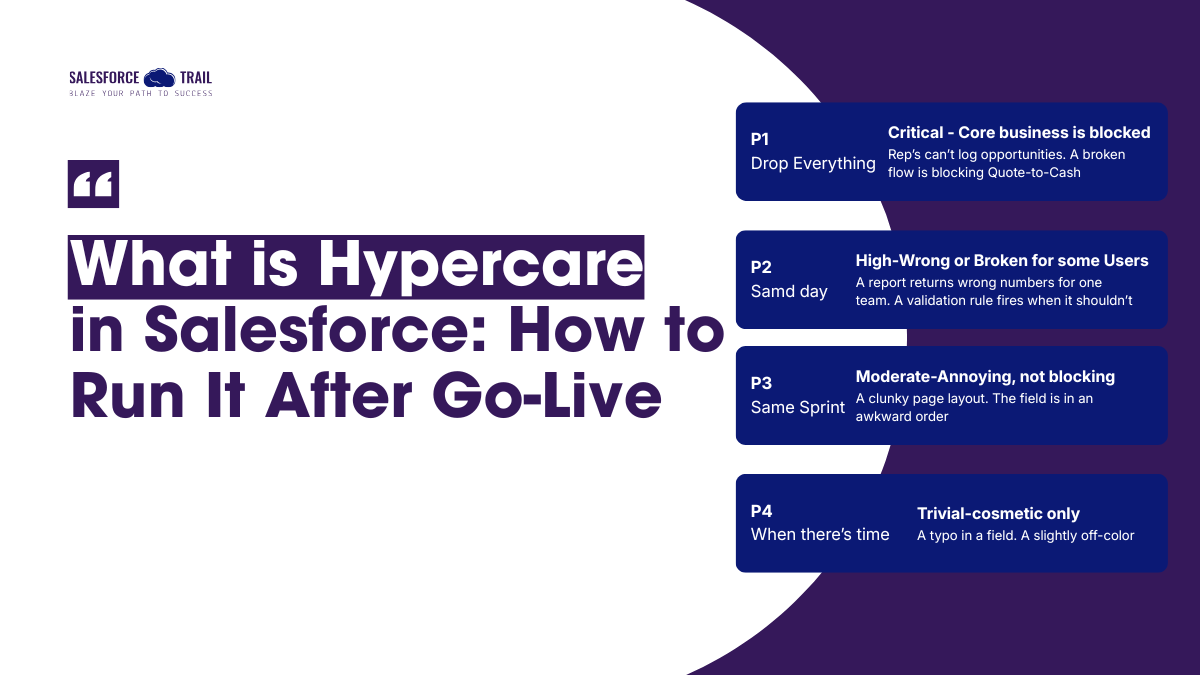
During hypercare, everything feels urgent. It isn’t. You need a way to sort the noise, and the classic P1–P4 model works well once you translate it into Salesforce terms. Quick note on wording: severity is how badly something’s broken; priority is how urgently you’ll fix it given the business impact. They’re related, not identical.
- P1 — Drop everything. Reps can’t log opportunities. A broken flow is blocking quote-to-cash. Revenue is literally stuck.
- P2 — Same day. A report is returning wrong numbers for one team. A validation rule is firing when it shouldn’t.
- P3 — This sprint. A clunky page layout, fields in an awkward order. Annoying, not blocking.
- P4 — When there’s time. A cosmetic typo in a field label.
Two habits make this work. Run a daily triage stand-up while things are hot — fifteen minutes, what’s new, what’s on fire, who’s got it. And keep one issue log as the single source of truth. Not scattered Slack threads, hallway asks, and sticky notes on someone’s monitor. One log. It’s what lets you prove the trend is improving and, later, sign off on the exit.
How to know when hypercare is actually over
This is the part teams skip, and then hypercare either drags on forever or gets declared “done” by whoever runs out of energy first. Neither is a real decision.
Use an exit checklist. Hypercare is over when:
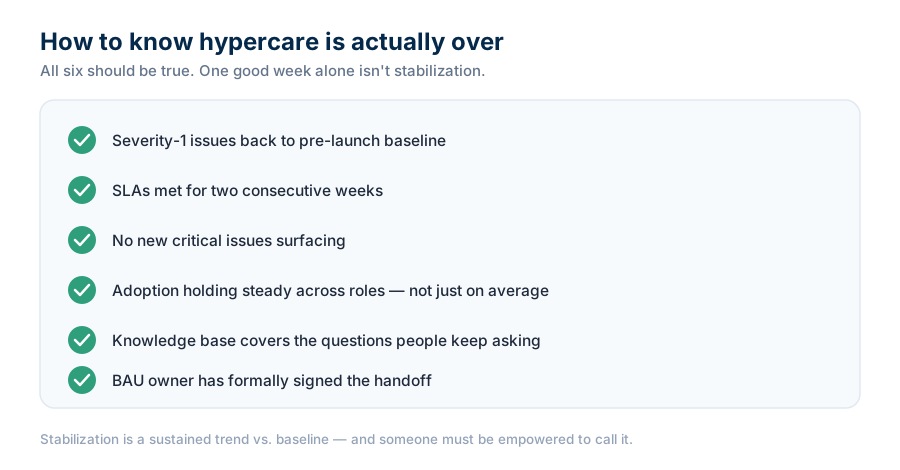
The core idea behind all this is that a single good week does not constitute ‘stabilization.’ Stabilization is a continuous trend, measured over a rolling window and compared against a baseline such as the 30 days before ‘go-live.’ Furthermore, someone must be empowered to make this determination; otherwise, the phase will end without anyone clearly understanding who is responsible for what.
Running Hypercare well comes down to three things
Strip away the process, and it’s really about three decisions.
Name one lead, so ownership is never in doubt. Run disciplined triage off a single issue log, so the loudest voice doesn’t set priorities. And write your exit criteria before go-live, so “stable” means something specific rather than “we’re all tired now.”
Do those three, and the technology mostly behaves. Ignore them, and no amount of clean code will save the launch.
So here’s the practical next step: if you’ve got a go-live on the calendar, draft your hypercare charter now, while things are calm. One page. Who’s the lead, how long the window runs, what you’ll monitor, how you’ll triage, and the exact criteria that end the phase. Get those written down and agreed before launch day — because the week after go-live is the worst possible time to be inventing the plan.
Frequently Asked Questions (FAQ)
It’s a short, intensive support period right after go-live — usually one to four weeks — where the admin, partner, and super users give the new system extra attention to fix issues fast and help users adjust before normal support takes over.
Typically one to four weeks, with two weeks a common default. Complex or multi-cloud rollouts may run longer. The better approach is to end it based on exit criteria rather than a fixed date.
Hypercare is time-boxed, proactive, and has one named owner running a war room. BAU (business-as-usual) support is ongoing, reactive, and handled through a standard support queue. Hypercare bridges the gap between go-live and BAU.
A single Hypercare Lead should own the phase, supported by the admin, the implementation partner in a scoped role, business process owners who set priorities, and super users on the floor. Avoid dumping it all on one admin.
No. Salesforce’s own guidance puts typical hypercare at one to four weeks. The “90-day” claim you may see online isn’t from Salesforce and contradicts their published guidance.
When critical issues are back to baseline, SLAs have held for two straight weeks, adoption is steady across roles, the knowledge base covers common questions, and the BAU owner has formally accepted the handoff. One good week alone isn’t enough.

- Akanksha Shukla

- Akanksha Shukla