



When I started working more closely with Agentforce, I realized that troubleshooting an AI agent can take you in very different directions. Sometimes the problem really is in the agent’s instructions. But sometimes the conversation is just where the problem becomes visible, while the real cause lies elsewhere in Salesforce.
I experienced both situations in a real project. In one case, a scheduling agent was giving users information about a location that did not actually exist. In another, the agent received the wrong information because a Salesforce Flow retrieved a field that didn’t match the variable configured for the agent.
These two problems were very different, but they taught me the same thing:
Working with Agentforce is not only about AI. You still need to understand the Salesforce solution behind it.
Here are five lessons I learned while troubleshooting these issues.
Key Takeaways
- Agentforce troubleshooting should start with the full Salesforce solution, not only the final response.
- Give Agentforce clear boundaries when it must rely on specific business information.
- Trace actions, Flows, fields, and variables when the agent appears to have the wrong information.
- Test from the user’s perspective, then investigate the configuration from an Admin’s perspective.
- Treat Agentforce instructions as application behavior and test changes accordingly.
Table of Contents
When an agent hallucinates, check what you actually told it
One of the most interesting issues I worked on involved a scheduling agent. The agent was supposed to help users with scheduling-related information, but during testing we noticed that in some conversations it was providing details about a location that didn’t exist.
The difficult part was that the answer sounded completely possible. If you were a user, you probably wouldn’t know that anything was wrong.
My first step was to understand why the agent believed it could give that answer. I reviewed the instructions controlling its behavior and noticed that we were leaving too much room for interpretation.
My initial thought might have been simply to add something like “don’t provide incorrect locations.” But that doesn’t actually solve the problem. Instead, I made the instructions more specific about the expected behavior and the information the agent was allowed to use. The goal was to reduce the space for assumptions when the information wasn’t available.
After making the change, I didn’t test only the original question. I tried different ways of asking the same thing, changed some of the information provided, and tested follow-up questions. That experience changed the way I think about Agentforce instructions.
Specificity matters. As Salesforce professionals, we are already used to this idea. If a Flow should execute only under certain conditions, we don’t expect Salesforce to guess those conditions. We configure them.
I started applying a similar mindset to Agentforce. If there is an important business boundary, I don’t want the agent to have to guess it.
Not every Agentforce problem is an AI problem
Another issue taught me an equally important lesson. This time, the agent was giving the wrong information, but changing the instructions wouldn’t have fixed anything. So instead of continuously changing the agent, I started following the process behind it.
Eventually, I found the problem in a Salesforce Flow. The Flow was retrieving the wrong field. That field didn’t match the variable the agent expected, so the agent wasn’t receiving the information we thought it was.
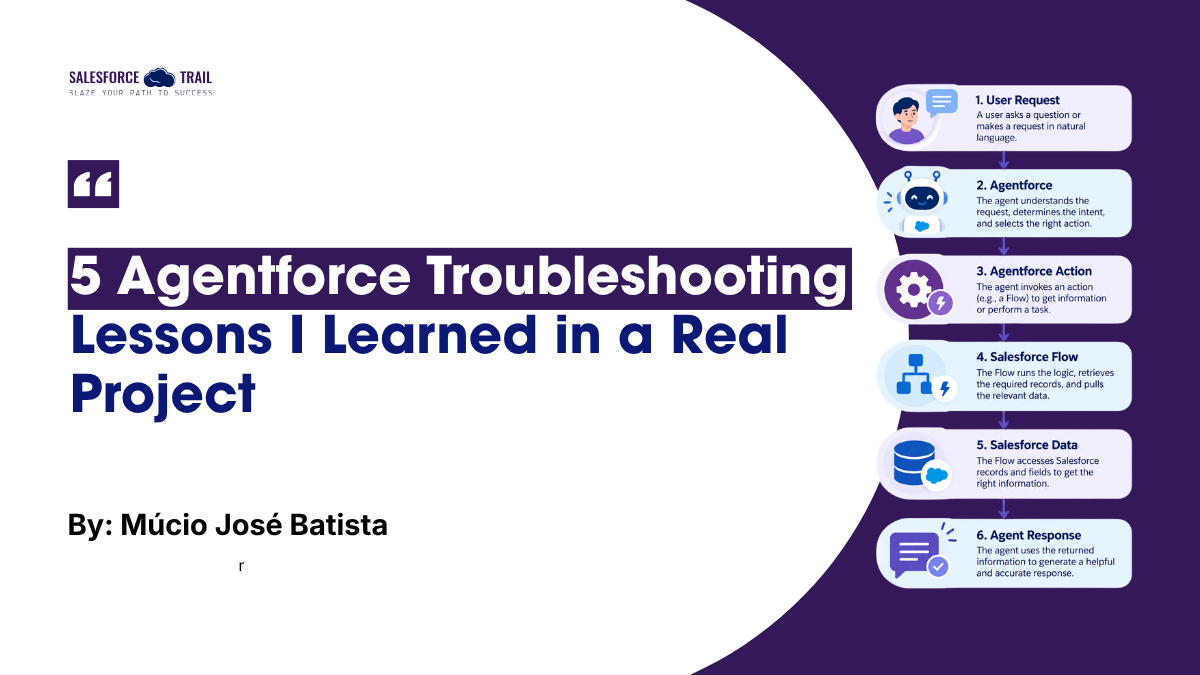
Flow -> Field -> Variable -> Agent
Once I saw that, the problem became much easier to understand. I corrected the Flow so the right field was passed to the variable the agent expected, then tested the full scenario again.
A wrong answer doesn’t automatically mean the AI is the problem.
The problem could be the instructions, the data, a Flow, a field mapping, a variable, or the connection between those components. My Salesforce Admin background helped a lot here. Instead of looking only at the conversation, I could follow what was happening behind it and understand what information was actually reaching the agent.
Since then, one question has become very important when I’m troubleshooting:
Is the agent reasoning incorrectly, or are we giving it the wrong information?
Those are two completely different problems.
Test like a user, then investigate like an Admin
This experience also changed the way I test Agentforce. I like to start from the user’s perspective. I try the question that caused the problem. Then I change the wording, provide less information, and ask a follow-up question. Basically, I try to understand what makes the unwanted behavior appear.
Once I recreate the problem, I change perspectives and start thinking like a Salesforce Admin. What instruction was involved? What action was called? What Flow executed? What field was retrieved? What variable received the value? And finally: what information was actually available to the agent?
This combination has worked very well for me.
The conversation shows you where the problem appears. The Salesforce configuration can show you why it appears.
Treat Agentforce instructions like real application changes
The two problems I described were technically different. One required changing Agentforce instructions. The other required changing a Salesforce Flow. But I learned to treat both as changes to application behavior.
After finding the root cause, the change still needs to be configured, tested, moved through the project’s deployment process when applicable, and validated again. I think this is particularly important with instructions.
Because instructions are written in natural language, changing a sentence can feel less risky than changing a Flow. But the user doesn’t care whether the problem came from a sentence or an automation. They only see whether the agent gives them the correct information.
And a small change to an instruction can change the behavior of many conversations. So I don’t see Agentforce instructions as “just text.” They are part of the solution and should be treated that way.
Agentforce made my Salesforce fundamentals more valuable, not less
Before getting hands-on experience with Agentforce, AI felt like another completely new Salesforce specialization I needed to learn. Working with real problems changed that perspective.
There are definitely new concepts to understand, but I noticed that many of the skills I already used as a Salesforce professional became even more useful. When the scheduling agent provided a nonexistent location, I needed to understand the business requirement and make the instructions more precise. When the Flow retrieved the wrong field, I needed to understand automation, fields, variables, and how data was moving through the process.
In both cases, knowing where the Agentforce configuration was located wasn’t enough. I needed to understand how the Salesforce components worked together.
My experience with Flow Builder, business rules, Service Cloud processes, and Salesforce configuration gave me a foundation for investigating these problems.
Agentforce added another layer on top of that foundation.
For Salesforce Admins who are starting to work with AI, I think that’s an important point:
You’re not starting from zero.
The Agent Is Only One Part of the Solution
The biggest lesson I’ve taken from working with Agentforce is that the agent can’t be treated as an isolated component. The user sees a conversation, but behind that conversation there can be instructions, actions, variables, Flows, Salesforce data, and other automations working together.
When something goes wrong, looking only at the final answer can send you in the wrong direction. Sometimes you need to improve the instructions. Sometimes you need to follow the data until you find a field that doesn’t match a variable. And sometimes you may need to do both.
That’s why I believe Salesforce Admins and Functional Consultants can have an important role in Agentforce projects. We already spend a lot of our time understanding business requirements and translating them into Salesforce configuration. Agentforce changes part of the experience, but that responsibility feels very familiar.
If you’re starting to work with Agentforce, the main lesson I would share is simple:
Don’t troubleshoot only the AI. Troubleshoot the Salesforce solution behind it.
That’s where I found some of my most useful lessons.
Salesforce Resources
- Best Practices for Agent Action Instructions – Salesforce Help guidance on writing and testing effective Agentforce action instructions.
- Build Agentforce Actions – Salesforce Help documentation on creating actions that allow Agentforce to perform tasks.

Múcio José Batista
Múcio Batista is a Salesforce Administrator and Functional Consultant with experience in Sales Cloud, Service Cloud, Flow, Data 360, and Agentforce. He enjoys solving business problems through Salesforce automation and exploring practical applications of AI within the platform.
- This author does not have any more posts.