



Every week I used to get the same two messages. One rep wanted me to pull “all the opportunities closing this month” into a list. Another asked why creating a single Lead took five clicks and three page loads. Neither is a hard problem. Together, they’re the reason I built Orbit.
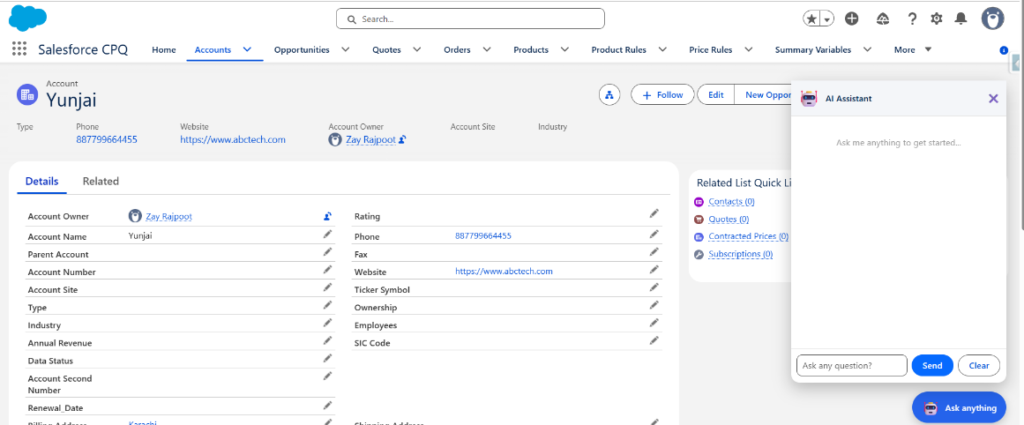
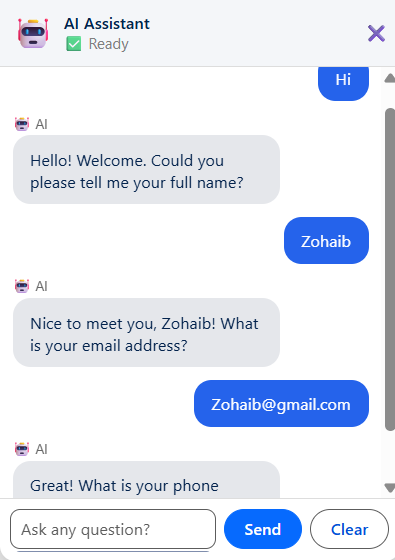
Orbit is a chatbot that lives inside Salesforce. You type a question or request in plain English, and it answers, queries, or creates a record for you – across Lead, Contact, Opportunity, Case, and eight other objects. It runs on a Lightning Web Component front end, with Apex doing the actual thinking, Claude AI handling language understanding, and n8n handling writing the record back to Salesforce.
This walkthrough covers how it’s put together: the Apex routing logic, the Claude API call, the n8n workflow, the security decisions, and a few things I’d do differently starting over. None of it is AI magic. Most of it is ordinary Apex doing ordinary things, with the model called in only where it earns its place.
Table of Contents
Architecture at a glance
Three parts, each with one job.
- The LWC is the mouth and ears. It shows messages and captures what the user types. It makes no decisions.
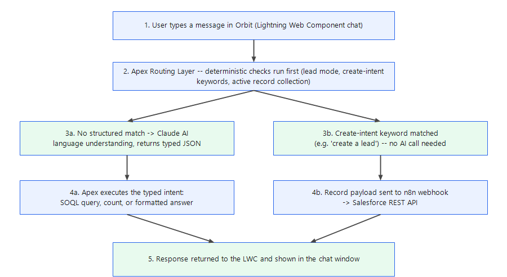
- Apex is the brain. Every message runs through a routing layer before anything else happens. That routing is deterministic – plain conditional logic, not the model – and it decides whether a message needs Claude at all.
- Claude and n8n are the specialists. Claude handles language understanding and response formatting. n8n handles the actual record write through Salesforce’s REST API.
That separation matters more than it first sounds. There’s a clear line between “the AI understood the request” and “the AI is allowed to act on Salesforce data.” Claude proposes. Apex decides. Hold onto that idea, because it shapes every decision that follows.
Setting up the Salesforce side
Before any Apex runs, two pieces of configuration need to exist in your org.
Named Credential and External Credential, for calling Claude
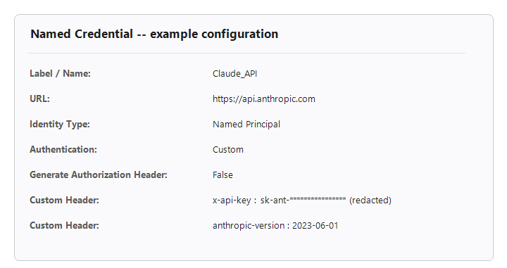
Salesforce reworked how authenticated callouts are configured a while back. Legacy Named Credentials still exist, but they’re deprecated and, per Salesforce’s own documentation, scheduled to be discontinued in a future release. The current model splits the job in two: an External Credential holds the authentication, and a Named Credential points at the endpoint. Here’s the setup that works today.
First, the External Credential:
- Go to Setup, then Named Credentials, then the External Credentials tab, then New.
- Give it a label like Claude_Auth and set Authentication Protocol to Custom.
- Save, then open it and add a Principal (Identity Type: Named Principal, Sequence Number 1). Under Authentication Parameters, add one named ApiKey and paste your Claude API key as the value.
- Add a Custom Header: Name x-api-key, Value {!$Credential.Claude_Auth.ApiKey}.
Then, the Named Credential:
- Back on the Named Credentials tab, click New.
- Label it Claude_API and set the URL to https://api.anthropic.com.
- Link it to the Claude_Auth External Credential you just made.
- Save.
The last step is access. Add the External Credential to a permission set (via a Principal Access mapping) and assign that permission set to the users who’ll use Orbit. This is the piece people miss – access to the Apex class is not the same as access to the credential, and skipping it produces an authentication error on the very first callout.
One habit worth stating plainly: the API key lives only in the External Credential. It never touches Apex code, a static resource, a custom setting, or a comment in a class file. If you ever pair with someone or paste code into a chat for help, that’s exactly where a key can accidentally end up. Treat anything pasted outside your org as compromised, and rotate it.
Talking to Claude: the actual API call
Once the credential exists, calling Claude from Apex is a fairly ordinary HTTP callout:
HttpRequest req = new HttpRequest();
req.setEndpoint('callout:Claude_API/v1/messages');
req.setMethod('POST');
req.setHeader('Content-Type', 'application/json');
req.setHeader('anthropic-version', '2023-06-01');
req.setBody(JSON.serialize(new Map{
'model' => 'claude-haiku-4-5-20251001',
'max_tokens' => 300,
'system' => routingSystemPrompt,
'messages' => conversationHistory
}));
HttpResponse res = new Http().send(req);
A couple of details trip people up here. Claude uses the x-api-key header, not Authorization: Bearer, which is why the header is stored in the External Credential rather than in this code. The anthropic-version header and the max_tokens field are required on every request; omit either, and the call fails. If you want the current version string and the latest model names, consult the Claude API reference rather than trusting a value copied from a blog post.
The system prompt is where the instruction-following happens. Orbit’s routing prompt tells Claude to return exactly one thing: a small JSON object with a type field, and nothing else. No explanation, no markdown, no extra text. A typical response looks like this:
{"type":"SF_QUERY","object":"Opportunity","accountName":"Acme Corp","isCount":false,"filterField":null,"filterValue":null}
Apex parses that and reads the type field to determine what happens next. SF_QUERY and SF_COUNT execute a SOQL query. SF_HELP and KNOWLEDGE return plain-text answers. WEB_SEARCH calls a search API. CHAT is just conversation. Claude never runs a query itself and never accesses Salesforce data directly. It only tells Apex what kind of request this is, and Apex decides what to do.
A routing layer that’s predictable, not psychic
Every incoming message runs through a short checklist in Apex before anything else happens:
- Is the conversation midway through capturing a visitor lead, and does this message look like an answer rather than a new question? Continue the lead-capture flow.
- Does the message contain a create-style keyword – “create,” “add a,” “new” – next to a recognizable object name, including common typos like “crate” or “creaet”? Start record collection. No AI call happens here at all.
- Is the conversation midway through collecting fields for a record? Continue from the state stored in the last message.
- Otherwise, send the message to Claude and let the typed JSON response decide.
if (mode == 'COLLECTING_LEAD' && !isRealQuestion(input)) {
return continueLeadCapture(input, history);
}
String targetObject = detectCreateIntent(input);
if (targetObject != null) {
return startRecordCollection(targetObject);
}
if (mode == 'COLLECTING_RECORD') {
return continueRecordCollection(input, history);
}
I used to describe step two as “100% reliable.” An editor pushed back, and they were right to. What’s actually true is narrower and more honest: because the create-intent check is plain keyword matching, not a model making a judgment call, it behaves the same way every time given the same input. That’s what deterministic means here – predictable, not infallible. If someone phrases a request in a way the keyword list doesn’t cover, like “I’d like a new one of these please,” it falls through to Claude instead of silently doing the wrong thing. A soft failure, not a guarantee.
Collecting a record, one field at a time
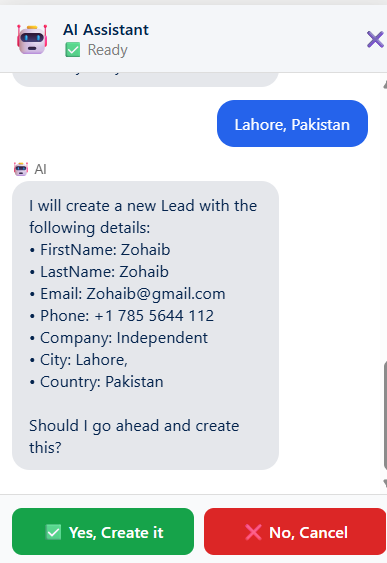
Once Orbit knows it’s creating a Lead or any supported object, it asks for the required fields first, one small group at a time, and only asks for optional fields once the required ones are filled. A typo in an email address doesn’t restart the conversation. It just re-asks that one field.
The tricky part is state. A Lightning Web Component doesn’t have a natural place to store “we’ve collected the last name and company, still need email.” Orbit handles this by writing a small tag into its own reply:
RCSTATE:Lead:Email,City:{"LastName":"Khan","Company":"Acme Retail"}:RCEND
The JavaScript layer retains the entire message (including the tag) in the conversation history and sends it back to Apex on the next turn, but strips out the tag before displaying anything to the user. Apex reads the bot’s last message, identifies the tag, and resumes the process from where it left off. This approach differs from using a dedicated session object. The advantages of this method are: no custom objects, no cleanup jobs, and no residual state (data) once the conversation ends.
Once all required fields are populated, Orbit displays a summary in plain language and requests confirmation before writing anything to Salesforce; nothing is created silently.
Why the write goes through n8n, not straight Apex DML
This is the question I get asked most, so let me be direct. Apex could absolutely do the insert directly, and for a smaller project I’d probably start there. Orbit routes the final write through n8n instead, for two reasons.
The first is decoupling. The moment you want to add an update or a delete, send a Slack message when a big Opportunity is created, or write to a second system alongside Salesforce, that logic lives in n8n and doesn’t touch Apex. Apex’s job stays fixed: figure out what the user wants, validate it, hand off a clean payload.
The second is iteration speed. Changing an n8n workflow doesn’t require an Apex deployment. If I want to add a field mapping or a retry step, I edit the workflow, and it’s live within a minute. That’s a real advantage while a project is still moving fast.
The tradeoff is honest, too. It’s one more moving part, one more thing that can be temporarily down, one more system to secure. For a simple, stable “just insert this Lead” use case, direct Apex DML is simpler and has fewer places to fail. I’d choose n8n again for Orbit because I knew I wanted update, delete, and multi-system writes down the road. But it isn’t free, and it isn’t the right call for every project.
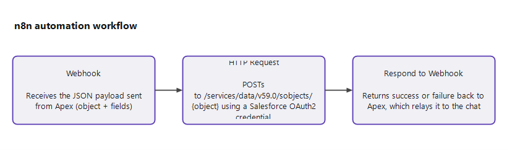
Here’s roughly what the n8n workflow looks like, in three nodes:
- Webhook – receives the JSON payload from Apex.
- HTTP Request – posts to Salesforce’s REST API at /services/data/v59.0/sobjects/{object}, authenticated through a Salesforce OAuth2 credential configured once inside n8n.
- Respond to Webhook – sends a success or failure status back to Apex, which Apex turns into a plain message for the user.
The payload Apex sends to the webhook looks like this:

{
"object": "Lead",
"fields": { "LastName": "Khan", "Company": "Acme Retail" },
"source": "OrbitChatbot",
"timestamp": "2026-09-15T10:22:00Z"
}
n8n’s HTTP Request node uses the object name and fields to build the actual Salesforce API call. If the insert fails, whether because a required field is missing or a validation rule on the object catches something Orbit doesn’t know about, that failure comes back through the same path, and Orbit tells the user something went wrong instead of claiming success it can’t back up.
Security: what actually matters here
Salesforce permissions. Orbit’s Apex class is declared with sharing, so it runs in the context of the logged-in user. Someone can’t query or create records they don’t already have access to just by asking the bot nicely. It is important to understand what that keyword does: while ‘with sharing’ enforces record-level sharing, it does not automatically enforce field-level security—a point Salesforce clearly states in its Apex sharing documentation. Therefore, ensure that the field-level access is correctly configured in the profiles or permission sets used for the objects to which Orbit writes data. Don’t assume a chatbot is exempt from your existing security model. Test it the way you’d test any other integration user.
Data sent to Claude. Claude only ever sees the current message and a trimmed slice of conversation history – never a raw SOQL result dumped wholesale, never more Salesforce data than the specific question needs. When Orbit summarizes a list of records, only the fields relevant to that query go into the prompt, not every field on the object.
Validating AI-generated values. Claude determines the intent, but it cannot write field values directly to Salesforce without verification. Every value: email, phone, date, amount passes through validation before it’s stored. An email needs an @ and a real-looking domain, a phone number needs enough digits and not too many letters, and so on. If a value fails validation, Orbit asks again instead of saving something bad. Treat anything a language model produces as user input, not as trusted system input, even when it’s technically your own AI saying it.
Conversation state. The state tags described earlier live only in the browser’s memory for that session – not in a Salesforce object, not in a cookie, nowhere durable. Refresh the page, and it’s gone. That’s a deliberate tradeoff: less convenience, since you can’t resume a session tomorrow, in exchange for less to secure and nothing lingering in your org’s data model. If you extend Orbit with persistent memory later, that’s the point to think seriously about data retention and consent – not before.
API keys, one more time. External Credential only. Never in Apex, never in a debug log, never pasted into a chat thread you don’t fully control.
Final Thoughts
You don’t have to build all of this at once – and honestly, you shouldn’t. Start with a single Lightning Web Component, one Apex method, and record creation for one object. Lead is the easiest first target. Get the routing checklist behaving predictably before you add a second object or a second intent type.
Spin it up in your own dev org this week. Wire up the Named Credential, get one clean callout to Claude returning JSON, and let Apex act on it. Once that loop works, everything else is just more objects and more intent types layered on the same shape. If you land on a better way to handle conversation state or routing, I’d genuinely like to hear about it in the Trailblazer Community.
Salesforce resources

Muhammad Zohaib
Muhammad Zohaib is a Salesforce Developer and Admin with 3+ years of experience across Sales Cloud, Service Cloud, and CPQ, building scalable CRM solutions for teams ranging from healthcare providers to B2B sales organizations. He works extensively in Apex, Lightning Web Components, and Flow, and has hands-on experience integrating Salesforce with third-party platforms including Claude AI and n8n.
- This author does not have any more posts.