

Did you know that only 27% of enterprise applications are integrated with each other, according to Salesforce’s 2026 Connectivity Benchmark Report? On top of that, enterprises now run 957 applications, leaving most systems disconnected.
So what can happen when one more system plugs into your Salesforce org? A sync can fail without warning, and that failure often lets duplicate records start filling your pipeline. As those duplicates spread, your reports begin to contradict each other. Then your team loses hours chasing errors that no one can trace.
This chain reaction is what a weak Salesforce integration architecture creates, and it forces you into constant troubleshooting. Or, in the worst case, you usually find out only when something important stops working. You can avoid this by building a scalable Salesforce integration architecture. Want to know how? Let’s read this blog to learn more
Why Salesforce Integrations Break Down at Scale
Before building a scalable Salesforce integration architecture, you need to understand why integrations fail. Integrations fail because they grow without a proper Salesforce integration strategy.
Each new connection solves one immediate need, and over time those quick fixes pile up into a web that nobody fully understands. These two problems cause most of the damage.
Point-to-Point Connections and Hidden Technical Debt
The first problem is point-to-point connections. When you link two systems directly, the sync works, and the ticket closes. This happens smoothly, but every new connection has its own authentication, field mappings, transformation rules, error handling, and deployment process. All of them also draw from the same daily API request allocation for your org, so one noisy integration can drain the allocation the others rely on. Once you have twenty of these connections, it becomes difficult to see how data moves across your systems.
As a result, when you rename a field in Salesforce, you cannot tell which downstream system will fail, so you end up testing in production. Over time, these connections also become technical debt because no one clearly owns or maintains them. New engineers then struggle to learn the setup, since the logic hides in scattered scripts instead of one visible layer.
Data Silos and Duplicate Records Across Systems
These tangled connections lead straight to the second problem, which is inconsistent data. Without a shared Salesforce integration strategy, each system keeps its own version of the customer information. Your ERP might have one billing address while Salesforce has another. If the systems sync only once a day, that difference can remain for hours.
The same problem can create duplicate records. For example, Salesforce and another system might create the same customer account separately, without knowing the other record already exists. Sales reps may then work with stale data, while finance teams spend time checking and correcting numbers manually.
When reports from different systems do not match, teams start losing trust in their dashboards. They may even create their own spreadsheets to track the “correct” numbers, ultimately creating more data silos.
Solving these problems needs a deliberate approach towards scalable Salesforce integrations.
What Approach Builds a Truly Scalable Integration Architecture
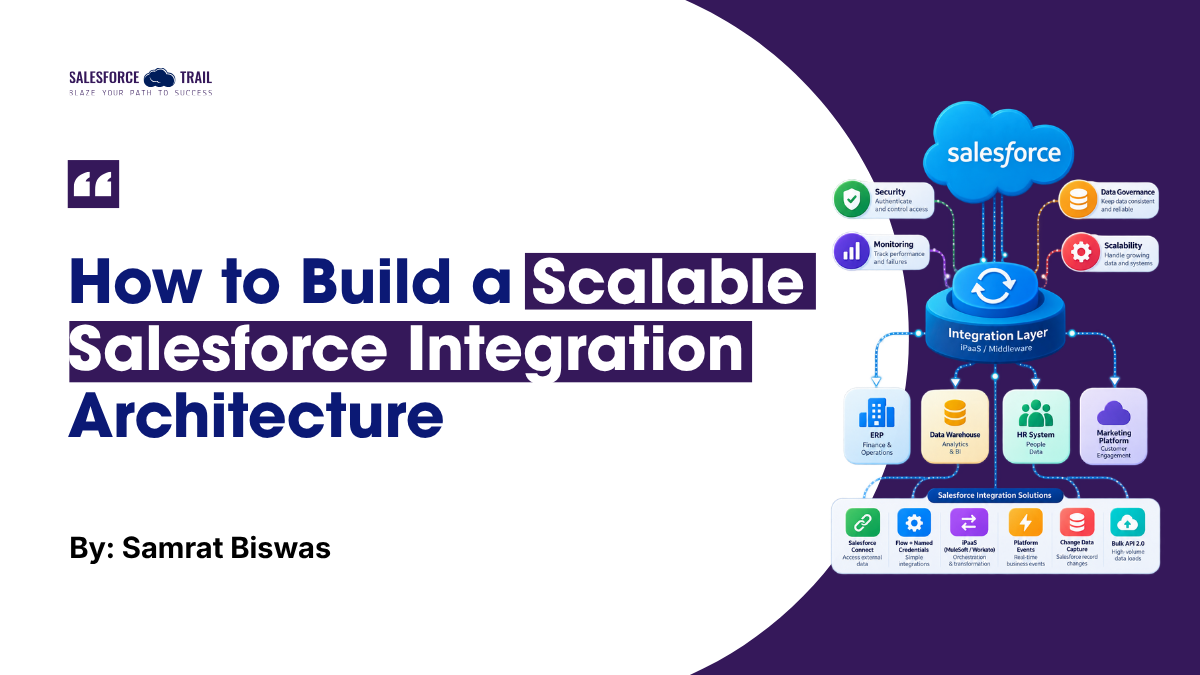
The short answer is that no single tool does. A strong Salesforce integration architecture matches each integration to the right pattern, and most mature stacks combine several. The right choice depends on data volume, speed, and how much custom logic each flow needs. Let’s start with the simplest option.
Native Salesforce Connectors and When They’re Enough
Native options work well for simple, low-volume needs. In practice, that usually means Salesforce Connect for external data you only need to view, prebuilt app connectors, or Flow with Named Credentials for simple outbound calls. Use them when you have limited transformation, predictable data flows, manageable volumes, and a small number of connected systems. They reduce implementation effort and avoid introducing another technology layer.
However, they struggle once you need custom transformation or complex routing. You need to watch your API limits too, because heavy sync jobs can use up your daily allocation and slow other processes.
iPaaS Platforms for Cross-System Orchestration
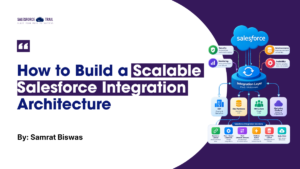
Once native connectors stop being enough, an iPaaS is the next step. Platforms like MuleSoft and Workato place one central layer between your systems, so each system connects once instead of linking to every other. This gives you a single place to monitor flows, reuse APIs, and update logic. Here, a Salesforce integration architecture framework takes shape, as you can set shared standards for authentication and error handling in one location.
For example, instead of your ERP and your billing tool each calling Salesforce on their own, both can call one shared customer API on the iPaaS layer, and only that layer talks to Salesforce. That also gives you one place to control how often Salesforce is called, which protects your daily API allocation.
The trade-off is cost and complexity. iPaaS platforms require licensing and some learning. So you need to compare both against the maintenance you avoid.
Event-Driven Integration Using Platform Events and CDC
Polling asks, “Has anything changed?” Event-driven integration allows systems to respond when something actually changes.
Salesforce Platform Events can publish business events, while Change Data Capture (CDC) publishes changes to Salesforce records. External applications can consume these events through the Pub/Sub API.
For example, when an opportunity becomes closed-won, an event can trigger downstream order processing without repeatedly polling Salesforce.
This approach is particularly useful when you need near-real-time synchronization and want to reduce tight dependencies between systems.
However, events do not automatically solve reliability. Your consuming system still needs appropriate retry, error handling, idempotency, and recovery logic. If a subscriber goes offline, it can use the last replay ID it stored to catch up on missed events, as long as they are still within the 72-hour window.
Custom Middleware for Complex or High-Volume Needs
Custom middleware makes sense when integration requirements are too specific for native tools or standard connectors.
You might need custom routing, advanced transformation, specialized security controls, or processing at significant data volumes.
The trade-off is ongoing engineering ownership. You become responsible for deployment, monitoring, scaling, security, and maintenance.
Salesforce’s Integration Patterns guide also stresses that the right pattern depends on data volume, failure handling, and transactionality. Weigh those factors before you commit to custom code.
For high-volume loads, check whether Bulk API 2.0 fits, since record-by-record calls can use up your org’s daily API allocation quickly.
Many teams end up with a hybrid, using iPaaS for standard flows and custom code for the few that need it. Whichever of these Salesforce integration solutions you pick, protecting the data that flows through them matters the most.
How to Protect Data Quality Across Integrated Systems
You can protect data quality with clear rules for how data moves, plus close monitoring once it does. Let’s start with the rules for the data itself.
Field Mapping, Deduplication, and Sync Conflict Resolution
Consistent field mapping keeps records from arriving mismatched or losing data. Start with a written field map that names the system of record for each field. For example, let your ERP own billing address and payment terms, and let Salesforce own opportunity stage and account owner.
Then add external ID fields so every upsert matches the right record, and turn on matching and duplicate rules to catch overlaps. When two systems update the same field, set a clear conflict rule, such as last write wins for low-risk fields and manual review for high-value ones.
Access Control, Data Residency, and Audit Logging
Clean data also needs protection, because every connected system adds a possible way in. To limit that exposure, give each integration a dedicated integration user with a permission set limited to the objects and fields it needs, and connect it through OAuth with narrow scopes. That way, a compromised system can reach only what it needs.
Regulated industries should also confirm where data is stored. For audit logging, turn on Field History Tracking for the fields your integrations update, and export Setup Audit Trail entries regularly, since Salesforce keeps them for at least the last 180 days. This gives you the compliance visibility auditors expect.
Tracking Latency, Data Drift, and Failure Alerts
Even with strict rules, problems still appear, so monitoring closes the loop. Track sync latency and compare record counts between systems to catch data drift early. Check your API usage in Setup, and alert on any event subscriber that stays offline, since Salesforce keeps platform events and CDC events for only 72 hours. Then set automated failure alerts with a named owner, so your team finds issues before end users do.
With these safeguards in place, you can now judge whether your setup will hold up.
Final Thoughts
A scalable Salesforce integration architecture comes down to one habit, which is deciding where each new connection lives and who owns it before you build it. If you cannot answer both, that connection will likely become your next hidden problem.
So start by listing every integration user and API connection in your org, and fix the shared point-to-point links first. Waiting for a failure only makes the rebuild costlier. When you build with growth in mind today, every system you add tomorrow strengthens your setup instead of stretching it.
Frequently Asked Questions
It’s the overall design of how Salesforce exchanges data with your other systems – which patterns and tools you use, how authentication and error handling are standardized, and who owns each connection. A scalable one avoids direct system-to-system wiring in favor of a shared layer.
Route integrations through a central layer so you control call frequency in one place, use Bulk API 2.0 for large data loads instead of record-by-record calls, and prefer event-driven patterns (Platform Events, CDC) over constant polling. Monitor your daily API usage in Setup.
Platform Events publish custom business events you define in your own logic. Change Data Capture publishes changes to Salesforce records automatically. External systems consume both through the Pub/Sub API, and both are retained for 72 hours.
Move to an iPaaS when native connectors can’t handle your transformation or routing needs, when you’re connecting many systems, or when you want one place to monitor and standardize everything. If your flows are simple and few, native connectors are cheaper and simpler.
Setup Audit Trail entries are kept for a rolling 180-day window. High-volume platform events and CDC events are stored for 72 hours. For anything you need beyond those windows, export it on a schedule.

Samrat Biswas
Samrat Biswas is a distinguished VP of Operations, Engineering, and Growth in the tech and consulting industry, renowned for his deep expertise in scaling teams and refining processes. His writings are informed by his wealth of experience, offering readers valuable insights into engineering leadership, operational efficiency, and driving transformational change within organizations.
- This author does not have any more posts.