Salesforce Setup is where administrators turn business requirements into working systems. It’s also where a simple request can quietly turn into a maze of menus, profiles, permission sets, and automation tools.

A request as ordinary as “give this user access” can mean checking multiple layers of permissions before finding the actual setting. Setup with Agentforce offers a different starting point. Instead of beginning with “Which Setup page do I need?”, you describe what you’re trying to accomplish and work through it conversationally.

I tested it hands-on in a Salesforce Developer Edition org: I used natural-language prompts to navigate Setup, troubleshoot user access, create an object, add a field, build a record-triggered Flow, activate it, and verify the result with a real test Lead. Here’s what I learned.

Key Takeaways

  • Start with the business problem. Describe what you want to accomplish instead of trying to remember every Setup navigation path.
  • Be specific with your prompts. Include the object, trigger, action, assignment, and desired outcome whenever possible.
  • Always review before confirming. Treat generated objects, fields, and automation as proposals that still require admin judgment.
  • Confirmation is not verification. Test the actual result in Salesforce before considering the work complete.
  • Understand the current boundaries. Not every Setup task is supported yet, and the agent works within the permissions of the user who is using it.
  • Treat Setup with Agentforce as a collaborator, not a replacement for administrative judgment.

Table of Contents

1. Get started with Setup with Agentforce

Before asking an AI agent to help with administration, one question matters most:

What actually has to be configured first?

This detail is important because the Setup with Agentforce experience has changed over time.

You can find the feature in Quick Find without special permissions.

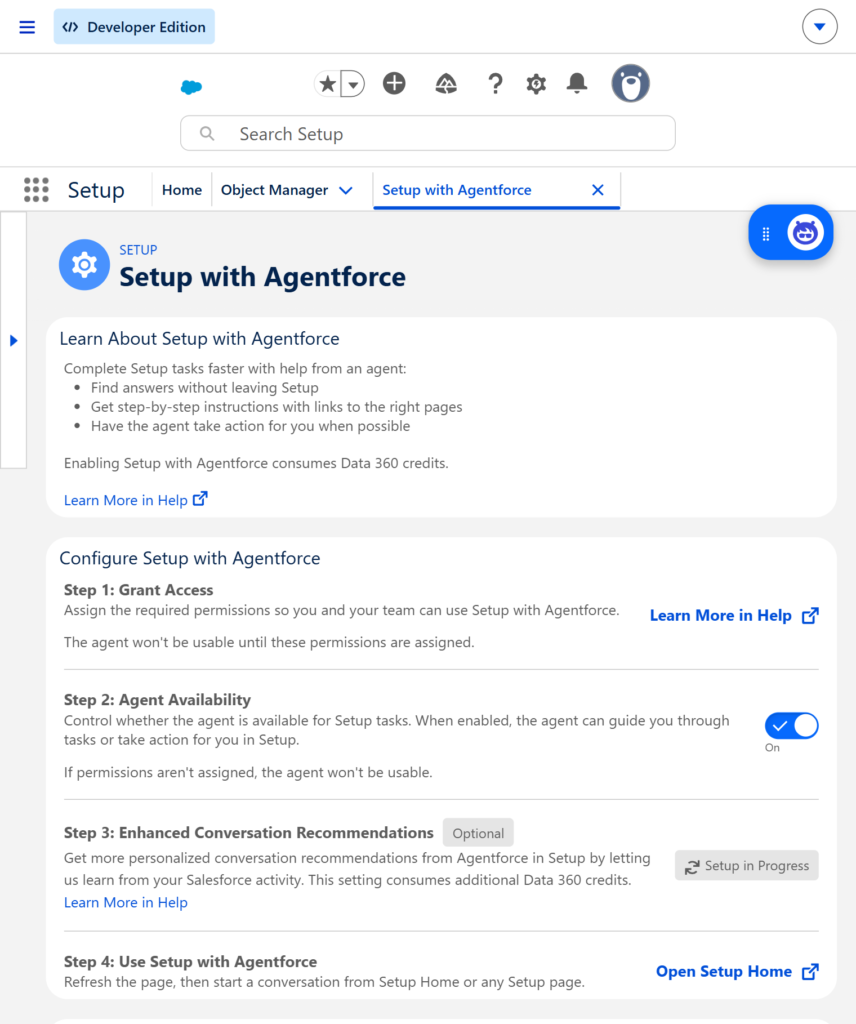
In Setup, searching for “Setup with Agentforce” takes you to the configuration page even if you don’t yet have the required permissions. However, you cannot turn on Agent Availability (and therefore cannot use the feature) until the correct permissions are assigned.

Assign the permissions first.

Salesforce’s current documentation recommends the Setup with Agentforce User permission set group, which bundles the Use Setup with Agentforce and Prompt Template User permissions. In my Developer Edition org, the permission set group was not available, so I assigned the two individual permission sets instead.

Once the permissions were assigned and I refreshed the browser, I was able to turn on Agent Availability.

About Data 360

Data 360 is no longer a prerequisite for the core Setup with Agentforce experience. According to Salesforce’s current release notes, admins can use Setup with Agentforce without enabling Data 360. However, some specialized capabilities such as custom report types, Enhanced Conversation Recommendations, and related list enrichments still require it.

In my own org, the enablement page displayed a notice about Data 360 credits. I treated that as a usage consideration rather than assuming Data 360 had to be provisioned before I could begin core testing.

After assigning the permissions and turning on Agent Availability, Setup Home presented the natural-language experience I wanted to test. I could now start with a request rather than a navigation path.

Setup with Agentforce
Figure 1. Granting the required permissions and enabling Agent Availability for Setup with Agentforce.

2. Find the right place in Setup faster

An experienced admin often knows that a particular setting exists but can’t remember exactly where it lives. That small gap is one of the everyday sources of friction in Salesforce administration.

I started with a simple question:

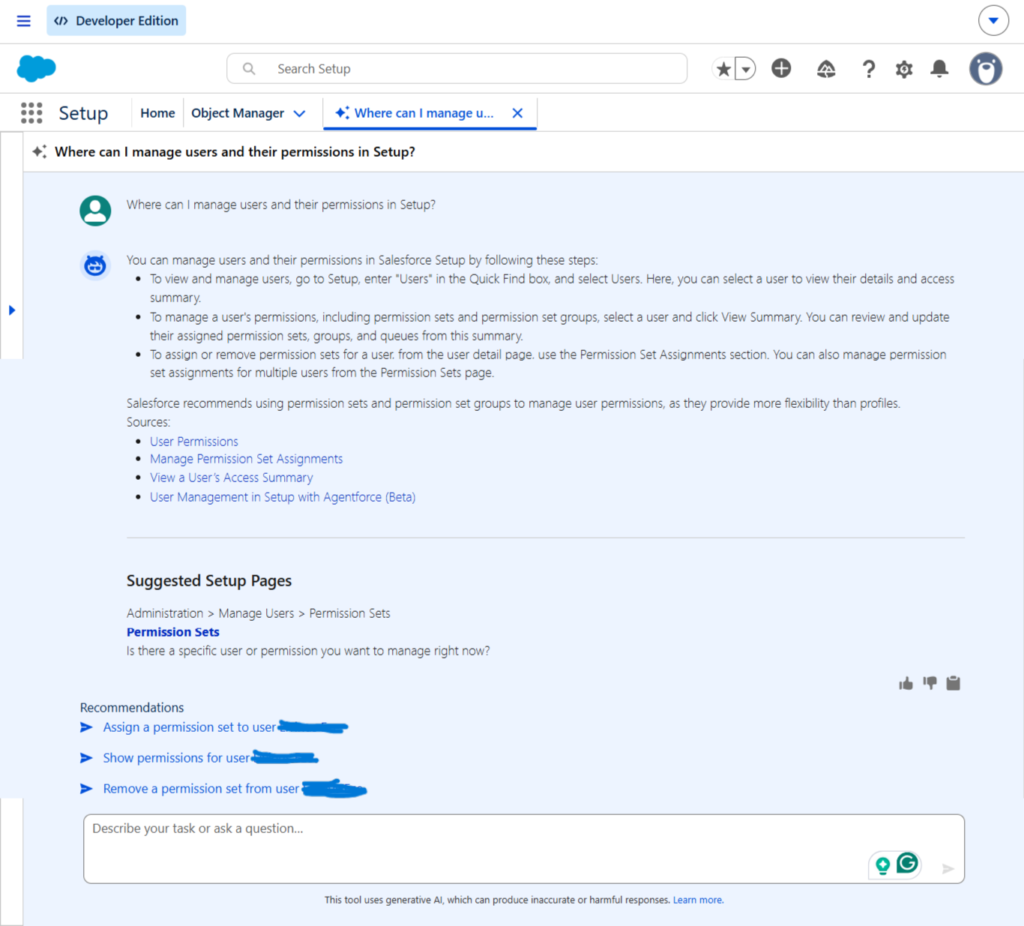
“Where can I manage users and their permissions in Setup?”

Agentforce pointed me toward Users, Permission Sets, and Profiles, and surfaced Permission Sets as a suggested Setup page.

The useful part wasn’t that Agentforce knew where Permission Sets were – most experienced admins already know that. The real value was that I could describe the outcome I wanted instead of recalling the exact navigation path.

That changes the starting point of the task.

Instead of thinking “Where is the setting?”, I could simply think “What am I trying to accomplish?”

image2
Figure 2. Using natural language to locate the appropriate Setup area for managing users and permissions.

This shift became even more useful when I moved from basic navigation to troubleshooting user access.

3. Troubleshoot user access and permissions

Few things are more frustrating for an admin than hearing:

“I can’t access this.”

The cause is rarely obvious. User access can involve multiple layers: profiles, permission sets, permission set groups, public groups, and queues, and identifying the real source of a missing permission often requires careful investigation.

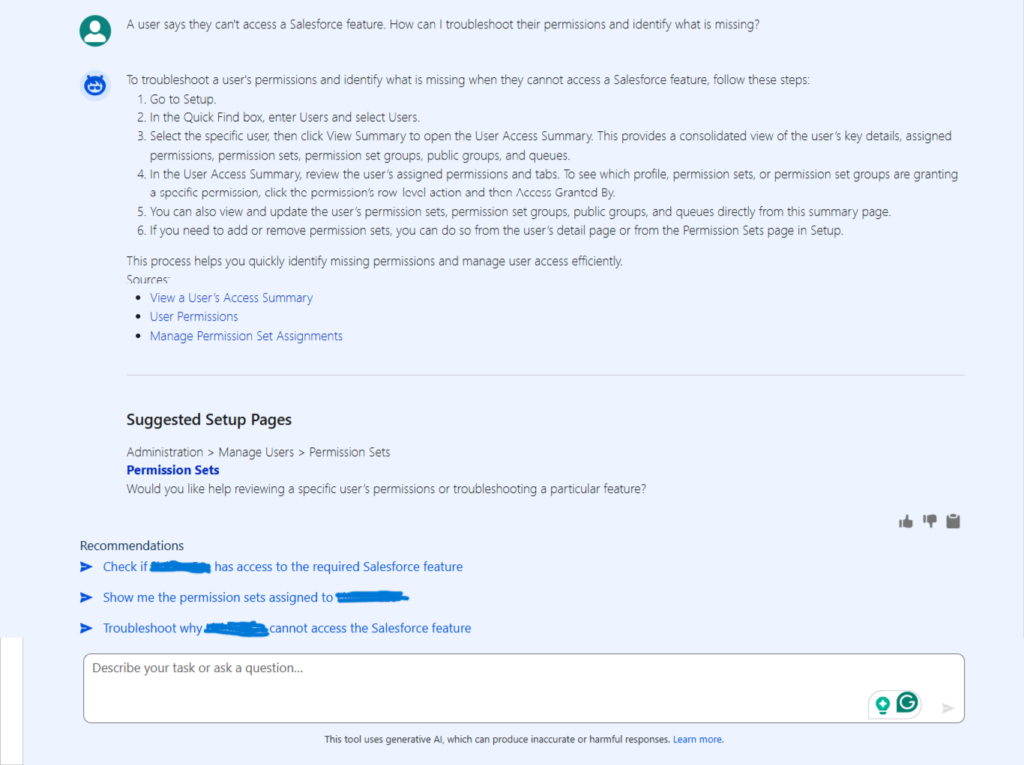
I tested this scenario with the following prompt:

“A user says they can’t access a Salesforce feature. How can I troubleshoot their permissions and identify what is missing?”

Agentforce recommended going to the user record and using View Summary to review the user’s access. It also pointed to permission sets, permission set groups, public groups, and queues, and explained how Access Granted By can help identify the source of a specific permission.

Screenshot showing the user-access troubleshooting response.

image3
Figure 3. Using Setup with Agentforce to investigate user access and identify where permissions are being granted.

This was one of the more useful tests. The response did more than define permissions – it gave me a practical investigation path.

The Setup agent did not replace Salesforce’s underlying access model. It simply helped me reach the right tools and information faster. I still needed to review the details and make the administrative decision myself.

That pattern became the approach I followed for the rest of the testing:

Ask → Review → Decide → Act.

That interaction was important.

4. Turn a business requirement into configuration

Navigation is useful, but I wanted to test something more substantial.

Could I describe a business requirement and have Setup with Agentforce help create actual Salesforce configuration?

For the first test, I chose a simple requirement: a team needs a place to store customer feedback.

I asked:

“Create a custom object called Customer Feedback to store feedback submitted by customers.”

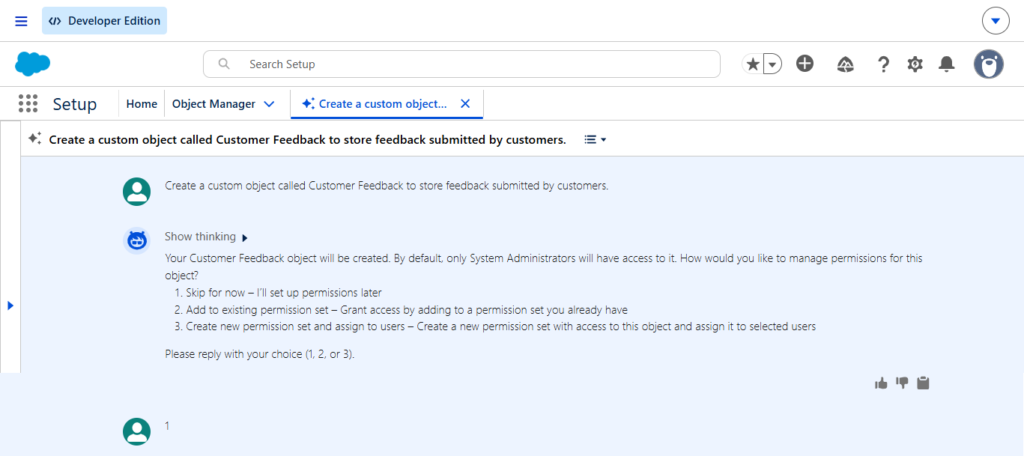
Before creating the object, Agentforce asked how I wanted to handle permissions. The options were:

  1. Skip for now
  2. Add to an existing permission set
  3. Create a new permission set and assign it to users. For this test, I chose Skip for now.
image4
Figure 4. Agentforce asks how permissions should be handled before creating the Customer Feedback object.

That interaction was important. The agent did not simply disappear into the background and create everything without showing me what was happening. There was a clear configuration decision that required my input.

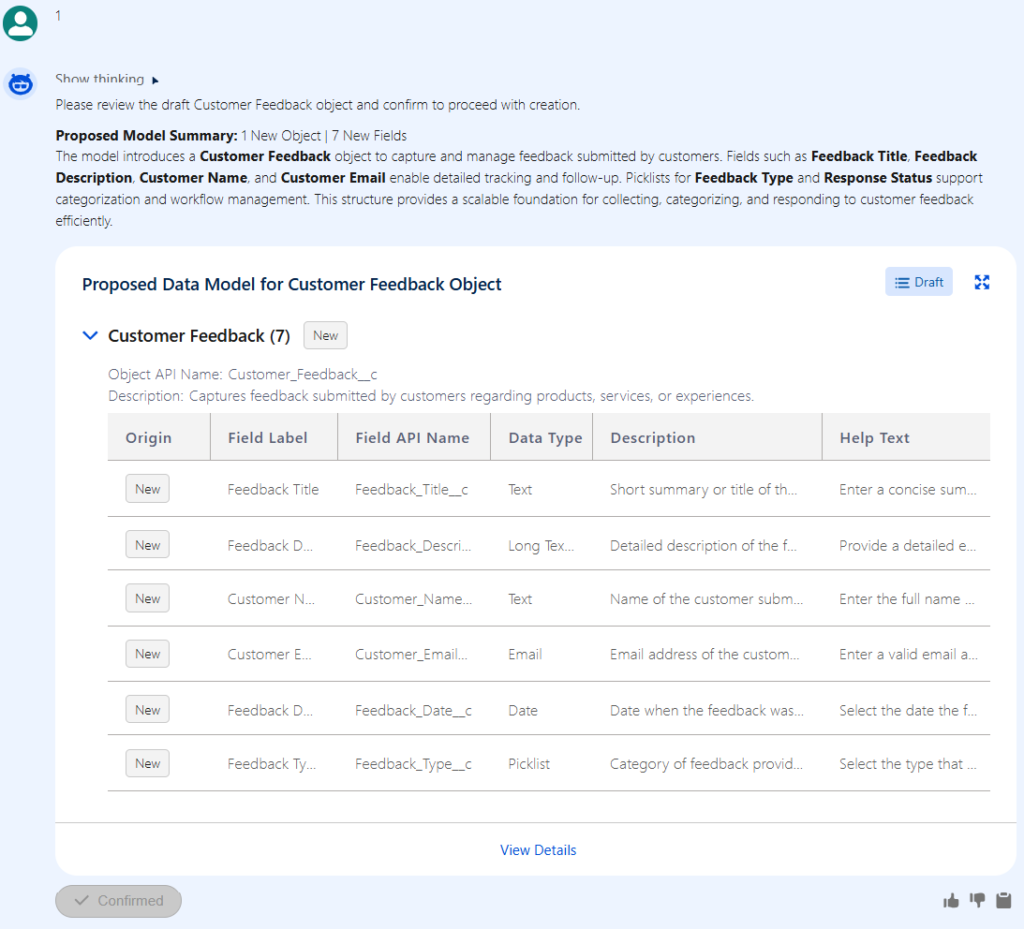
Agentforce then presented a proposed data model for the Customer Feedback object. The proposal included the object label, API name, and seven fields:

  • Feedback Title
  • Feedback Description
  • Customer Name
  • Customer Email
  • Feedback Date
  • Feedback Type
  • Response Status
image5
Figure 5. Reviewing the proposed data model for the Customer Feedback object before confirming.

This was the point where I deliberately slowed down. A generated data model can be technically valid and still be the wrong model for a business requirement. So I carefully reviewed the proposed object and fields before selecting Confirm.

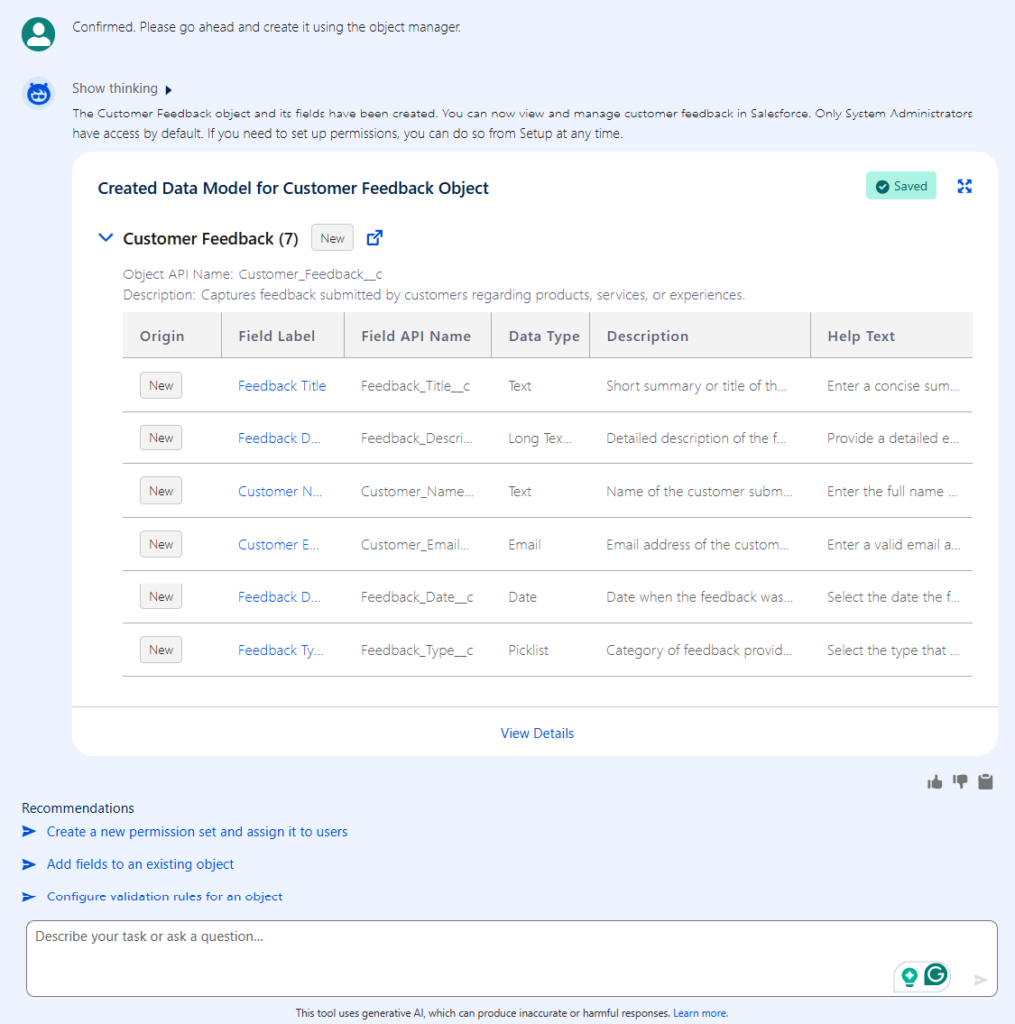
After reviewing the proposal, I selected Confirm. A few seconds later, Agentforce reported that the Customer Feedback object and its fields had been created and saved.

image6
Figure 6. The Customer Feedback object and fields after successful creation.

The lesson was simple and direct:

Use Agentforce to accelerate configuration, but use your own admin judgment to review the configuration before accepting it.

5. Add fields without extra navigation

Next, I tested a smaller but still practical change.

I wanted to add a Priority field to the newly created Customer Feedback Object.

I asked:

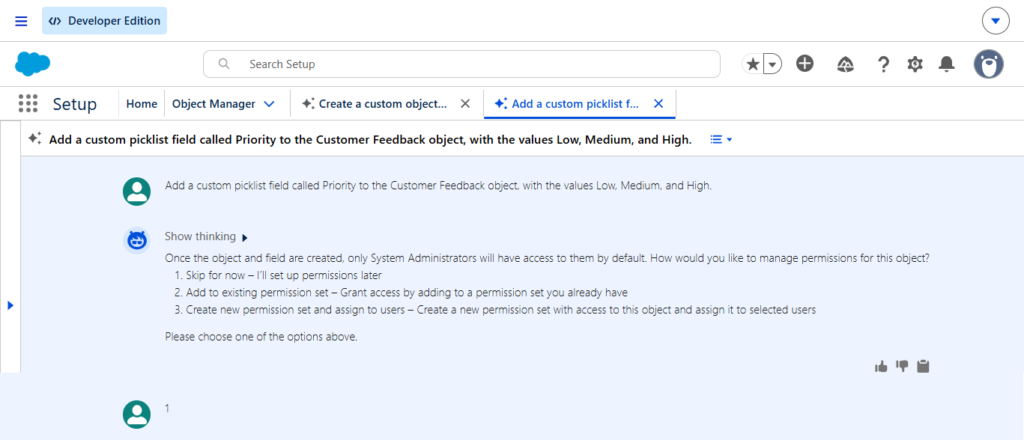
“Add a custom picklist field called Priority to the Customer Feedback object, with the values Low, Medium, and High.”

Before creating the field, Agentforce again asked how I wanted to handle permissions. I selected Skip for now.

image7
Figure 7. Agentforce asks how permissions should be handled when adding the Priority field.

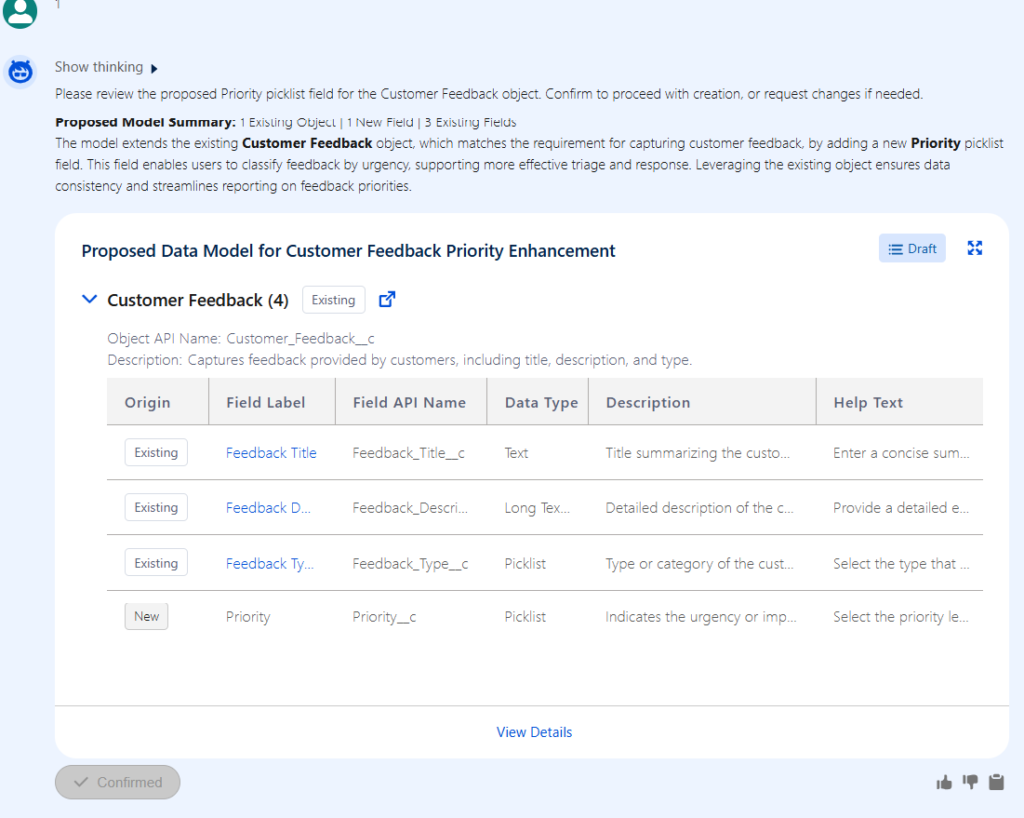
Agentforce then presented a proposed configuration for the new Priority picklist field, showing the field label, API name, data type, and description.

image8
Figure 8. Reviewing the proposed Priority picklist field before confirming.

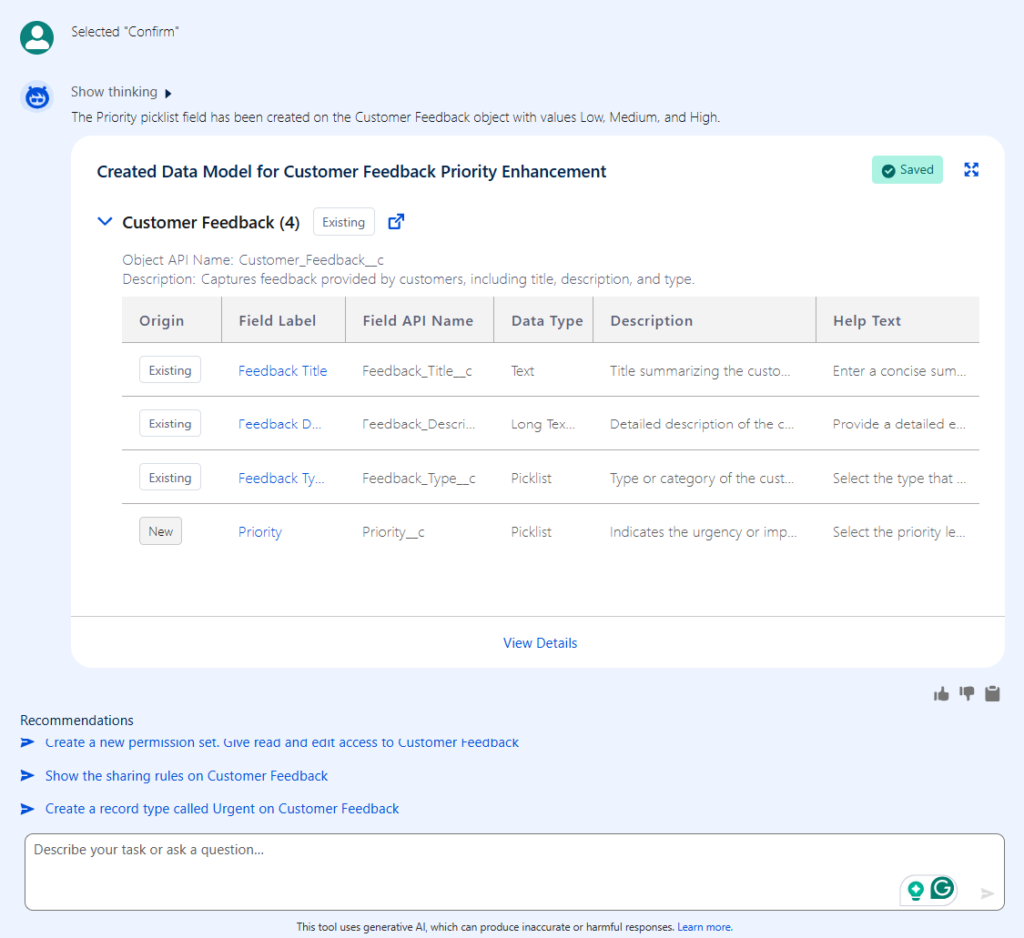
I reviewed the proposal and confirmed it. Agentforce then reported that the Priority field had been successfully created and saved a few seconds later, with the values: Low, Medium, and High.

image9
Figure 9. The Priority field successfully added to the Customer Feedback object.

This was a clear example of where natural language reduces interface navigation without removing the administrator from the process. I still needed to know what I wanted, describe it clearly, review the proposed configuration, and confirm it.

The agent shortened the path.

It did not eliminate the need for administration.

6. Build working automation from a Business request

Configuration is useful. Automation is where the experiment became much more interesting.

A request such as “When a new Lead is created, create a follow-up Task for the Lead owner” sounds simple from a business perspective. But an admin still needs to think about the trigger, the action, Task fields, ownership, timing, and most importantly whether the resulting automation actually works.

I gave Agentforce the requirement directly:

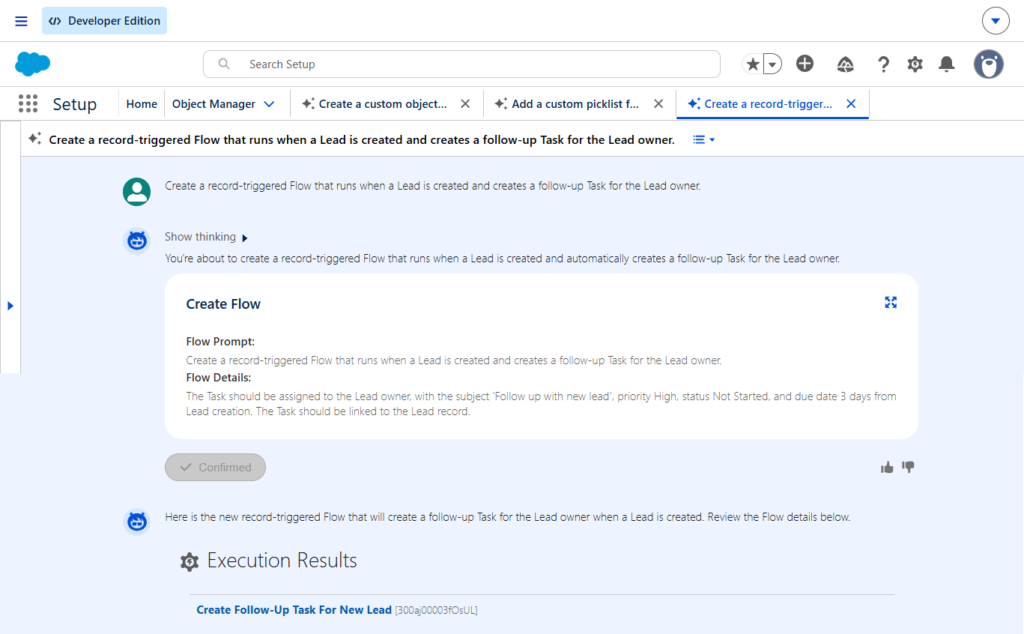
“Create a record-triggered Flow that runs when a Lead is created and creates a follow-up Task for the Lead owner.”

Agentforce generated a record-triggered Flow with these details:

  • Runs when a Lead is created
  • Creates a follow-up Task
  • Assigns the Task to the Lead owner
  • Subject: “Follow up with new lead”
  • Priority: High
  • Status: Not Started
  • Due Date: 3 days after Lead creation
  • Links the Task to the Lead record
image10
Figure 10. Setup with Agentforce generating a record-triggered Flow to create a follow-up Task when a new Lead is created.

Before activating the Flow, I reviewed the proposal carefully against the original requirement:

  • Was the trigger correct?
  • Was the Task assigned to the right person?
  • Did the priority and status make sense?
  • Was the due date appropriate?

Once I was satisfied, I confirmed and activated the Flow.

But activation alone is not enough. The real test is whether the automation works when a real record is created.

7. Verify that the automation actually works

Activation alone does not prove that an automation works. The real test is whether it behaves correctly when a real record is created.

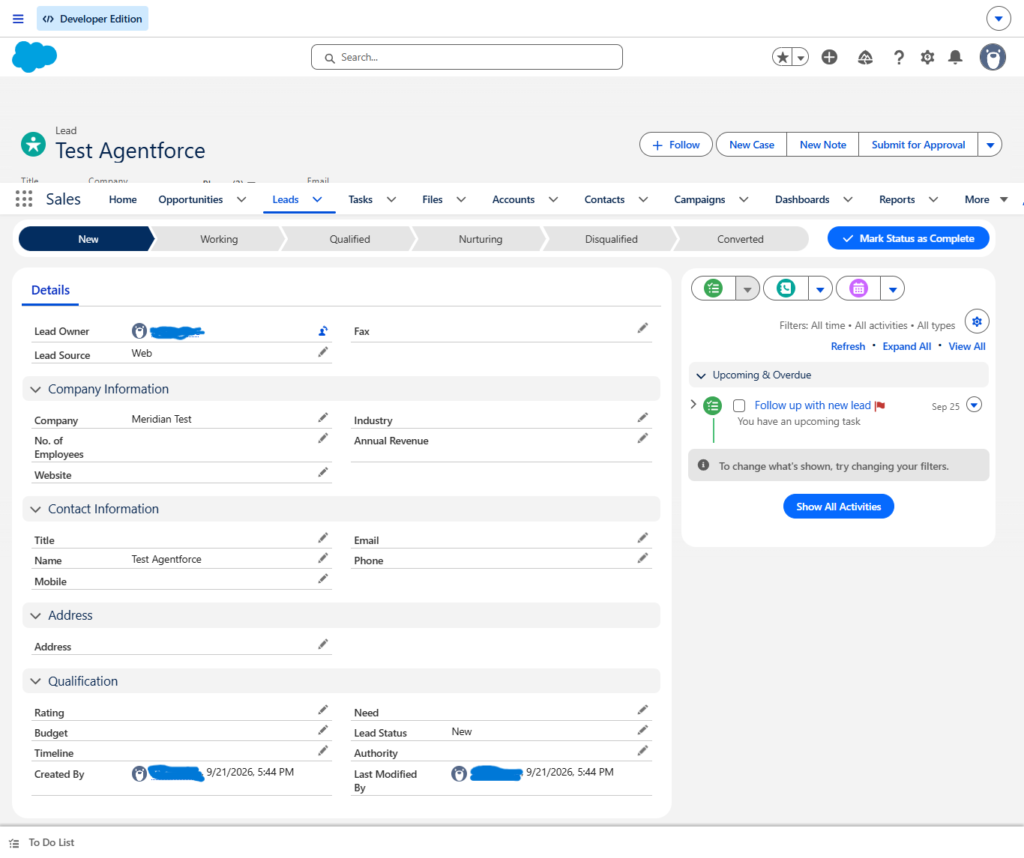
I created a test Lead with these details:

  • Name: Test Agentforce
  • Company: Meridian Test
  • Lead Source: Web
  • Lead Status: New
image11
Figure 11. Test Lead created to verify the automation.

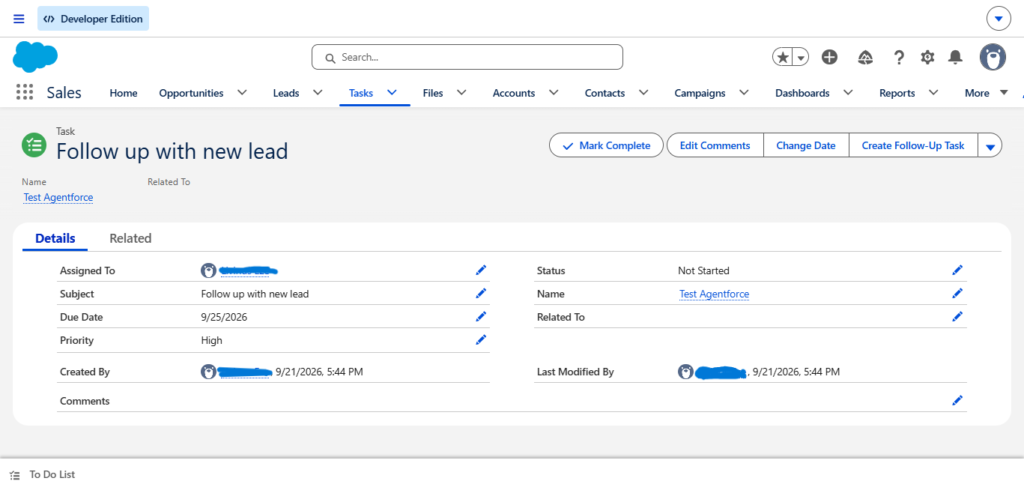
Then I checked the Lead’s activity. The expected Task appeared exactly as designed:

  • Subject: Follow up with new lead
  • Assigned To: the Lead owner
  • Status: Not Started
  • Priority: High
  • Due Date: three days after the Lead was created
image12
Figure 12. The follow-up Task automatically created and correctly populated after the Lead was created.

This was the most important part of the entire experiment.

I had not simply asked Agentforce to create a Flow and stopped when it said the Flow was created. The complete process was:

Describe the requirement → Review the proposed automation → Activate it → Create a test record → Verify the result.

The Flow worked. The Task appeared. The owner, priority, status, and due date were populated as expected.

There is a real difference between:

  • “The agent says it worked.”
    and
  • “I verified that it worked.”

For an administrator, that difference matters.

8. What Setup with Agentforce changes, and what it doesn’t

The biggest lesson from this test was not that admins no longer need to understand Salesforce.

It was closer to the opposite: the better you understand the platform, the more effectively you can direct an agent working on top of it.

Setup with Agentforce can meaningfully shorten the distance between a business requirement and the configuration needed to implement it. But the administrator still has to understand the actual requirement, judge whether the proposed solution fits, weigh permissions and security, and verify the outcome. Salesforce states that the Setup agent respects existing user permissions and does not make changes without approval, which matched what I saw throughout: it proposed, I decided.

Prompt quality mattered more than I expected.

Compare these two requests:

  • “Create a Flow.”
  • “Create a record-triggered Flow that runs when a Lead is created and creates a follow-up Task for the Lead owner.”

The second version names the object, trigger, action, and assignment up front, so the result comes back close enough to a finished proposal that evaluating it is straightforward rather than guesswork.

That evaluation is not a single check – it happens at different levels depending on what you asked for:

  • For configuration → check the actual object and fields, not just the confirmation message
  • For permissions → investigate the user’s real access rather than assuming the agent’s summary is complete
  • For automation → test it against a real record before trusting it in production

Current limitations worth keeping in mind

Not every Setup task is supported yet. The agent operates strictly within the permissions of whoever is using it. Some actions (including Flow creation) require additional permissions such as Manage Flow. Salesforce currently documents a monthly allocation of Setup agent actions per org, and a handful of more advanced capabilities still depend on Data 360.

None of these are dealbreakers – they are simply the shape of the tool as it exists today.

Treating those limits as expected rather than surprising is what makes this genuinely useful. By the end of testing, the workflow that actually worked was simple:

Ask → Review → Confirm → Test → Verify

Setup with Agentforce is a fast collaborator. It is not a replacement for the judgment that decides whether what it built is actually correct.

Conclusion

The most interesting part of this experiment was not that Salesforce could understand a sentence.

It was what happened after the sentence.

A natural-language request became a navigable Setup path. A permissions question became a practical investigation. A business requirement became a proposed data model. A field request became actual configuration. And an automation request became a working Flow that created a Task the moment I created a Lead.

At no point did the administrator disappear from the process. I still had to decide what I wanted, review what Agentforce proposed, confirm the changes, activate the automation, and verify the result.

That is how I now think about Setup with Agentforce: not as a replacement for Salesforce administration, but as a new way for an admin to work with Salesforce.

If you’re trying Setup with Agentforce yourself, start small. Pick one real administrative problem, describe the outcome in plain language, review what the agent proposes, and then verify the result directly in your org.

The goal isn’t simply to make fewer clicks. It’s to spend less time finding the path and more time making sure the solution is the right one.

Salesforce Resources
Livinus Eze
Livinus Eze
Salesforce Admin

Livinus Eze is a 2X Salesforce Certified Administrator with hands-on experience building and testing Salesforce solutions. His work focuses on Salesforce administration, automation, and emerging AI capabilities such as Agentforce. With a background in healthcare, he brings a practical, problem-solving approach to technology, treating every build as something to verify, not just something to deploy. He enjoys learning by building real-world projects and sharing practical lessons with other Salesforce professionals.

Share.
Leave A Reply

Exit mobile version