



Writing Apex code that works is easy. Writing Apex that scales, stays maintainable, and survives real-world business complexity is the real challenge. Many Salesforce developers begin with fast, “quick-fix” solutions—only to struggle later with bloated classes, hard-to-test logic, and fragile code.

If you want to future-proof your Salesforce projects, reduce technical debt, and build enterprise-grade solutions, Layered Architecture is not optional—it’s essential.

In this guide, you’ll learn:

  • Why monolithic Apex fails at scale
  • How the 3-tier layered architecture works in Salesforce
  • What each layer is responsible for
  • The real-world benefits for performance, testing, and maintainability

The Problem: Why “Spaghetti” Apex Fails

When building Salesforce apps, it’s common, especially for smaller features, to combine all logic, SOQL queries, DML operations, and controller methods into one class. It works at first, but as your application grows, the code quickly becomes unmanageable.
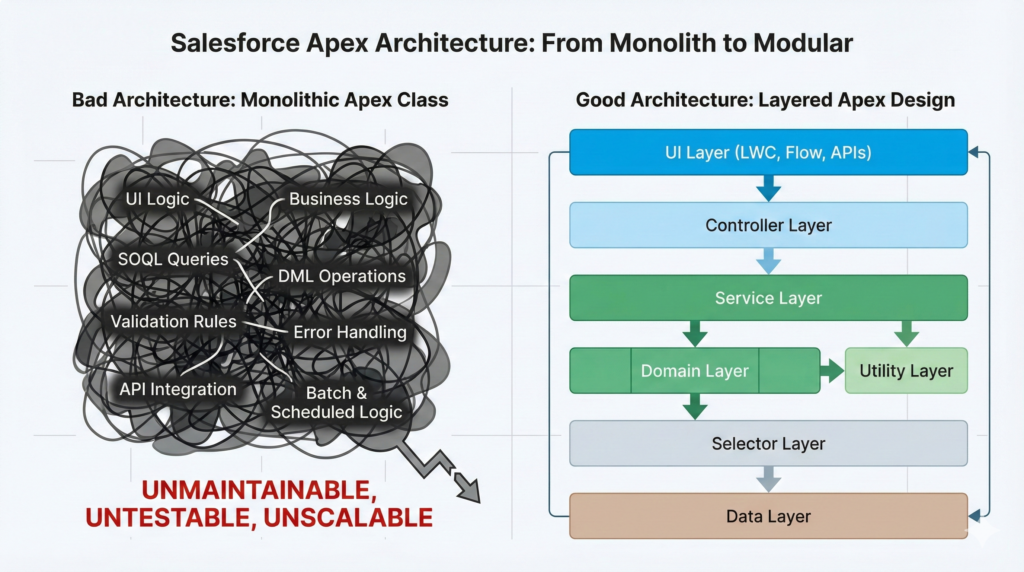
Why "Spaghetti" Apex Fails

In this Single-Class approach, you combine the logic for UI exposure, business rules, and database access into one file. This violates the Single Responsibility Principle and leads to:

  • Code is becoming hard to read and understand, leading to high onboarding costs.
  • Testing and debugging are becoming painful because you cannot easily isolate business logic.
  • Logic duplication occurring across multiple controllers and triggers.
  • Exception handling is inconsistent, leading to confusing error messages for users.

‘Understanding the Chaos

Here is a representation of the chaos that ensues when all concerns are mixed in a monolithic class, resulting in what developers often call “Spaghetti Code”:

Looks simple now, but imagine adding validation, complex business rules, and error handling. Chaos starts creeping in fast.

The Solution: The 3-Tier Layered Architecture

Layered architecture separates responsibilities into distinct horizontal layers, establishing a clear pipeline for data flow. This adheres strictly to the Single Responsibility Principle (SRP).

The Clean Pipeline

This diagram shows the clean, one-way dependency flow of a standard 3-Tier Layered Architecture in a Salesforce application:
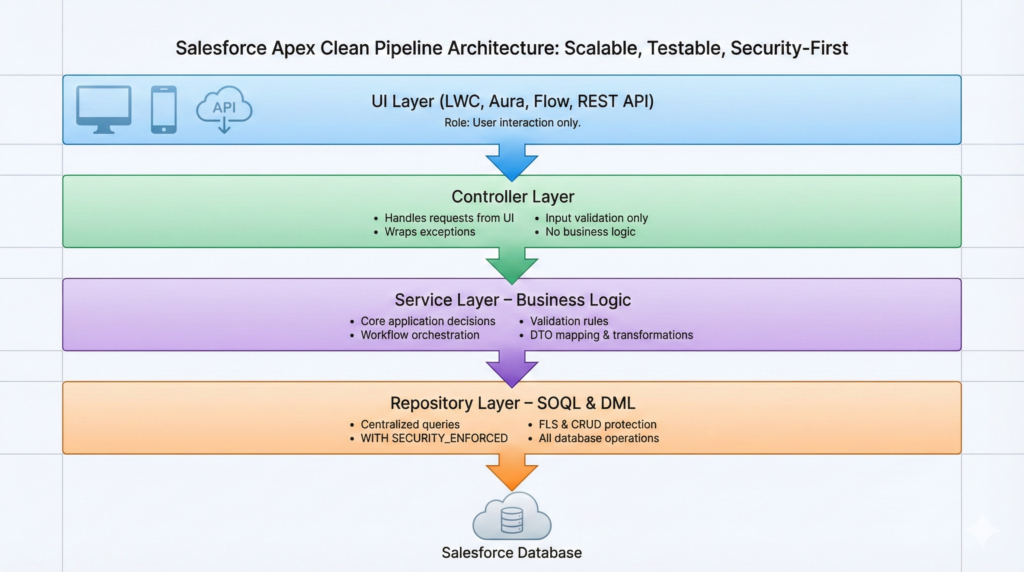

3-Tier Layered Architecture

The Three Core Layers

1. Controller Layer (UI Integration):

  • Responsibility: Exposes methods to UI components (LWC/Aura) and handles the presentation of data.
  • Key Action: Wraps technical exceptions into user-friendly messages (using AuraHandledException).
  • Dependency: Only calls the Service Layer.

2. Service Layer (Business Logic):

  • Responsibility: Contains all your core business logic, validation, transformations, and complex calculations. This is the brain of your application.
  • Key Action: Converts Salesforce SObjects into Data Transfer Objects (DTOs) for clean data handling.
  • Dependency: Calls the Repository Layer.

3. Repository Layer (Data Access):

  • Responsibility: Handles all database operations (SOQL queries and DML statements).
  • Key Action: Centralizes all queries, making them easy to manage and update (e.g., handling Security checks like WITH SECURITY_ENFORCED).
  • Dependency: Talks directly to the Salesforce Database.

Before vs. After: The Real-World Impact

Single-Class Approach (The Trap)Layered Architecture (The Solution)
Hard to read & maintainClear separation of concerns (SRP)
Logic duplication is rampant.Reusable service methods (DRY principle)
Difficult unit testingEasy testing with mock repositories/services
Inconsistent exception handlingCentralized, predictable error messages
Hard to extend and changeScalable & maintainable structure

Layered Architecture in Apex: Code Examples

Here’s how the messy code is transformed into a clean, layered structure:

1.  Repository Layer: Isolating Data Access

2. Service Layer: Managing Business Logic

3. Controller Layer: Preparing for the UI

Key Benefits That Will Save Your Project

  • Testability: You can easily mock the EmployeeSkillRepository or TalentPoolService during unit testing, ensuring tests are fast and reliable without hitting the database.
  • Reusability: The Service Layer can be called not only from the Controller but also from a Trigger Handler, an Apex Batch job, or a Scheduler, maximizing code reuse.
  • Consistency: Centralized exception handling and clear responsibilities mean fewer bugs and predictable user feedback.

My Real-World Experience

While working on a LWC + Apex project, I initially combined SOQL, business logic, and UI handling in a single class. After restructuring to a layered architecture, debugging time was drastically reduced, and adding new features became fast and error-free. The difference was night and day; clean architecture saved the project from chaos.

Pro Tip & Conclusion

Start with layered architecture early in your project. Fixing messy code later is vastly more time-consuming and expensive than doing it right from the start.

Clean code isn’t just about writing neat classes; it’s about writing maintainable, testable, and scalable Apex that supports the long-term growth of your application.

Layered architecture is not optional for serious Salesforce projects; it’s essential. Start using this pattern today, and your future self (and your team) will thank you.

Share.
Leave A Reply

Exit mobile version