


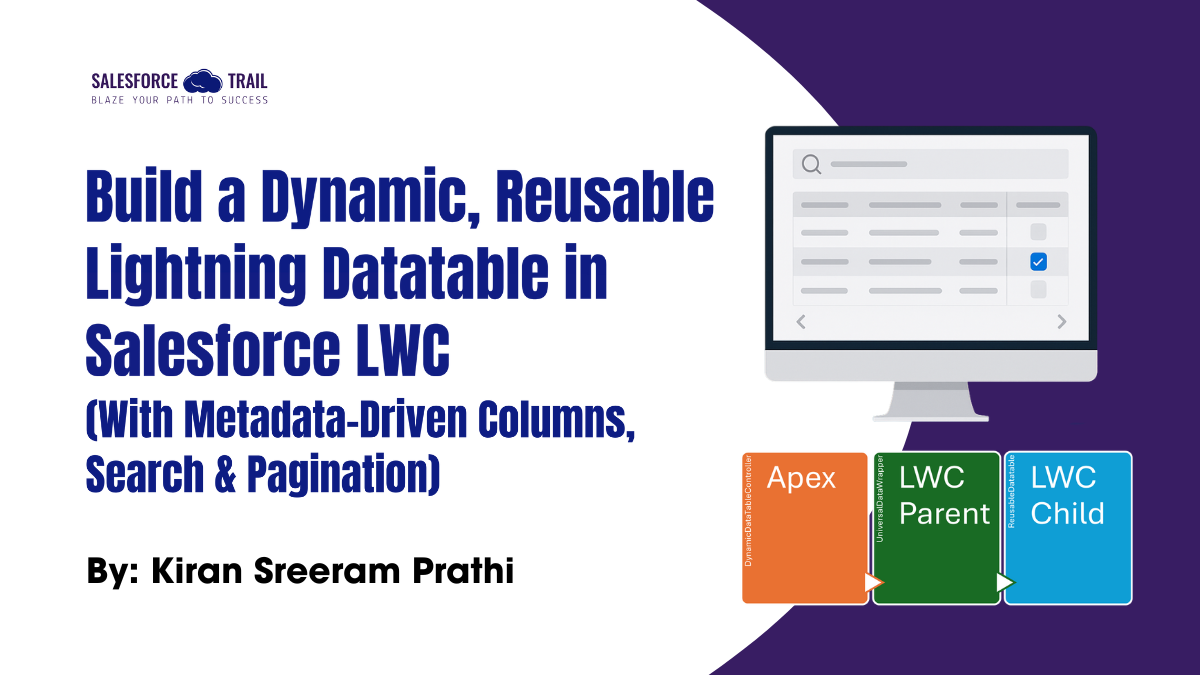
Have you ever built multiple lightning-datatable components — one for Accounts, one for Contacts, and yet another for custom objects — each time duplicating the same logic?
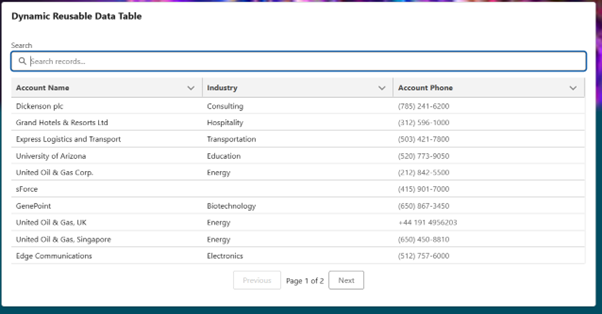
What if you could build one reusable lightning datatable that can display any object’s data dynamically, with automatic column generation, search, pagination, and toast messages?
In this blog, we’ll build a fully dynamic, metadata-driven Data Table in LWC that works for any Salesforce Standard or Custom Object — without changing a single line of front-end code.
Table of Contents
Key Features:
- Works for any SObject (Standard or Custom)
- Dynamic SOQL and field validation in Apex
- Auto-generated columns with correct labels and field types
- Client-side search
- Client-side pagination (10 records per page)
- Toast notifications for success, errors, and no records
- Graceful “No records found” message
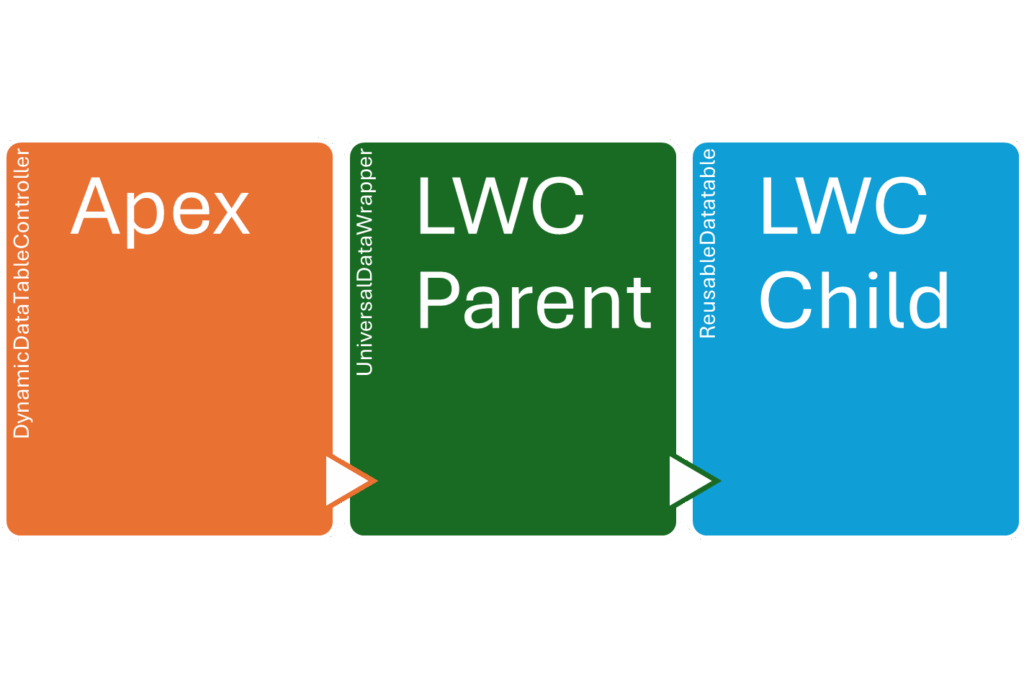
Architecture Overview:
- Apex Controller: Accepts a dynamic request (object name, fields, conditions, limit) and returns metadata + records.
- Parent LWC: Calls Apex, handles success/error toasts.
- Child LWC: Displays data dynamically with search and pagination.
Step 1: Apex Controller – DynamicDataTableController.cls
We’ll create a single, flexible Apex class that accepts any object, any fields, and returns both the data and column metadata.
/**
* Author: KIRAN SREERAM PRATHI
* DynamicDataTableController.cls
*
* This Apex class provides a method to fetch dynamic data for a Lightning Web Component (LWC) data table.
* It accepts a JSON string as input, which specifies the object name, fields to retrieve, optional
* filtering conditions, and limit size. The method constructs a SOQL query based on the input parameters,
* executes it, and returns the results along with metadata about the columns.
*/
public with sharing class DynamicDataTableController {
public class DataRequest {
@AuraEnabled public String objectName;
@AuraEnabled public List fields;
@AuraEnabled public String whereClause;
@AuraEnabled public Integer limitSize;
}
public class DataResponse {
@AuraEnabled public List> rows;
@AuraEnabled public List columns;
}
public class ColumnMeta {
@AuraEnabled public String label;
@AuraEnabled public String fieldName;
@AuraEnabled public String type;
}
@AuraEnabled(cacheable=true)
public static DataResponse getDynamicData(String request) {
System.debug('Raw request string: ' + request);
if (String.isBlank(request)) {
throw new AuraHandledException('Request body is missing.');
}
// Explicitly deserialize JSON string to Apex object
DataRequest parsedRequest = (DataRequest) JSON.deserialize(request, DataRequest.class);
System.debug('Parsed Request: ' + JSON.serialize(parsedRequest));
if (String.isBlank(parsedRequest.objectName)) {
throw new AuraHandledException('Object name is required.');
}
if (parsedRequest.fields == null || parsedRequest.fields.isEmpty()) {
throw new AuraHandledException('At least one field must be provided.');
}
// Validation and Query Building (same as before)
Map schemaMap = Schema.getGlobalDescribe();
if (!schemaMap.containsKey(parsedRequest.objectName)) {
throw new AuraHandledException('Invalid object name: ' + parsedRequest.objectName);
}
Map fieldMap = schemaMap
.get(parsedRequest.objectName)
.getDescribe()
.fields.getMap();
List validFields = new List();
List columns = new List();
for (String field : parsedRequest.fields) {
if (fieldMap.containsKey(field)) {
validFields.add(field);
Schema.DescribeFieldResult describeField = fieldMap.get(field).getDescribe();
ColumnMeta col = new ColumnMeta();
col.label = describeField.getLabel();
col.fieldName = field;
col.type = getLwcFieldType(describeField);
columns.add(col);
}
}
if (validFields.isEmpty()) {
throw new AuraHandledException('No valid fields found for ' + parsedRequest.objectName);
}
String soql = 'SELECT ' + String.join(validFields, ',') + ' FROM ' + parsedRequest.objectName + ' WITH SECURITY_ENFORCED';
if (!String.isBlank(parsedRequest.whereClause)) {
soql += ' WHERE ' + parsedRequest.whereClause;
}
if (parsedRequest.limitSize != null && parsedRequest.limitSize > 0) {
soql += ' LIMIT ' + parsedRequest.limitSize;
} else {
soql += ' LIMIT 200';
}
System.debug('SOQL Query: ' + soql);
List records = Database.query(soql);
List> dataList = new List>();
for (SObject s : records) {
Map recordMap = new Map();
for (String field : validFields) {
recordMap.put(field, s.get(field));
}
dataList.add(recordMap);
}
DataResponse response = new DataResponse();
response.rows = dataList;
response.columns = columns;
return response;
}
private static String getLwcFieldType(Schema.DescribeFieldResult fieldDescribe) {
Schema.DisplayType fieldType = fieldDescribe.getType();
switch on fieldType {
when Email { return 'email'; }
when Phone { return 'phone'; }
when Url { return 'url'; }
when Currency { return 'currency'; }
when Double { return 'number'; }
when Integer { return 'number'; }
when Percent { return 'percent'; }
when Boolean { return 'boolean'; }
when Date { return 'date'; }
when DateTime { return 'date'; }
when else { return 'text'; }
}
}
}
Step 2: Parent LWC – UniversalDataWrapper
This LWC sends the JSON request to Apex and handles toast notifications.
universalDataWrapper.js
/**
* Author : KIRAN SREERAM PRATHI
*/
import { LightningElement, wire, track } from 'lwc';
import getDynamicData from '@salesforce/apex/DynamicDataTableController.getDynamicData';
import { ShowToastEvent } from 'lightning/platformShowToastEvent';
export default class UniversalDataWrapper extends LightningElement {
@track data;
@track columns;
@track error;
request = {
objectName: 'Account',
fields: ['Name', 'Industry', 'Phone'],
whereClause: '',
limitSize: 20
};
// Convert to JSON string for Apex
get jsonRequest() {
return JSON.stringify(this.request);
}
@wire(getDynamicData, { request: '$jsonRequest' })
wiredData({ data, error }) {
if (data) {
this.columns = data.columns;
this.data = data.rows;
this.error = undefined;
// Success toast when data fetched
this.showToast('Success', 'Data fetched successfully', 'success');
// If no records found, show info toast
if (!this.data || this.data.length === 0) {
this.showToast('No Records Found', 'No matching records were found.', 'info');
}
} else if (error) {
this.error = error;
this.data = undefined;
this.columns = undefined;
console.error('Error fetching data', error);
// Error toast
this.showToast('Error', 'Failed to fetch data. Check console for details.', 'error');
}
}
showToast(title, message, variant) {
const event = new ShowToastEvent({
title,
message,
variant,
mode: 'dismissable'
});
this.dispatchEvent(event);
}
}
universalDataWrapper.html
universalDataWrapper.xml
63.0
true
lightning__AppPage
lightning__HomePage
lightning__Tab
lightning__FlowScreen
lightningCommunity__Default
lightningCommunity__Page
Step 3: Child LWC – Reusable Data Table
reusableDatatable.js
/**
* Author : KIRAN SREERAM PRATHI
*/
import { LightningElement, api, track } from 'lwc';
export default class ReusableDatatable extends LightningElement {
@api records;
@api columns;
@track filteredRecords = [];
@track visibleRecords = [];
@track searchTerm = '';
@track currentPage = 1;
@track totalPages = 0;
@track noData = false;
pageSize = 10;
connectedCallback() {
if (this.records) {
this.filteredRecords = [...this.records];
this.setPagination();
}
}
// Search
handleSearch(event) {
this.searchTerm = event.target.value.toLowerCase();
if (this.searchTerm) {
this.filteredRecords = this.records.filter(row =>
Object.values(row).some(val =>
val && val.toString().toLowerCase().includes(this.searchTerm)
)
);
} else {
this.filteredRecords = [...this.records];
}
this.currentPage = 1;
this.setPagination();
}
// Pagination logic
setPagination() {
this.totalPages = Math.ceil(this.filteredRecords.length / this.pageSize);
// Set noData flag if empty
this.noData = this.filteredRecords.length === 0;
this.updateVisibleRecords();
}
updateVisibleRecords() {
const start = (this.currentPage - 1) * this.pageSize;
const end = start + this.pageSize;
this.visibleRecords = this.filteredRecords.slice(start, end);
}
handleNext() {
if (this.currentPage < this.totalPages) {
this.currentPage++;
this.updateVisibleRecords();
}
}
handlePrevious() {
if (this.currentPage > 1) {
this.currentPage--;
this.updateVisibleRecords();
}
}
get disablePrevious() {
return this.currentPage <= 1;
}
get disableNext() {
return this.currentPage >= this.totalPages;
}
get pageInfo() {
return `Page ${this.currentPage} of ${this.totalPages}`;
}
}
reusableDatatable.html
reusableDatatable.xml
63.0
false
lightning__AppPage
lightning__HomePage
lightning__RecordPage
lightning__Tab
lightning__FlowScreen
lightningCommunity__Page
lightningCommunity__Page_Layout
How It Works:
- Parent LWC sends a JSON request → Apex
- Apex Controller dynamically validates fields, constructs SOQL, enforces FLS, and returns data + metadata
- Child LWC:
- Auto-builds columns using metadata
- Displays 10 records per page
- Filters results instantly on search
- Shows “No records found” when applicable
UI Preview:
Example JSON Inputs:

{
"objectName": "Account",
"fields": ["Name", "Industry", "Phone"],
"whereClause": "Industry != null",
"limitSize": 20
}
{
"objectName": "Contact",
"fields": ["Name", "Email", "Phone"],
"limitSize": 30
}
Final Output:
- Works for any object
- Auto column generation
- Search & pagination
- Success, info, and error toasts
- Graceful empty state
Next-Level Enhancements:
- Add server-side pagination using OFFSET
- Add sorting via onsort in <lightning-datatable>
- Add export to CSV for filtered data
- Add UI controls to select objects and Fields dynamically
Conclusion:
With this approach, you’ve built a universal, reusable LWC data table that’s fully metadata-driven, dynamic, secure, and user-friendly.
No more duplicating components for each object — this one solution can power any list view, admin dashboard, or configuration UI.
- This design pattern can easily evolve into a managed utility component or developer productivity accelerator inside your Salesforce org.
Repo Link: https://github.com/kiransreeramprathi/salesforce-dynamic-datatable-lwc
Most Reads:
- Salesforce Marketing Cloud to Agentforce: The Future of Marketing Automation
- How to Create a WhatsApp Business Channel and Configure It in Meta Business Suite
- How Salesforce Transformed My Career and Helped Me Build a Future in Tech
- 5 Agentic Lessons Learned from the Rise of the Agentic Enterprise Era
- Dreamforce 2025 Main Keynote Top Announcements You Can’t Miss
- Your First 90 Days as a Salesforce Admin: A Step-by-Step Checklist
Resources
- [Salesforce Developer]- (Join Now)
- [Salesforce Success Community] (https://success.salesforce.com/)
For more insights, trends, and news related to Salesforce, stay tuned with Salesforce Trail

Kiran Sreeram Prathi
I’m Kiran Sreeram Prathi, a Salesforce Developer dedicated to building scalable, intelligent, and user-focused CRM solutions. Over the past five years, I’ve delivered Salesforce implementations across healthcare, finance, and service industries—focusing on both technical precision and user experience. My expertise spans Lightning Web Components (LWC), Apex, OmniStudio, and Experience Cloud, along with CI/CD automation using GitHub Actions and integrations with platforms such as DocuSign, Conga, and Zpaper. I take pride in transforming complex workflows into seamless digital journeys and implementing clean DevOps strategies that reduce downtime and accelerate delivery. Recognized by organizations like Novartis, WILCO, and Deloitte, I enjoy solving problems that make Salesforce work smarter and scale better. I’m always open to connecting with professionals who are passionate about process transformation, architecture design, and continuous innovation in the Salesforce ecosystem.

- Kiran Sreeram Prathi#molongui-disabled-link