

Close Menu

    Subscribe to Updates

    Get the latest creative news from FooBar about art, design and business.

    What's Hot

    How to Handle High-Volume API Integrations in Salesforce Without Hitting Limits

    December 19, 2025

    How to Think Like a Salesforce Architect: Mindset Shifts Every Pro Should Learn

    December 17, 2025

    Salesforce Business Rules Engine (BRE) Explained: Smarter Decisioning Beyond Apex & Custom Metadata

    December 15, 2025
    Facebook X (Twitter) Instagram
    Facebook Instagram LinkedIn WhatsApp Telegram
    Salesforce TrailSalesforce Trail
    • Home
    • Insights & Trends
    • Salesforce News
    • Specialized Career Content
      • Salesforce
      • Administrator
      • Salesforce AI
      • Developer
      • Consultant
      • Architect
      • Designer
    • Certifications Help
    • About Us
    • Contact Us
    Salesforce TrailSalesforce Trail
    Home - Salesforce Tutorials - How to Create a WhatsApp Business Channel and Configure It in Meta Business Suite
    Salesforce Tutorials

    How to Create a WhatsApp Business Channel and Configure It in Meta Business Suite

    Leandro Augusto CorreaBy Leandro Augusto CorreaNovember 18, 20254 Mins Read
    Facebook LinkedIn Telegram WhatsApp
    How to Create a WhatsApp Business Channel and Configure It in Meta Business Suite
    Share
    Facebook LinkedIn Email Telegram WhatsApp Copy Link Twitter

    The goal of this article is to explore one of the core themes of omnichannel and guide you through configuring a customer service channel via WhatsApp Business Channel. Currently, there isn’t a straightforward way to implement this setup for testing without the specific Messaging permission. This permission is essential to create the new channel and to access standard objects such as Messaging User and Messaging Session, ensuring integrated and efficient communication with your customers.

    Table of Contents

    What is Omnichannel?

    Omnichannel goes beyond offering multiple contact channels. It allows the customer to move between channels (such as WhatsApp, phone, and email) without losing the context of the previous interaction. This means that, regardless of where the contact started, service remains consistent and the interaction history is available to agents—ensuring a unified and efficient customer experience.

    How Can Omnichannel Help Day to Day?

    Omnichannel integration streamlines support operations by centralizing interactions on a single platform, such as Salesforce. Instead of using multiple systems to manage different channels, you can control everything in a single environment, such as an Omnichannel System. This increases efficiency, saves time, and improves the experience for both the support team and customers.

    Benefits of Integrating WhatsApp Business with Meta Business Suite

    • Efficient Routing: With the Salesforce integration, routing becomes faster and more effective, directing customers to the right agent based on their needs.
    • Unified Monitoring: All communication channels are consolidated in one platform, making interaction history easy to access and manage—facilitating performance analysis and continuous improvement.
    • Personalized Service: The team has access to each customer’s full history, enabling more personalized and efficient service and increasing customer satisfaction.

    🔍 Read More: 10 Apps Every Admin Should Know to Simplify Work in Salesforce

    Configuring the WhatsApp Business Channel

    Let’s get started! The goal of this section is to provide a practical, step-by-step guide so you feel confident kicking off the setup.

    Step 1: Create the Permission Set

    • Access Salesforce: Go to the Messaging settings section.
    • Create New Channel: Select Enable, then Create a New Channel.
    • Add Permissions: Create a permission set specific to the WhatsApp Business channel and assign it to the appropriate users (Messaging permissions).

    Step 2: Channel Configuration

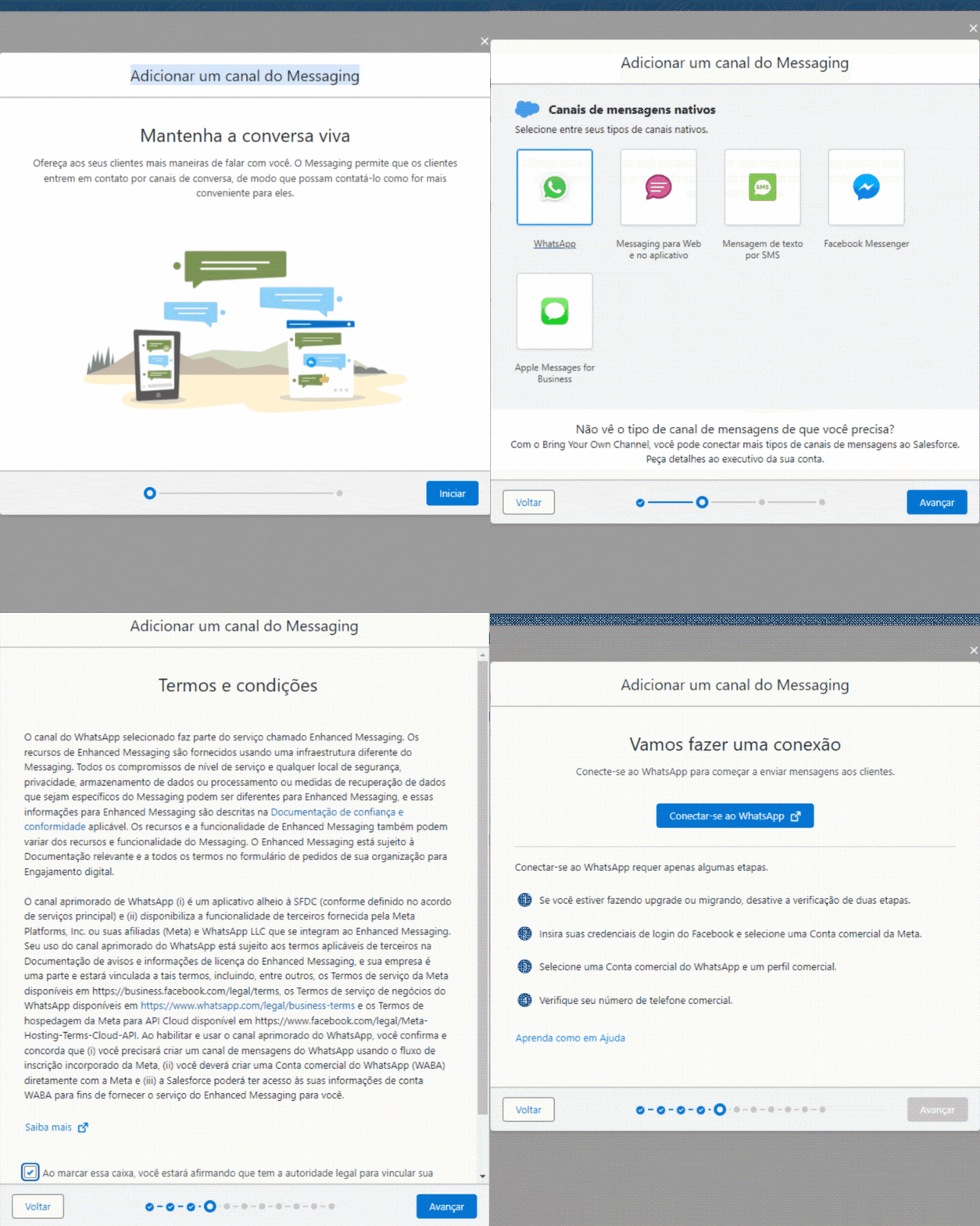
    • Start Configuration: When you begin channel setup, a new window opens with a guided, step-by-step wizard.
    • Visual Guides: See the GIF below for a visual walkthrough of the process.
    vedio 1

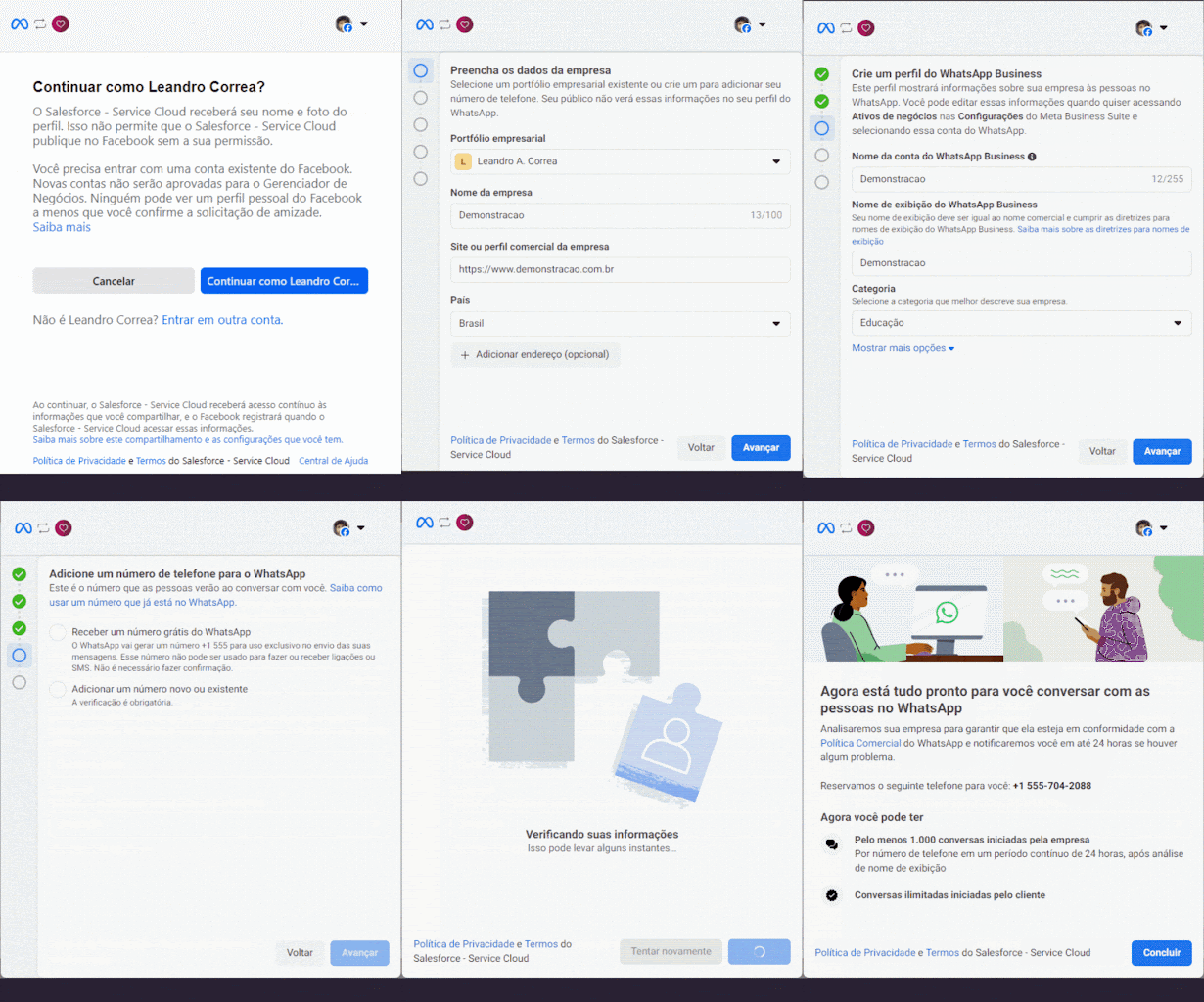
    Step 3:

    Note that in this scenario, we are using the phone number provided by WhatsApp Business, without the need to use a regular personal number.
     

    vedio 2 1

    Step 4

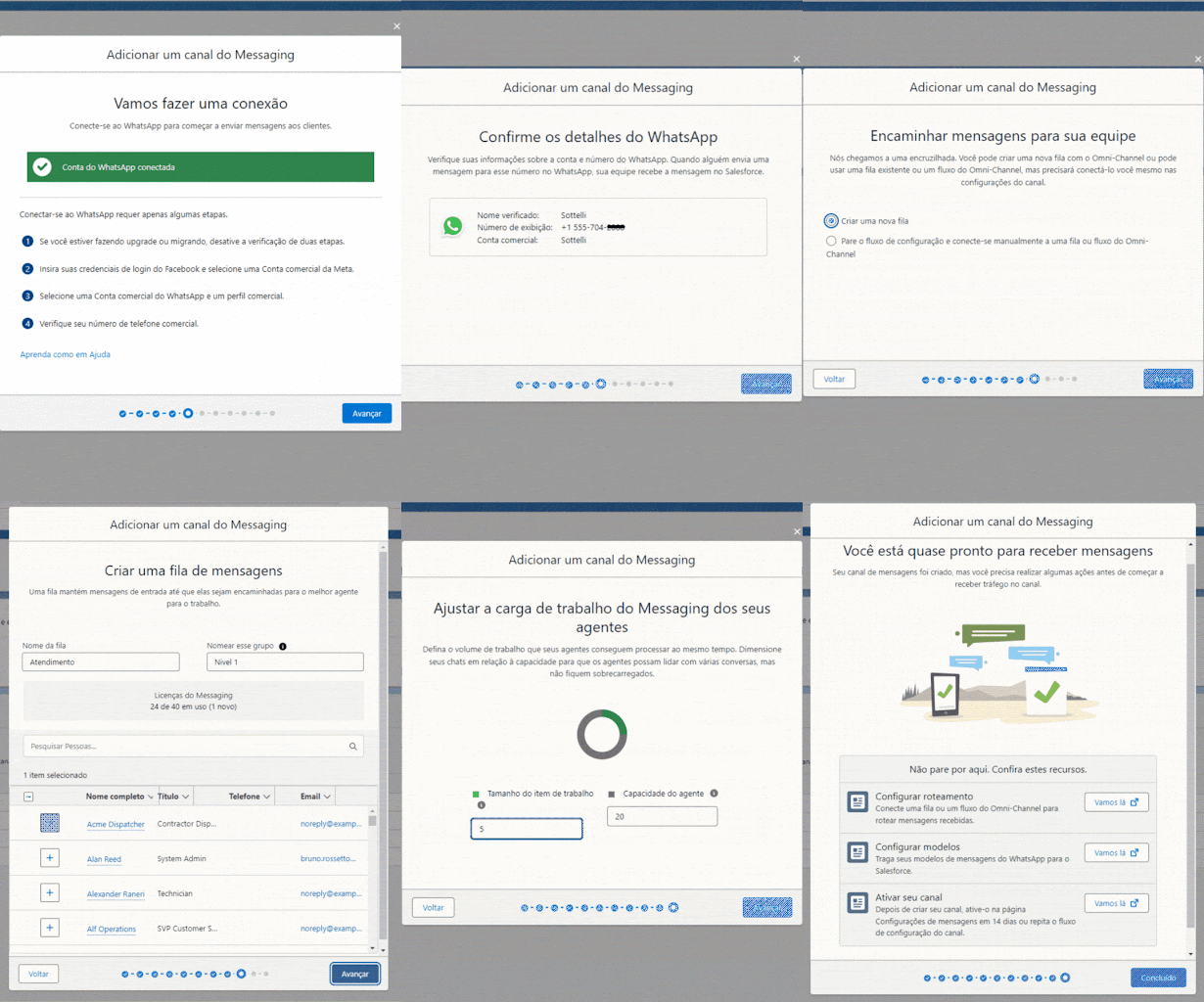
    • Detailed View of the Facebook Configuration Window: After completing the channel setup in your Business account, Salesforce will return to the internal configuration window, displaying additional details about the connected channel.
    • You can configure routing at this stage or move forward and adjust it later. In some cases, the setup process may fail, requiring you to restart it — this is expected behavior. In practice, I usually prefer to complete the channel creation first and only then proceed with building the routing flow.
    vedio 3

    🔍 Read More: Salesforce MVP Architecture: A Beginner’s Guide to Building Clean, Scalable Lightning Web Components

    Second Stage in Creating the WhatsApp Channel

    After completing these steps, your messaging channel will be configured. The next step is to activate the channel and review the configuration completed in Facebook/Meta.

    • Access the Activation Page: Click the channel name or the arrow on the right to select Edit and access the activation panel.
    • Create the Routing Process: Configure how conversations will be routed, either directly to a Queue or through an omnichannel flow. In the example, we are routing to a queue for activation.

    Picture1

    Configuring Outbound Messages

    After the channel has been created and activated, you can configure an outbound message to be used within Salesforce.

    • Access the Message Templates Page:
      Go to your Meta Business account and navigate to:
      Message Templates → Manage Templates → Create Template

    Important Consideration: Salesforce does not support WhatsApp message templates that include footer buttons.

    If your template contains these buttons, the message will not display correctly when used in Salesforce messaging components.

    If you are already logged into your Meta account, you can access the templates page directly here:
    https://business.facebook.com/wa/manage/message-templates

    Picture2

    Template editing screen:

    Picture3

    Conclusion

    Once the channel is configured, activated, and routing is set, your Salesforce org is ready to handle WhatsApp communication smoothly and efficiently.

     

    Salesforce Trail

    Relevant Resources

    • Salesforce Messaging Permissions Documentation
      https://help.salesforce.com/s/articleViewid=sf.messaging_permissions_parent.htm&type=5
    • WhatsApp Business API Terms of Service (Meta / WhatsApp Business Platform)
      https://www.whatsapp.com/legal/business-terms
    • Considerations for Using WhatsApp within Salesforce Service Cloud
      https://help.salesforce.com/s/articleViewid=sf.messaging_whatsapp_considerations.htm&type=5
    • WhatsApp Business Messaging FAQ – Digital Engagement (Salesforce)
      https://help.salesforce.com/s/articleViewid=000380726&type=1
    • “Edit” Option Not Appearing for Messaging Channel Setup (Troubleshooting Guide)
      https://help.salesforce.com/s/articleViewid=000380773&type=1
    Certified_Agentforce-Specialist
    Salesforce Administrator
    Business Analyst New
    Sales-Cloud-Consultant
    Salesforce Platform-Developer-1

    Most Reads:

    • 5 Agentic Lessons Learned from the Rise of the Agentic Enterprise Era
    • What is Agentic Analytics? Your Guide to the Future of AI-Driven Insights
    • Top 3 Takeaways from the Dreamforce 2025 Keynote: The Era of the Agentic Enterprise
    • Dreamforce 2025 Main Keynote Top Announcements You Can’t Miss
    • Your First 90 Days as a Salesforce Admin: A Step-by-Step Checklist

    Resources

    • [Salesforce Developer]- (Join Now)
    • [Salesforce Success Community] (https://success.salesforce.com/)

    For more insights, trends, and news related to Salesforce, stay tuned with Salesforce Trail

    Leandro Augusto Correa
    Leandro Augusto Correa
    Salesforce Consultant and Solution Architect – le_acorrea@hotmail.com

    Leandro is a Salesforce Consultant and Solution Architect with experience leading multi-cloud implementations across Service Cloud, Sales Cloud, Marketing Cloud, and Data Cloud. He specializes in Omnichannel strategies, WhatsApp Business integration, Digital Engagement, and Einstein Bots, ensuring scalable architectures and smooth customer service operations. With a strong background in team leadership and agile delivery, he has guided squads in improving platform governance, customer experience, and continuous evolution of Salesforce solutions.

      This author does not have any more posts.
    agentforce Meta Business Suite Omnichannel Engagement salesforce salesforce admin salesforce integration WhatsApp Business WhatsApp Business Channel WhatsApp Integration
    Share. Facebook LinkedIn Email Telegram WhatsApp Copy Link

    Related Posts

    How to Handle High-Volume API Integrations in Salesforce Without Hitting Limits

    December 19, 2025

    How to Think Like a Salesforce Architect: Mindset Shifts Every Pro Should Learn

    December 17, 2025

    Salesforce Business Rules Engine (BRE) Explained: Smarter Decisioning Beyond Apex & Custom Metadata

    December 15, 2025
    Add A Comment
    Leave A Reply Cancel Reply

    Advertise with Salesforce Trail
    Connect with Salesforce Trail Community
    Latest Post

    6 Proven Principles to Drive Faster Salesforce CRM Adoption

    November 3, 2025

    Driving Revenue Efficiency with Sales Cloud in Product Companies

    October 30, 2025

    How to Become a Salesforce Consultant: A Complete Guide to Success

    August 15, 2025

    5 Expert Tips for Salesforce Consultants and Architects to Improve Collaboration

    April 9, 2025
    Top Review
    Designer

    Customizing Salesforce: Tailor the CRM to Fit Your Business Needs

    By adminAugust 6, 20240

    Salesforce is an adaptable, powerful customer relationship management (CRM) software that businesses can customize, and…

    Sales Professional

    Unlock 10 Powerful Sales Pitches to Boost Your Revenue by 30X

    By Mayank SahuJuly 4, 20240

    Sales is a very competitive arena, and it is followed by one must have a…

    Salesforce Trail
    Facebook X (Twitter) Instagram LinkedIn WhatsApp Telegram
    • Home
    • About Us
    • Write For Us
    • Privacy Policy
    • Advertise With Us
    • Contact Us
    © 2025 SalesforceTrail.com All Right Reserved by SalesforceTrail

    Type above and press Enter to search. Press Esc to cancel.