

Most enterprise technology changes begin with a familiar sense of confidence. The architecture has been reviewed. Integrations have been mapped. Teams have been engaged. Test plans exist. On paper, the environment looks understood.
Then the change happens, and something unexpected appears: an integration nobody expected to be affected, an old network rule, a security dependency outside the application architecture, or a manual validation step known by only a few people.
The interesting part is that the change may not have created any of these dependencies. They were already there. The change made them visible.
After years supporting Salesforce in complex enterprise environments, I have come to see major platform changes as more than technical events. They are also architecture tests. They show how the organization actually works, and that picture is sometimes broader than our diagrams.
Key takeaways
- Big changes rarely create new dependencies. They reveal ones that were already there.
- Salesforce being “up” is not the same as the business journey working end to end.
- The riskiest dependencies live outside the app, in networks, security, process, people, and ownership.
- Test complete business journeys, not just individual components.
- Find the gaps before the war room, not during it.
Table of Contents
The Architecture you draw vs. the Architecture you actually run
Architecture diagrams are useful because they solve complexity. A Salesforce landscape is often drawn as Salesforce to middleware to backend systems, and that’s fine for a design conversation.
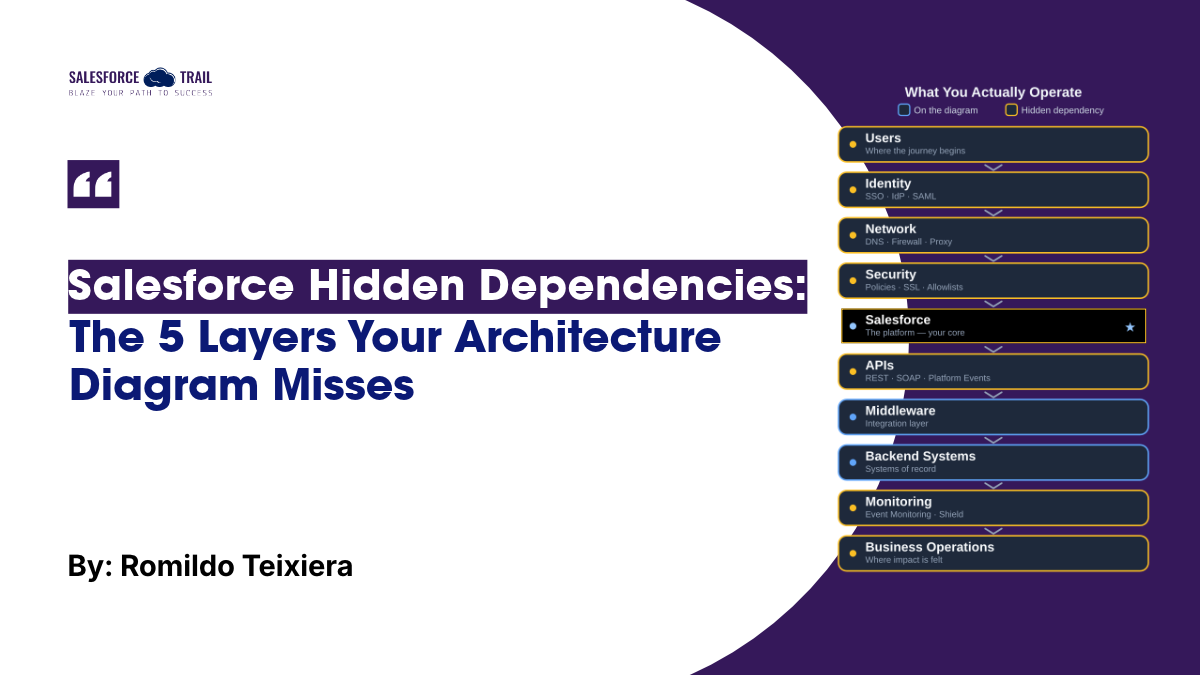
The trouble is that the thing you operate is wider than the thing you drew. The real path looks more like this: users, identity provider, network, security layer, Salesforce, APIs, middleware, backend, monitoring, support process, business operations. Connectivity, certificates, DNS, authentication, a manual check someone runs every morning. All of it is part of how the service actually works, even though none of it fits neatly into a box-and-arrow picture.
So you end up with two architectures: the one you designed and the one you run. The whole job, in a mature org, is keeping those two as close together as you can.
Why a “successful” change can still break the business
This is the part people underestimate; that’s why I will put it clearly: your Salesforce org can be completely healthy while the business is down.
Picture a release. Salesforce is up. Login works. The APIs respond. Middleware is humming. Every component on your checklist is green. And an order still will not go through. Technically, nothing is broken. From the customer’s side, the service does not exist.
The gap represents the difference between application availability and business availability, where most post-change incidents actually occur. A security policy can block a dependent app while the API behind it reports perfect health. An identity provider can quietly stop issuing tokens while Salesforce insists everything is fine. Each piece passes its own test. The journey still fails.
When you measure availability component by component, you are measuring the wrong thing. The question that matters to the business is simpler and harder: can a real person finish the thing they came here to do?
The Five Layers of Hidden Salesforce Dependencies
Hidden dependencies tend to appear across the operating model. I group them into five layers: technical, network and security, operational, knowledge, and organizational dependencies.
None of these layers is unusual by itself. The risk comes from not knowing that the dependency exists until the environment is already changing.
1. Technical Dependencies
These are the easy ones to spot: APIs, endpoints, certificates, authentication, DNS, scheduled jobs, Platform Events, batch processes, middleware flows. The trap is assuming that technical size equals business importance. A small integration, maybe a handful of records a day through a Named Credential nobody thinks about, can be the single thread holding up a critical order journey. Small footprint, big blast radius. Those are the ones that bite.
2. Network and Security Dependencies
This layer gets missed because it usually sits with a different team. Firewalls, proxies, IP allowlists, SSL inspection, VPNs, your identity provider, SSO and SAML config, My Domain, routing rules. The Salesforce admin does not own most of it, so it rarely shows up in a Salesforce change assessment. But a proxy rule written three years ago can block an integration just as hard as a code bug, and it will take you longer to find, because you are staring at a healthy org wondering why nobody can reach it.
3. Operational Dependencies
Some important dependencies are not technical at all. They live in manual validations, operational checks, recovery steps, escalation paths, approvals, and reconciliation procedures.
These processes often develop gradually. A temporary workaround becomes permanent. A manual check becomes part of a critical flow. A troubleshooting step becomes common knowledge but is never formally documented.
Everything keeps working until the environment changes. Then the organization discovers that the real operating model contains steps that never made it into the change assessment.
4. Knowledge Dependencies
Sometimes the architecture is documented, but the reasoning is not. One person remembers why that integration retries the way it does. One person knows which log to check first. One person knows the safe recovery order. A useful question to ask before any big change: if that person were on holiday the day it happened, could the team still recover safely? If the honest answer is no, you have a knowledge dependency, and it is every bit as fragile as an undocumented API.
5. Organizational Dependencies
This raises a critical question: who owns the end-to-end outcome? If every team owns a component but nobody owns the full journey, the organizational structure itself becomes a dependency.
A single Salesforce journey can cross application, integration, network, security, infrastructure, a vendor or two, business ops, and support. On a normal day, the boundaries feel clear. During an incident, they blur fast, because the technical failure shows up in one team’s area while the business pain shows up somewhere completely different. So who owns the end-to-end outcome? If every team owns a piece and nobody owns the whole journey, your org chart is itself a dependency.
Why your usual pre-change testing is not enough
Before a big change, most teams validate the obvious: login, platform availability, API responses, integration connectivity, authentication. All necessary. None of it proves the business works.
Go back to that order that would not complete. Every component test passed. The thing the business actually depends on still failed. Component checks tell you the parts are alive. They say nothing about whether the chain holds together.
What catches the real problems is testing the full journey, end to end, the way a transaction actually travels: user, Salesforce, business transaction, integration, downstream processing, business confirmation. If you can walk a real scenario all the way to that final confirmation, you have tested the service. If you only checked the pieces, you have tested your confidence, not your system.
This is the part of Salesforce change management that is easiest to skip, and the most expensive to skip.
Make your observability follow the business
When something does break, a 403 or a timeout tells you where to start digging. It doesn’t tell you what the failure means for the business, and that is the information operations actually needs at 2 a.m.
Which process failed? When did the impact start? How many customers or transactions are affected? Are those transactions lost, queued, or recoverable? Is it still happening? A dashboard full of green checkmarks that cannot answer those questions still leaves you half-blind.
Salesforce gives you real material to work with here. Event Monitoring and Real-Time Event Monitoring, as part of Salesforce Shield, surface login, API, and transaction-level events you can pull into your operations tooling. The useful move is not collecting more logs. It is connecting the logs you already have back to the business journey, so a technical signal reads as “orders in region X are failing” instead of just “HTTP 403.”
The Hidden dependency test: a pre-change checklist
You do not need another hundred-page document. You need to pick a handful of your most critical business journeys, maybe three to five, and pressure-test each one before the change. For every journey, work through this:
- Do we know every system and integration this journey touches, including the small ones?
- What network and security controls sit in the path (firewalls, proxies, allowlists, SSO, My Domain)?
- Who is the technical owner of each piece, by name?
- Who owns the business outcome end to end?
- How would we know this journey is failing, and would monitoring tell us, or would a customer?
- If it breaks mid-change, what is the recovery, and who can run it?
- How do we confirm the journey actually completed, not just that the components responded?
The most useful answer you can get here is “we would have to ask someone.” That is not a failure. It is a map. It shows you exactly where the documentation, the automation, or the clear ownership is missing, while you still have time to fix it calmly instead of at 2 a.m. with a bridge call running.
Run this once, and you will almost always surface at least one dependency nobody had on the radar. That is the whole point.
Final Thoughts
Hidden dependencies are not only an architecture problem. They drive change risk, how long incidents drag on, business continuity, audit readiness, and cost. When a journey no one owns goes down, the clock runs while teams argue about whose component it is.
There is an honest tension here, and I will name it. When everything is stable, dependency reviews and recovery drills lose every budget fight to shipping new features. They look optional. The value only becomes obvious after something fails, which is the worst possible time to learn it. The mature move is to pull that discovery forward, so you are finding dependencies on a quiet Tuesday instead of in the middle of a war room.
Frequently Asked Questions
They are the connections your architecture diagram leaves out: network and security rules, manual process steps, tribal knowledge, and unclear ownership. They are not in your API catalog, but they can stop a business journey even when the org itself is healthy.
Usually because the change exposed a dependency that was already there and undocumented. An old integration, a forgotten firewall rule, or a manual step that quietly became load-bearing. The change did not create it; it just removed whatever was keeping it hidden.
Pick your most critical business journeys and walk each one end to end before the change, checking systems, network and security controls, owners, monitoring, and recovery. The checklist above is a good starting point. Anywhere the answer is “we would have to ask someone” is a dependency worth documenting now.
Application availability means the components are responding. Business availability means a real person can complete their journey. The org can be perfectly healthy while a security policy or broken integration stops orders from going through, so only end-to-end journey testing tells you the truth.
No. The Dependency API (MetadataComponentDependency) is genuinely useful, but it maps relationships between metadata components inside your org. It does not see network rules, security policies, manual processes, or knowledge that lives in people’s heads, which is where the riskiest dependencies usually hide.
Possibly, if anything in your estate still calls an old Platform API version. Salesforce retired versions 21.0 through 30.0 in Summer ’25, with more to follow under the Salesforce legacy API version retirement plan. Check the API Total Usage event in your EventLogFile to see which versions your org is actually using.

Romildo Teixiera de Paula
- Romildo Teixiera de Paula