Salesforce Sandbox is one of the basic skills that every Salesforce administrator and developer should have. A sandbox is an environment where you can develop, test, and train everything without affecting or stopping your production data. In this article, you will find how to create a Salesforce Sandbox and the best practices for working with them.
What is a Salesforce Sandbox?
The Salesforce Sandbox however is an isolated version of your Salesforce organization on another platform. As an admin or developer, you could try out new modifications; add features, and even train users without having the risk of changing data that impacts live information. The various types of these environments generally differ in terms of data volume stored and best practices employed by them.
Types of Salesforce Sandboxes
- Developer Sandbox: Ideal for code and testing in a clean space Contains the same metadata set from your production org but without data
- Developer Pro Sandbox: This Sandbox is similar to a Developer one except it has more storage space for big development projects and tests.
- Partial Copy Sandboxes: It provides access to some production data and all metadata which incorporates real data while making minor changes/tests.
- Full Sandboxed: This Sandbox refers to the production org with all data and metadata. As a result, you may perform performance testing, load testing, and staging before heading to production deployment.
Steps to Create a Salesforce Sandbox
Setting up a Salesforce Sandbox is pretty fast. How to create a sandbox in your Salesforce instance:
Step 1: Salesforce login
First, log in to your Salesforce production organization. Check whether you have the privilege to create a sandbox or not. This typically requires system administrator privileges.
Step 2: Accessing Sandboxes
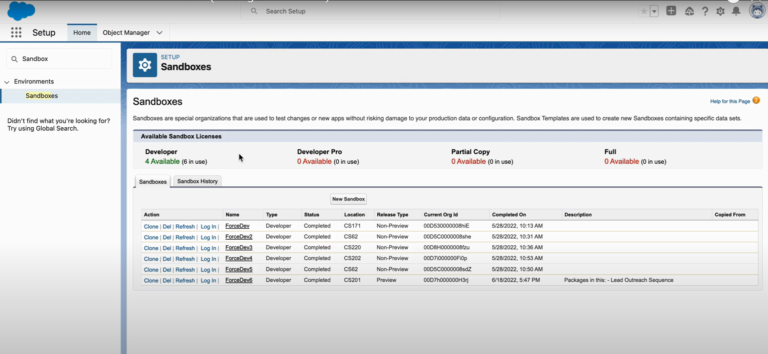
Visit the “Set up” tab under Salesforce Classic and locate Sandboxes in Data Management.
For salesforce lightning click on the setup icon then enter sandboxes in the quick find box.
Step 3: Click “New Sandbox”
To create a new sandbox, click New Sandbox. After which, you will be required to give it a name and description of your sandbox.
Step 4: Choose Sandbox Type
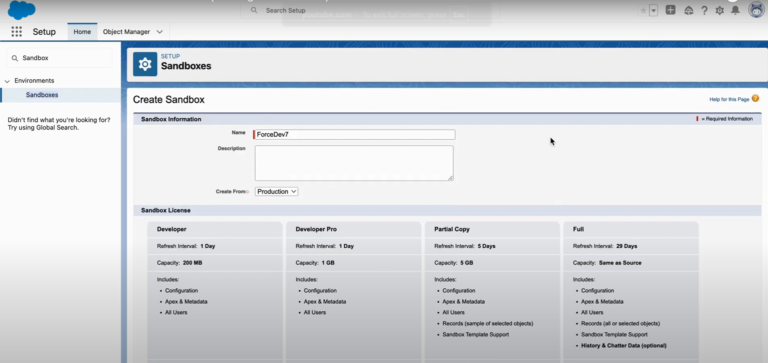
Choose one that suits you best (Developer, Developer Pro, Partial Copy, or Full) They attract different audiences, and many more select based on your requirements.
Step 5: Configure Sandbox Settings
Sandbox Name: Give the sandbox a distinctive name. This title sets it apart from other sandboxes within your Salesforce org.
Description: Write about why you created this environment It would be even better if this assists other users to know what you are up to.
Step 6: Commence the Process of Copying Data
Once you set this information up, click Create. This is because Salesforce will commence copying the metadata into your newly created sandbox while taking some time depending on how large and complex your org is.
Step 7: Gain Access to Your Sandbox
You will receive an email when Sandbox creation is finished, visit the Sandboxes page then click on the login link for your sandbox name.
Best Practices for Using Salesforce Sandbox
- Refresh Your Sandboxes Regularly: Frequently reset sandboxes to a fresh state. This way, it contains the freshest version of metadata and data information from your production org. The refresh interval is going to be different for the sandbox type.
- Utilize Sandboxes for Specific Purposes: Every sandbox should serve one purpose developer sandboxes are meant to be used by developers only, partial copy sandboxes are for integration testing while the full copy is UAT (user acceptance test).
- Manage Data and Storage: Know your Sandbox storage limits (Developer, Developer Pro) Continuously delete old or pointless data to ensure you do not run out of storage space.
- Enforcing Security: Ensure that your sandbox environments include the same security measures as those used in production. Proper security settings and access controls should be configured to safeguard against unauthorized exploits.
- Backup of Critical Data: Sandbox is completely different from your Production Org, but you don’t want to lose important data which means taking regular backups of essential data & configurations.
Conclusion
Sandbox management is one of the most crucial skills to keep up a robust and secure Salesforce environment, and how intensely regulated it can be by your connecting strategy. Once you understand the many ways to set up a sandbox and practice them, you’re suited towards safe new feature development without breaking all of your production data along with it. Improve your development productivity and reliability by signing up for a Salesforce Sandbox now.
Resources
- [Salesforce Trailhead] (https://trailhead.salesforce.com/)
- [Salesforce Developer] (https://developer.salesforce.com/)
- [Salesforce Success Community] (https://success.salesforce.com/)
- [Salesforce Developer Community] (https://developer.salesforce.com/forums)
For more insights, trends, and news related to Salesforce, stay tuned with Salesforce Trail

- Vivek Kumar

- Vivek Kumar
- Vivek Kumar