


You have added the green #OpenToWork frame. You wrote a LinkedIn post: “Happy to share that I’m looking for my next Salesforce role; reposts appreciated!” You clicked publish. And then, the feed just kept scrolling. You got a few likes from people you hadn’t spoken to since Dreamforce years ago. Maybe a “Good luck!” message from an old colleague. No recruiter InMails. No hiring managers in your messages.
If that’s where you are right now, two things are true. It isn’t only you. And the banner was never built to do the heavy lifting.
The Salesforce market is genuinely crowded. 10K’s 2025 Salesforce Talent Ecosystem Report put global candidate supply at roughly 3.4 times demand – a saturation rate above 330%. Admin supply alone jumped 47% in a single year, while admin demand grew just 14%. So a quiet inbox isn’t proof you’re unhireable. It’s a signal that “I’m available” is competing against thousands of other people saying the same thing, in the same way.
Table of Contents
Why “Open to Work” alone stalls (and when the banner does help)
I’m not going to tell you to rip the banner off. It does something. LinkedIn’s own data, reported by Fortune in 2024, found that people using the #OpenToWork photo frame were on average about 40% more likely to receive recruiter InMails. That’s real.
But read this carefully. It affects how you are approached – it doesn’t determine the outcome when a recruiter lands on your profile and sees nothing but a list of job titles. The banner is a signal, not a strategy. It can enhance a profile that already demonstrates value, but it cannot save an empty one.
Most people aren’t aware of two things. First, “Open to Work” has two settings: the public green frame visible to everyone and a discreet “recruiters only” setting that signals your status to recruiters without alerting your current boss. For many employed individuals, this discreet option is the more sensible choice. Second, some recruiters – particularly those in agencies and executive search – view the public banner as a sign of desperation or urgency, as their core job involves finding candidates who aren’t actively looking for a new role. This isn’t the case everywhere, and many corporate recruiters don’t mind it at all; however, it is important to be aware that such perceptions exist.
So keep the toggle on if you like. Just stop treating it as the work. Everything below is the work.
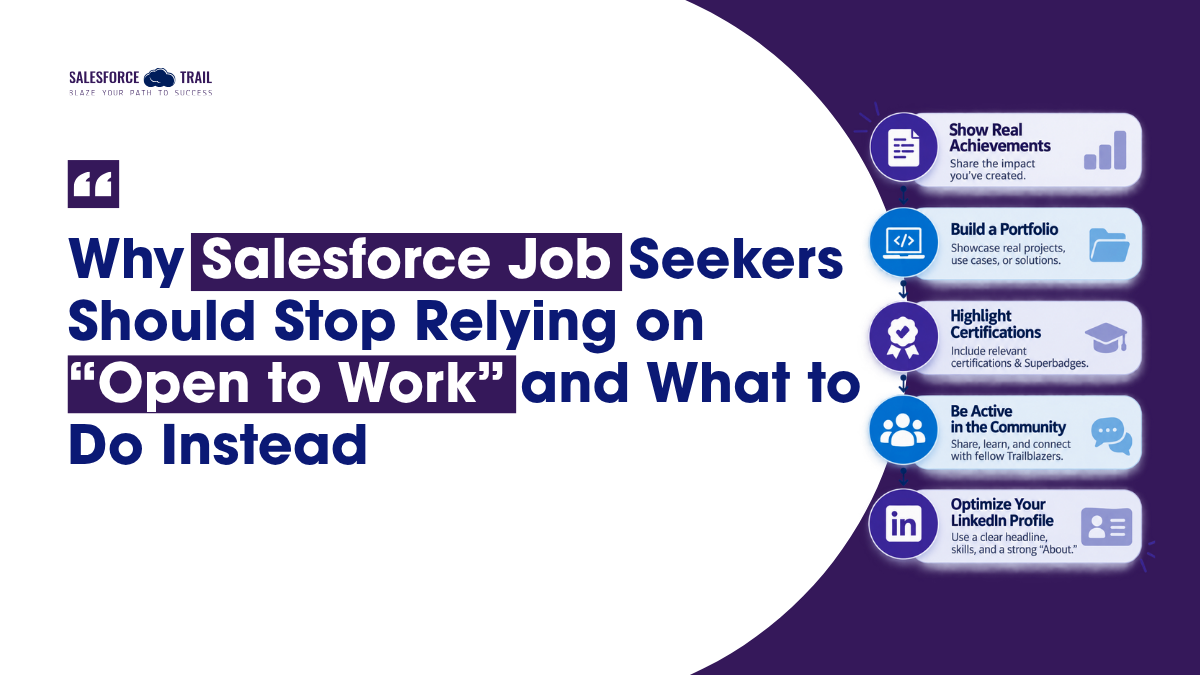
Post Real Achievements, not Availability
This is the single highest-leverage change you can make, so I’ll spend the most time here.
Instead of saying you are looking for work, start showing what you have created. Not empty grandiosity or motivational quotes over stock photos – but actual, specific work you’ve done and the results it achieved. Here is a method I use time and again because it works:
Problem → What you built → Measurable result → Challenge you beat → The lesson.
Let’s understand this through a situation most of us have experienced. A support team is busy triaging cases. Someone reviews each incoming case, categorizes it, and routes it to the appropriate queue. Naturally, some cases end up in the wrong place and bounce around for a day before anyone takes responsibility for them.
You build a Screen Flow (a Lightning Web Component would work too) that reads the incoming case, auto-routes it based on subject and product, and pre-fills the fields agents were typing by hand. The result: the team gets back roughly four hours a week, and mis-routed cases drop noticeably. The challenge you beat along the way – maybe a governor limit you hit when the routing logic ran on bulk case creation, or the two agents who swore the old way was faster until you sat with them for twenty minutes. The lesson: automation adoption is half config, half change management, and the config is the easy half.
That post does something an “Open to Work” post cannot: it shows recruiters how you think. It turns out this format performs better, too. AuthoredUp analyzed thousands of LinkedIn posts and found that posts highlighting achievements generate more engagement than standard updates. Furthermore, starting a post with the result elicits a better response, whereas most people typically begin with a vague opening line. When a hiring manager sees this while scrolling, they don’t see a plea; they see proof.
Steal this template
A [team/role] was struggling with [specific manual problem].
Every [time period] they had to [tedious task], which meant [cost — time, errors, frustration].
I built [Flow / LWC / integration / data model] that [what it does].
The result: [measurable outcome — hours saved, errors reduced, adoption up].
The tricky part was [real challenge — a limit, a requirement, adoption resistance],
and here’s how I got around it: [what you did].
If I were doing it again, I’d [one honest lesson].
Post it. Then do it again next month with a different win.
“But I haven’t done anything impressive”
I hear this constantly, and it’s almost always wrong. The work had impact. You just never wrote the number down.
Untracked doesn’t mean unmeasurable. You can reconstruct a metric after the fact by asking four questions about any project: How many? (records cleaned, users onboarded, cases handled). How much? (time, money, licenses saved). How long — before versus after? (a report that took an hour now takes five minutes). What measurably improved? (adoption, data quality, error rate).
And to be clear: honest approximations are fine. “About four hours a week” and “roughly 40% fewer duplicate records” are legitimate. Nobody expects a stopwatch-accurate figure, and hiring managers use ranges like this all the time.
What counts as an achievement genuinely depends on your role:
- Admins: hours saved through automation, fewer manual errors, duplicate records cleaned up, login and adoption rates, faster reporting.
- Developers: page load time cut, support tickets reduced, higher test coverage, a reusable component other teams adopted, an integration that stopped breaking.
- Consultants: faster go-live, adoption percentage after launch, requirements-to-delivery time, a CSAT bump, license or cost savings.
- Beginners and career-changers: a superbadge you earned, a pro-bono build for a nonprofit, a documented Playground project — plus the transferable numbers from your last career. If you managed support volume, ran a classroom, or hit sales targets, that’s evidence of exactly the skills Salesforce work rewards.
Build a Salesforce Portfolio that Proves it
Posts scroll away. A strong portfolio stays put, and it’s the thing you link to when a recruiter asks, “Can you show me something?” Four pieces do most of the job.
- Your Trailhead profile, Superbadges, and certifications serve as public, verifiable proof of your skills. Salesforce also considers Superbadges the closest evidence of practical experience, as they place you in real-world business scenarios without step-by-step guidance and automatically verify the results. Employers increasingly glance at Trailhead profiles when screening junior candidates. Be honest with yourself, though – 200 badges with zero real-org experience signals motivation, not seniority. Superbadges carry more weight than badge count.
- Sanitized case studies. Write up two or three projects once, in the problem → what you built → result format, and reuse them everywhere.
- A simple personal site. One page that gathers your case studies, certs, and links. It doesn’t need to be fancy.
- GitHub, if you write code. For developers, a real repo beats any bullet point on a resume
How to Show Your Work without Leaking Client Data
This is the part people freeze on, and the fix is straightforward. Don’t screenshot a client org – rebuild the concept in a Trailhead Playground or a Developer Edition org and screenshot that. Populate it with synthetic or mock data, never real records. Anonymize the client down to a category: “a mid-size nonprofit,” “a B2B manufacturer.” Talk about the problem and the pattern you used to solve it, not anything that identifies who paid for it. And if you want to reference a real engagement by name, get written sign-off first. Describing a solution you designed is fine. Exposing someone’s data or their name without permission is not.
Your LinkedIn Profile is Permanent Proof – Use it that way
Think of your profile as the always-on portfolio the banner is supposed to point at.
Your headline should be a searchable value statement, not just your job title — recruiters filter on keywords, so “Salesforce Admin | Flow & Service Cloud automation” beats “Salesforce Administrator.” Your About section is where the story lives: what you do, results you’ve driven, and a clear line about what you’re looking for. Your Featured section is the easy win almost nobody takes — most people leave it completely blank, so pinning your best achievement post, a case study, and a superbadge instantly puts you ahead of the field. Round out your Skills with the ones that match your target role; LinkedIn’s own data shows profiles with at least five relevant skills get contacted and viewed far more often.
Other Ways to Prove your Value
A few more moves, kept short because none of them needs a lecture:
- Show up in the community. Contribute in the Trailblazer Community, answer questions with actual substance, join a local or virtual user group. Salesforce has reported that a majority of community members credit their engagement for landing a job or a raise. The nice part is that you get noticed without ever announcing you’re looking.
- Collect third-party proof. A specific, detailed recommendation – one that names what you actually did and how you solved something – carries far more weight than a generic “great to work with.” Ask for the specific kind.
- Match your proof to the role. Architects should show design and scale; developers, code quality and reusable work; admins, automation and adoption; consultants, delivery and client outcomes. And keep in mind what recruiters consistently rank first: hands-on experience tends to outweigh certification count.
- Reach out warm, not wide. A targeted message to a hiring manager that references a relevant win lands far better than another application into the void. One good message beats fifty cold ones.
- Document as you go. Maintain a document of your achievements – a note where you drop wins, numbers, and the complex problems you solved during the very week they occurred. That is the difference between staring at a blank page and having a month’s worth of material ready to go.
What to do today
You don’t need to overhaul everything this weekend. Do three things this week.
Write one achievement post using the template above. Pin it to your Featured section so it’s the first thing a recruiter sees. Then send one warm message to a hiring manager whose team you’d want to join, and lead with a relevant result instead of your availability.
That’s it. Because the whole game comes down to one line: stop telling recruiters you’re available, and start showing them what you deliver. Proof beats availability, every time.
Frequently Asked Questions
To some recruiters, yes – mostly in agency and executive search, where the pitch is finding candidates who aren’t openly looking. Plenty of corporate recruiters don’t mind it at all. If you’re worried, use LinkedIn’s “recruiters only” setting instead of the public green frame.
Because it says what you want, not what you can do – and thousands of people are posting the same thing. The market is heavily oversupplied right now. Posts that show a specific result (a Flow that saved hours, a data cleanup, a working integration) get far more traction than availability announcements.
Build in a Trailhead Playground or Developer Edition org, earn superbadges, do a pro bono project for a nonprofit, and write each one up as a short case study. Documented, hands-on work counts as experience even when nobody paid you for it.
Two or three, fully documented. One strong project with a clear problem statement, documented design decisions, and a video walkthrough will outperform five shallow entries every time.
A specific problem you solved, what you built to solve it, and a measurable result – hours saved, errors reduced, adoption improved. Add the challenge you overcame and one lesson. Skip the buzzwords.
They help, but they’re not the whole picture. Surveys of Salesforce professionals consistently rank hands-on experience above certification count. Certs get you past a screen; demonstrated work gets you the offer. Pair them.
Rebuild the concept in a Playground or Dev org with synthetic data, anonymize the client to a category (“a mid-size nonprofit”), and describe the problem and your approach rather than any real records. Get written permission before naming an actual client.

Priya Rastogi
Priya is a 3x Salesforce Certified who believes in the power of continuous learning and collaboration. She’s passionate about exploring how Salesforce can simplify work, boost productivity, and create better user experiences. When she’s not experimenting with new features or automating processes, Priya enjoys connecting with fellow Trailblazers and sharing insights to help others grow in their Salesforce journey.
- Priya Rastogi
- Priya Rastogi
- Priya Rastogi
- Priya Rastogi