


Model Context Protocol has made one part of agent integration genuinely easy. Agentforce ships with a built-in MCP client, so you can register an external MCP server, pick the tools you want, and expose them to an agent as actions without writing custom connectivity code. Salesforce can also host MCP servers that expose platform capabilities, including Agentforce agents themselves, to outside clients like Claude or ChatGPT.
What MCP doesn’t do is make the decisions that actually determine whether your agent is safe and maintainable. It tells the agent which tools exist and how to call them. It stays silent on which tools belong in front of which agent, how tightly each one should be scoped, whose authority it runs under, what to do when a call fails, and who looks after it once it’s live.
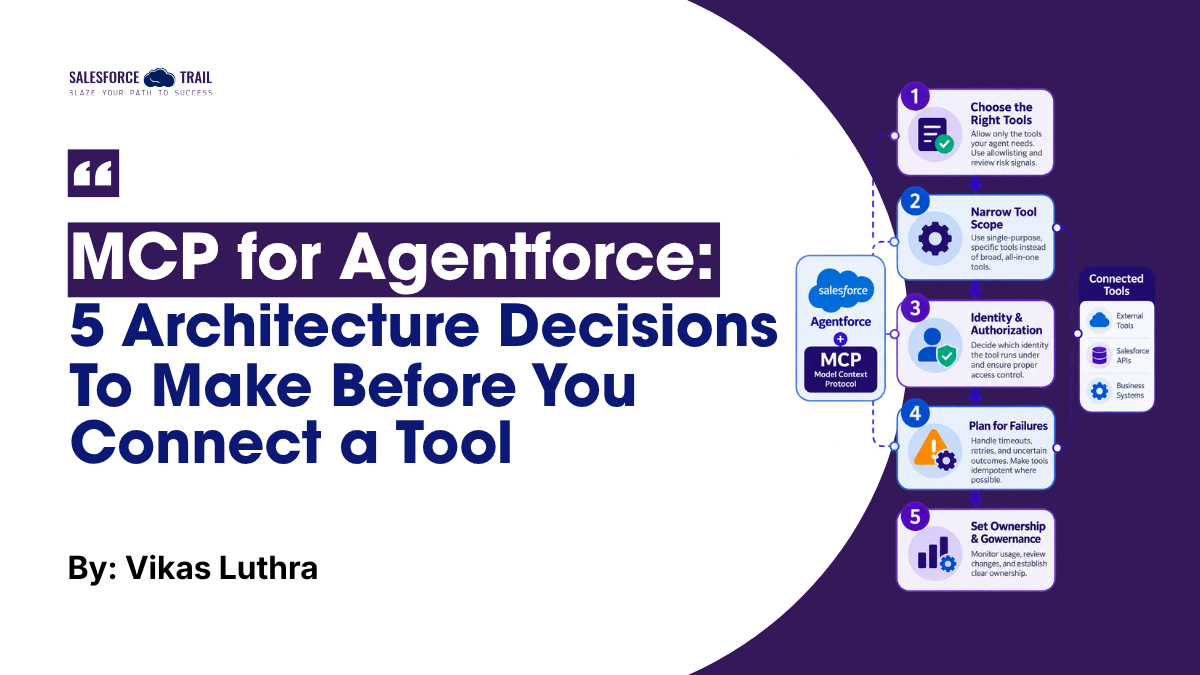
These are architectural decisions, and they don’t change simply because the plumbing has become easier. Here is how I evaluate each decision before approving an MCP-enabled tool.
Key takeaways
- MCP removes connection friction. It doesn’t remove architecture decisions.
- Allowlisting is a boundary, not a formality. Start with the smallest useful tool set.
- Narrow, task-specific tools are easier to reason about, govern, and select correctly.
- Name the execution identity for every tool. Outbound has no user-level auth; inbound runs in the user’s context.
- A timeout is not an outcome. Design tool contracts around business state.
- Every production tool needs a named owner, and metadata changes deserve code-level review.
Table of Contents
What MCP for Agentforce actually gives you
A quick grounding so the rest of this makes sense. In MCP terms, a server publishes tools (executable functions an LLM can call), a client connects to those servers, and a host coordinates the whole thing. Agentforce acts as both host and client, which is why registration and trust controls live inside Salesforce.
A few current boundaries are worth knowing up front, because they shape good design. The considerations for MCP for Agentforce highlight the aspects that matter most:
- MCP for Agentforce supports the Streamable HTTP transport only, and it works with server tools – not MCP prompts or resources.
- Agentforce Builder handles simple, shallow JSON responses best. Deeply nested payloads and arrays of objects aren’t fully supported end to end yet.
The feature is available in Enterprise, Performance, Unlimited, and Developer editions, with add-on licenses that vary by agent type. Keep that in mind if you’re scoping a project across sandboxes and production.
Which tools should the agent actually be allowed to use?
The first trap is quiet: treating tool discovery as tool approval. A server can expose a dozen tools. Discovering them doesn’t mean every one belongs in your agent.
Salesforce draws this line on purpose. When you register a server in Agentforce Registry, its tools can be discovered, but an administrator must add each one to an ‘allowlist’ before it can be used as an ‘agent action.’ This allowlist is an architectural constraint, not merely a formality.
Picture a customer-service agent pointed at an order-management server that exposes tools to check order status, modify an order, issue a refund, cancel fulfillment, and update customer records. If the agent’s job is answering “Where’s my order?”, it needs exactly one of those. The other four are blast radius you’ve invited in for no reason.
So the question isn’t what can this server do? It’s what should this agent be allowed to do? Start with the smallest set that delivers the outcome, and add from there with intent. Salesforce also surfaces an MCP Risk Score and scans tool names and descriptions for hidden or invisible characters at registration, so review those signals before you allowlist anything.
How narrowly should each tool be scoped?
Even an appropriate tool can be too broad. Compare two designs: manageOrder and getOrderStatus. The first sounds convenient. In an agentic system, that’s a liability because “manage” hides several distinct business operations behind one call, making the agent’s permitted behavior much harder to reason about.
Narrow tools communicate intent. Instead of one catch-all, expose capabilities the agent can actually explain to itself:
getOrderStatusgetShipmentTrackingcheckRefundEligibilityrequestOrderCancellation
There’s a selection reason too, not just a governance one. When Agentforce agents are exposed as MCP tools, external AI clients choose which tool to call based entirely on the tool’s name and description, which is why Salesforce recommends creating separate, task-specific tools rather than one generic one. The same principle holds when you’re evaluating tools coming into Agentforce. A clear, specific tool gets picked at the right moment. A vague one gets picked at the wrong time.
Narrow tools also help you govern. A read-only lookup and a tool that moves money shouldn’t share an approval path or a monitoring expectation, and you can only treat them differently if they’re separate tools to begin with. There’s a practical bonus: simple, single-purpose responses map far more cleanly onto Agentforce Builder’s preference for shallow JSON.
What identity and authorization context does the tool run under?
This is the one I push hardest on, because it’s where enterprise implementations quietly go wrong.
The direction matters, and the two directions behave very differently.
When Agentforce connects to an external MCP server, only ‘No Authentication’ or ‘OAuth 2.0 Client Credentials’ authentication methods are supported. User-level authentication is not supported; therefore, you cannot execute use cases that rely on a specific user’s identity or require responses tailored to individual users. If an agent assists ten different employees using a single machine identity, downstream systems will perceive ten calls originating from the same principal. While this is acceptable for public shipping lookups, it can become problematic for operations involving dynamic pricing, the retrieval of sensitive records, or fund transfers.
The inbound path flips the model. When an Agentforce agent or a Prompt Builder template is exposed through a Salesforce-hosted MCP server, execution runs in the authenticated user’s context, with sharing rules, field-level security, and Einstein Trust Layer policies applied.
Here’s the contrast in one place:
| Agentforce as MCP client (calling out) | Agentforce exposed via hosted MCP server (inbound) | |
|---|---|---|
| Authentication supported | No auth, or OAuth 2.0 client credentials | Standard authenticated Salesforce session |
| End-user identity | Not passed; no user-level auth | Runs as the authenticated user |
| What the far side sees | A shared integration/machine identity | The individual user |
| Controls that apply | Whatever the external system enforces | Sharing rules, field-level security, Einstein Trust Layer |
Neither model is “better” in the abstract. The point is to name the execution identity for every tool, on purpose. Before anything reaches production, I want answers to:
- Which identity does the downstream system actually see?
- Is authorization based on the agent, the user, or a shared integration account?
- Does this tool genuinely need to know the end user, or not?
- Does Salesforce’s authorization context survive the hop?
- What does the downstream system enforce on its own?
A reasonable default: give each tool the narrowest execution identity so it can do its job. Reserve a shared integration identity for tools that truly don’t care who the user is, and make anything that changes business state or touches sensitive data earn its way through explicit review first. Authentication tells you who connected. Authorization still has to decide what that connection may do.
What happens when the tool fails?
Standardizing the interface doesn’t standardize distributed-systems reality. An agent can call a tool and hit a timeout, an auth failure, an unavailable downstream service, a half-finished operation, or a response whose meaning is simply unclear.
Salesforce sets a 60-second timeout on the MCP client and a 120-second timeout on the Atlas reasoning engine. A timeout tells you the response didn’t arrive in time. It tells you nothing about what happened on the other end.
Let’s say an agent submits a return request through an MCP tool and the call times out. Should it retry? That depends entirely on the downstream outcome. If the request never landed, retrying is correct. If the return was already created and only the response got lost, retrying creates a duplicate and an annoyed customer. That’s not an MCP quirk. It’s an old distributed-systems problem wearing a new interface.
Design the tool contract around business outcomes, not just transport results. Depending on what the tool does, that can mean idempotency keys, correlation identifiers, an explicit “pending” or “unknown” state, a companion status-check tool, controlled retries, or a reconciliation path. The question to answer before you deploy is simple to state and easy to skip: if the agent can’t tell whether the operation succeeded, what is it allowed to do next?
Who owns the tool after it reaches production?
A classic Salesforce integration usually has an obvious owner. MCP blurs that, because one server can feed many agents and potentially many AI clients at once.
Salesforce gives you real controls for this. You connect third-party servers through Agentforce Registry and MuleSoft or Salesforce-hosted servers through API Catalog, allowlist individual tools, and apply Agentforce Gateway policies to govern usage. There’s also a tamper safeguard: Salesforce captures server and tool definitions at registration and allowlisting, then scans for changes and automatically blocks an out-of-sync server or tool at runtime by removing the affected action from the agent’s logic and reasoning, without disturbing the rest of the agent.
Tooling covers the platform side. It doesn’t assign accountability. For every production tool, somebody needs to own the answers to: Who approves changes? Who reviews the description and input schema? Who decides which agents get it? Who handles downstream failures? Who deprecates it? Who confirms a change didn’t quietly widen its authority?
My rule here is short. Assign one named owner to every production tool before it goes near an agent, and treat any edit to a tool’s name, description, or input contract as a change that gets the same review as code. For an agent, it is code, because the description is part of how the model decides when to call it. Reusable capabilities make lifecycle governance more important, not less.
Your Pre-Deployment Checklist
Run this before any MCP tool goes in front of a live agent:
- This agent needs this specific capability (not just that the server offers it)
- The tool is scoped to one clear business operation, with a precise name and description
- The MCP Risk Score and the tool’s name/description have been reviewed before allowlisting
- The execution identity is named: agent, user, or shared integration account
- For write operations, authorization is confirmed on the downstream side, not assumed
- Failure behavior is defined: idempotency, correlation IDs, and a pending/unknown path where needed
- Retry rules are explicit, and non-idempotent writes don’t retry blindly
- A single named owner is assigned
- Changes to the tool’s name, description, or schema trigger a review
Final Thoughts
If you’re standing up MCP for Agentforce, don’t start with the most useful-looking tool. Start with a read-only one, run it through the checklist above, give it an owner, and watch how it behaves in a sandbox before you add anything that writes. The connection is the easy part now. The work that keeps your agents trustworthy starts the moment it succeeds, and teams that treat each tool as a governed, owned capability will add risky, high-value tools later without flinching.
Frequently Asked Questions
No. The current considerations confirm it supports no authentication or OAuth 2.0 client credentials only, and use cases needing individual user IDs or personalized responses aren’t currently supported.
Salesforce documents a 60-second MCP client timeout and a 120-second Atlas reasoning engine timeout.
Yes. You can expose Agentforce agents and Prompt Builder templates as tools through Salesforce-hosted MCP servers. Execution runs in the authenticated user’s context, with sharing rules, field-level security, and the Einstein Trust Layer applied.
Salesforce scans definitions for changes and blocks the out-of-sync server or tool at runtime by removing the affected action from the agent’s reasoning, leaving the rest of the agent intact.
Register the server in Agentforce Registry or API Catalog, allowlist only the tools you want, and apply Agentforce Gateway policies to govern usage per agent and per tool.

Vikas Luthra
Vikas Luthra is an Enterprise Solution Architect with 21 years of experience designing enterprise CRM, B2B commerce, CPQ, and integration platforms for large manufacturers. He has led Salesforce implementations across complex multi-tier dealer and distributor ecosystems, with deep focus on platform architecture, distributed systems, identity and authorization, and system integration. His current work centers on AI-agent accountability and governance, including decision provenance and auditable, tamper-evident records for autonomous agents, through architecture research, open-source implementation, and public speaking.
- This author does not have any more posts.