

1. Notebook AI: Personal and Organizational Research and Analytics
Notebook AI is the analytical engine of the platform. It acts like an always-on research assistant, processing large amounts of information, connecting insights, and structuring knowledge in ways that typically take humans hours (or days).
Think of it as your organization’s collective memory and thinking space where ideas, data, and content come together. You can summarize large reports, ask multi-source questions, and explore trends and patterns in your data and learning material to reinforce internal understanding.
For companies using Data Cloud, Notebook AI becomes especially powerful as a workspace to explore customer data and insights, test hypotheses conceptually, and design AI-driven experiences that can later be operationalized using other Salesforce tools such as Data Cloud, Model Builder, and Agentforce.
Core Focus:
Personal and organizational research, analysis, and rapid synthesis of information.
Key Knowledge Features:
- Summarization & note-taking
- Multi-source Q&A
- Lightweight analysis and insights
- Adaptive quizzes/learning reinforcement
- Contextual reasoning over structured + unstructured data
Strengths:
- Fast, accurate synthesis
- User-centric organization of insights
- Great for internal research, data exploration, and designing “what should we do next?” initiatives
Best at: Synthesis, deep analysis, research workflows, and strategic exploration when you have a limited number of static PDF documents to analyze.
Where it fits in Salesforce ecosystem:
Notebook AI complements Data Cloud by giving admins, analysts, and consultants a personal workspace to explore CRM and customer data, derive insights, and shape strategies before they are turned into operational journeys, models, or automations elsewhere in the platform.
Here are some illustrations showing Notebook AI setup and usage:
- Enabling Notebook AI: This involves simple steps, including adding this feature to the current data space (Data Cloud Setup → Notebook AI → Select the data space (‘default’ in our case)

- Permission Set: Create a new permission set, providing all the necessary permissions, and assign this to the desired user and the Agentforce agent.

- Notebooks with Resources: It is possible to create multiple personalized Notebook AI projects and upload the relevant resources needed for the analysis. Once the upload completes, the documents are indexed and become available for asking questions.

In this way, Notebook AI functions as a personal AI-powered workspace, enabling you to find answers quickly and efficiently by processing unstructured data (PDF files).
2. Document AI: Document Digitization, Extraction, Automation
If Notebook AI is the brain, Document AI is the hands. It focuses on the heavy lifting of digitizing and extracting usable data from PDFs, forms, IDs, invoices, contracts, work orders, and scanned documents.
Most businesses still rely on documents to run core processes. Document AI allows Salesforce to ingest them intelligently by identifying key fields, parsing layout, extracting entities, and converting unstructured content into structured, usable data.
It handles everything from automated case creation and invoice processing to identity verification and regulatory documentation. Paired with Agentforce, Document AI enables AI agents to read documents, answer questions about them, generate summaries, and take action based on the extracted data.
For example, if your business receives a large number of PDFs for new work order requests, Document AI can help standardize the extraction of useful data (like job address, job type, and predicted job value) from those PDFs, without manually processing those files. Then the Agentforce agent can be used to ask questions about Work Orders related to any specific product or service, or Work Orders that match characteristics of high-priority work orders.
Key Features:
- OCR + high-quality text extraction
- Entity and key-value pair extraction
- Layout, table, and content parsing
- Understanding of forms, invoices, KYC, and work orders
Strengths:
- Scalable automation
- High-quality structured data
- Supports digital transformation for paper-heavy industries
- Insight analytics where documents feed real-time dashboards
Best at: Automation, data integrity, and taking paper-based processes digital.
Where it fits in the Salesforce ecosystem:
In Salesforce, Document Intelligence powers:
- Automated case ingestion
- Work order extraction (e.g., in Field Service)
- Loan/claim processing
- ID verification flows
- Feeding structured content into Agentforce so agents can read documents and answer questions
At a high level, Document AI setup and usage involves the following steps:
- Initiating a new Document AI model in Data Cloud (in the Unstructured Data or the Process Content tab).

- Creating a Document Schema Configuration (which could be done either from any existing Unstructured Data Model (UDMO) or by manually defining the entire schema programmatically.

- Providing necessary information in Document Schema Builder, including the UDMO (that contains documents for processing), file types (PDFs or Images), LLM Configurations (options include Gemini 2.0/2.5 Flash, and OpenAI GPT-4, OpenAI GPT -5, OpenAI GPT -5 mini, and OpenAI GPT -5 nano).
- The auto-extraction method can be used to extract the useful information automatically. For instance, when we upload a sample Work Order PDF, representing an ideal Work Order PDF received by the business, the auto-extraction method could read and extract all the key fields shown in the images:
Input PDF file:

Extracted Output:
- Once the schema configuration is set, it can be accessed programmatically via REST APIs, Apex Classes, and flows. For example, you can create a flow or Apex class that accepts a customer’s name or ID as input, scans the corresponding PDF file attached to its record, and transforms the extracted details into well-structured data objects.
Thus, Document AI configuration helps extract structured data from unstructured input files. This data can be leveraged further by joining with other harmonized data or creating calculated insights. Instead of navigating through the PDF files manually, you can directly view the relevant information, query it or use it to power downstream workflows, etc.
3. Intelligent Context: Workplace Knowledge
AI is only as good as the context it knows. Intelligent Context is what gives Salesforce’s AI agents and Copilot the awareness they need to understand situations, retrieve the right information, and respond meaningfully.
This layer continuously pulls signals from across the ecosystem: CRM activity history, customer profiles, Data Cloud insights, knowledge bases, and recent user actions. The result is an AI that feels far more helpful and accurate because it knows not just what you said, but why you said it and what you were doing before.
It’s the difference between a generic chatbot and a system that can say:
“Here’s the last opportunity you worked on. Should I update the close date to next Monday and notify the team?”
Core Focus:
Making AI “aware” of who the user is, what they are trying to do, and what has happened recently across CRM.
Key Knowledge Features:
- Context-aware access across CRM objects
- Smart search & semantic retrieval
- Understanding user workflows and next steps
- Identifying knowledge gaps or inconsistencies
- Pulling details from CRM, Data Cloud, Knowledge, activity history, and recent interactions
Strengths:
- Tailored, domain-specific intelligence
- Integrates with CRM/ERP/LMS systems
- Scales across departments and personas
- Makes AI feel “aware,” not generic
Best at: Personalization, context-aware recommendations, and grounding AI responses in real business data.
Where it fits in the Salesforce ecosystem:
This is the “memory layer” for Copilot and Agentforce, enabling:
- Hyper-personalized responses
- Accurate actions (e.g., “Update the last opportunity I worked on”)
- Case-aware service assistance
- Task-aware sales execution
Here are the key steps involved in setup and usage of Intelligent Context:
- Define the data sources: All the source files that need to be processed can be uploaded in Data Cloud (Unstructured Data or the Process Content tab → Intelligent Context).
- Setup and Configurations: There is a wide range of parameters and options available for setting up indexing configurations and retrieval strategy:
- Search Index Type: You can choose between Vector search (index based on only semantic meaning) vs Hybrid search (semantic meaning + keywords)
- Parsing Options: Text and visual data could be parsed in any of these three ways: Default Parser (built-in settings for text parsing), LLM-based Parser (use an LLM to parse text, images, and other visual elements), Docling Parser (Use Docling Parser to parse images, tables, and document layouts)
- Preprocessing Options: By default, there is no preprocessing done before chunking; however, you can opt to have LLM-based preprocessing to define the extraction.
- Embedding Model: You can select which embedding model to use for processing your documents into vector embeddings. Options include E5 Large V2 Embedding Model, Multilingual E5 Large Embedding Model, and Salesforce Embedding V2 Small.
- Data Chunking Rules: You can define how to split the data into chunks, based on size and logical boundaries. Options include Passage extraction (semantics from HTML tags used to chunk data) vs. Section-aware chunking (title and heading elements used in content). You can also define the Max Tokens and the Overlap Tokens for any value between 0 and 512.
- To test the configuration and the performance, you can ask questions to the model and validate the responses against the source PDF, tally them with the values stored in the respective chunks – all in a single frame.
- The image shows the PDF file SampleWOPDF uploaded for Intelligent Context extraction, with its chunked values visible in the middle section, and queries (the estimated value of the work order) and corresponding responses (the correct value extracted from the PDF) visible on the right-side page.

- Once you are satisfied with the performance, the new configuration can be published, creating a new search index. It can be deployed and continually improved based on usage and feedback.
Intelligent Context thus provides a way to build search configurations specific to your business needs.
4. Agentforce: Enterprise Knowledge and AI Agents
Agentforce is where everything comes together. It’s Salesforce’s full AI agent platform that supports real workflows, not just conversations.
These agents can retrieve knowledge, interpret documents, take multi-step actions, automate processes, and collaborate with humans when needed. Whether it’s rescheduling appointments, qualifying leads, updating CRM data, assisting support teams, or answering policy questions, Agentforce acts like a dependable digital coworker.
Because it learns from Document AI, understands context via Intelligent Context, and is powered by the intelligence in Data Cloud + Notebook AI, Agentforce becomes more capable over time and more aligned with how your business actually operates.
Core Focus:
AI agents that can reason, take actions, retrieve knowledge, and support employees or customers.
Key Knowledge Features:
- Real-time learning
- Q&A with retrieval over Knowledge, documents, and Data Cloud
- Workflow execution
- Auto-FAQ
- Process guidance
- Multi-step reasoning
- Human-in-the-loop review workflows
Strengths:
- Curated responses with high accuracy
- Feedback loops that continuously improve the agent
- Ability to identify missing knowledge
- Executes tasks, not just answers questions
Best at: Workflow execution, reasoning, assisted operations, and closing knowledge gaps.
Where it fits in the Salesforce ecosystem:
Agentforce is Salesforce’s end-to-end AI agent platform, powering:
- Knowledge agents (service bots powered by KCS content)
- Scheduling agents (e.g., rescheduling, appointment flows)
- Case automation agents
- Sales execution agents
- Domain-specific custom agents using Copilot Studio skills
Here are the key steps involved in setting up and using the Agentforce agent (for this use case, we will be building the Agentforce Service Agent, capable of basic tasks available OOTB):
- Grant permissions: The user shall be assigned the required permissions (the permission set ‘Agentforce Service Agent Configuration’).
- Agent Selection: Instead of creating a new agent from scratch, you can pick from any of the existing pre-configured agents to accelerate the agent creation process. For instance, to build an agent meant for customer service, you can pick the ‘Agentforce Service Agent’, which automatically triages cases, retrieves customer context, and triggers resolution workflows.

- Configure Topics and Actions: From the list of topics (which means the activity areas supported by the Agent), you can select the topics (like Case Management, Account Management, Order Enquiries, and General FAQ). This selects the corresponding Actions (actual activities like retrieving the record’s details using flows or sending emails via Apex code) automatically.

- Provide a brief description of the agent’s role (key tasks and daily responsibilities), details about the company that this AI agent serves, and the agent user, which drives all the access permissions and capabilities of this AI agent (you could select an existing user or create a new one).

- The last step involves providing the data sources (data libraries), which would be leveraged by the agent when responding to its user’s general queries. Without a data library, Agentforce can perform all other tasks except answering general questions. Agentforce library can be set up later using a separate set of steps.
- Once ready, the agent becomes available to interact with users directly from within the ‘Agent Builder’. For validation purposes, you can ask the agent to make a reservation; it will guide you through the process of completing a (dummy) booking. Real-world user interactions will take place once the agent is hosted on a customer-facing website and its backend workflows are integrated with CRM data, ensuring that all actions and responses are based on actual customer data.

How the four fit together
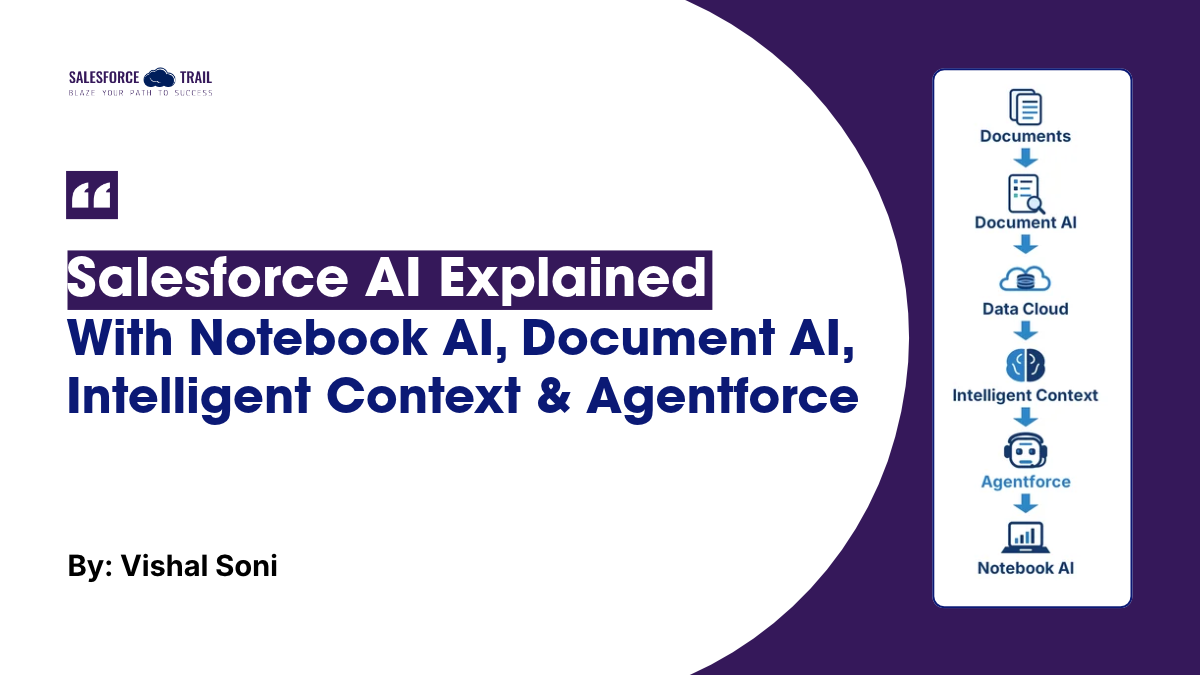
The individual pieces are fine on their own. They’re better in a line. Picture a single request moving through the stack:
- A customer sends in a PDF.
- Document AI extracts the fields from it.
- Data 360 unifies that data with everything else you know about the customer.
- Intelligent Context makes sure the right passages come back when they’re needed.
- Agentforce acts on it, opening a case or kicking off a workflow.
- Notebook AI looks across the results later to find patterns and spot what to improve.
That loop is the whole idea: data comes in messy, gets structured, gets grounded, gets acted on, and feeds back into your next decision.

This is how the entire lifecycle of AI-based analysis flows through all the pieces described above. This forms the foundation of Salesforce’s AI vision: a system where data flows freely, documents become structured, context guides decisions, and AI agents collaborate seamlessly with humans.
What to watch before you roll this out
A few things worth planning for, based on where real projects get stuck:
- Your output is only as good as your data. Messy or inconsistent source data produces messy extractions and shaky answers. Fix the inputs first.
- Extraction accuracy varies by document. A clean, consistent form extracts well. A smudged scan with an odd layout won’t. Build review steps for anything high-stakes.
- Cost is real. Data 360 processing and LLM calls add up. Scope a pilot, measure consumption, then expand.
- Governance can’t be an afterthought. Set access controls and data policies early, and remember the PII-masking gap on the multimodal document path.
- Grounding is the whole game. An agent grounded in trusted sources is an asset. One that isn’t becomes a liability the first time it invents an answer.
Final Thoughts
Salesforce’s AI ecosystem is no longer just a collection of disparate features; it is an integrated engine that understands, reasons, and takes action. ‘Notebook AI’ enables deep thinking and analysis, ‘Document AI’ extracts data hidden within files, ‘Intelligent Context’ ensures that every response is personalized and accurate, and ‘AgentForce’ executes these capabilities through intelligent action. Together, these components form a unified, AI-powered CRM. As organizations embrace this shift, the winners will be the teams that learn to combine these capabilities, turning everyday processes into intelligent workflows and everyday decisions into data-driven advantages.
Resources
- Notebook AI: https://help.salesforce.com/s/articleView?id=data.c360_a_notebook_ai_research_analyze.htm&type=5
- Document AI: https://help.salesforce.com/s/articleView?id=data.c360_a_document_ai.htm&type=5
- Intelligent Context: https://www.salesforce.com/in/news/press-releases/2025/10/13/agentic-enterprise-announcement/ )
- Agentforce 360: https://www.salesforce.com/in/platform/

Vishal Soni
I have been actively writing and sharing knowledge on topics related to data, analytics, AI, and technology through blogs, articles, and tutorials. With over 17 years of experience in the tech industry, I focus on translating complex technical concepts into simple, practical insights that professionals and learners can apply. My work includes writing about Salesforce solutions like Einstein GPT, Data Cloud, and CRM Analytics, as well as broader themes in data visualization using tools like Power BI and Tableau. I have contributed to knowledge-sharing platforms, delivered webinars, and created content aimed at helping individuals and organizations leverage technology effectively. Writing is not just a task for me—it’s a way to engage with the community, build understanding, and foster curiosity. I am excited to contribute as an author and bring clarity, relevance, and actionable guidance to your readership.
- Vishal Soni