


External integrations show up in almost every Salesforce project. Prompt Builder is no different: the UI is great for Lead context, but the moment you need live data from outside the org (search hits, match scores, URLs you did not store on the record), you need Apex in the middle.
In this guide, we connect a Lead prompt template to a real invocable Apex class, LinkedInProfileGoogleSearchAction. The class calls SerpAPI for web search, scores LinkedIn matches, returns a JSON text block on the invocable Prompt output, and the model summarizes that evidence instead of inventing links. The source below is the full implementation you can deploy; only the API key is left blank for you to set in your org.
Quick note: We used SerpAPI because it exposes Google-style organic results over a simple HTTPS JSON endpoint that Apex can call with HttpRequest. That keeps the Salesforce side focused on Prompt Builder wiring and match logic, not on scraping HTML. SerpAPI also offers a free API key tier that is enough to prove the pattern in a sandbox.
Solution Overview
A rep opens a Lead, runs Recommend LinkedIn Profiles, and gets profile suggestions backed by a real web search, not a best guess from the model.
The flow:
- User runs Recommend LinkedIn Profiles on a Lead
- Prompt Builder passes Lead fields into the template
- searchLinkedInProfiles calls SerpAPI, scores matches, returns JSON on Prompt
- The LLM formats markdown recommendations using only that evidence
| Piece | Technology | Role |
|---|---|---|
| UI / entry point | Prompt Builder on Lead (Recommend_LinkedIn_Profiles) | User-facing prompt |
| Integration logic | LinkedInProfileGoogleSearchAction | SerpAPI callout, match rules, JSON for the prompt |
| Query helper | LinkedInSearchQueryAction | Company token extraction used by the search action |
| Config | LinkedIn_Search_Settings__mdt (Default) | SerpAPI key and optional engine id (set per org) |
| Network | Remote Site SerpAPI → https://serpapi.com | Allow outbound callouts |
| Prompt body | GenAiPromptTemplate | Instructions + {!$Apex:LinkedInProfileGoogleSearchAction.Prompt} |
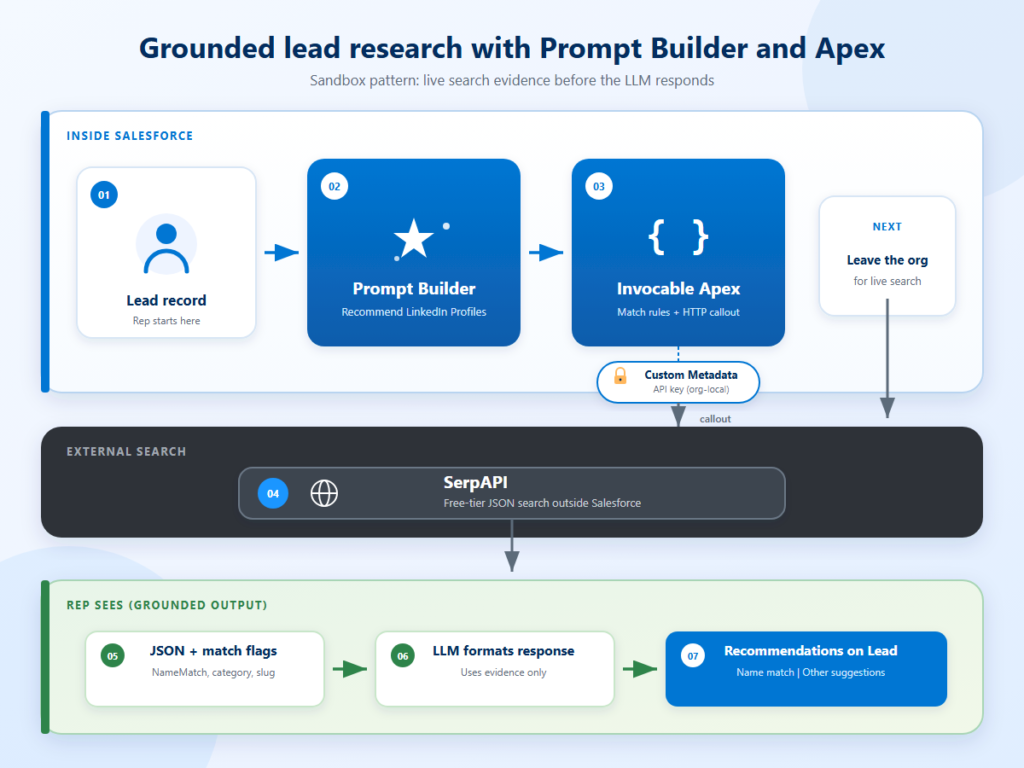
Keep secrets in the org, not in Git. Keep match logic in Apex, not in the prompt. The model is better at explaining results than deciding if a URL belongs to the right person.
Quick note: Match flags stay in Apex on purpose. Prompt Builder may redact person names in titles, so the LLM cannot reliably decide “is this the right Ahmed?” from text alone.
Enable Einstein first
- Setup → Einstein Setup: Turn on Einstein.
Make sure to assign all permission sets related to Agentforce and Prompt Templates to your user.
Config and Remote Site before Apex
SerpAPI key
Quick note: We chose a free SerpAPI key for this solution, so anyone can reproduce the Prompt Builder + Apex loop in a sandbox without first buying a search contract. Free-tier monthly search limits are enough for demos and smoke tests.
Custom Metadata Type: LinkedIn Search Settings
Create Custom Metadata Type LinkedIn_Search_Settings__mdt with two text fields:
- API_Key__c (label: API Key)
- Search_Engine_Id__c (label: Search Engine Id; optional; code defaults to google_light when blank)
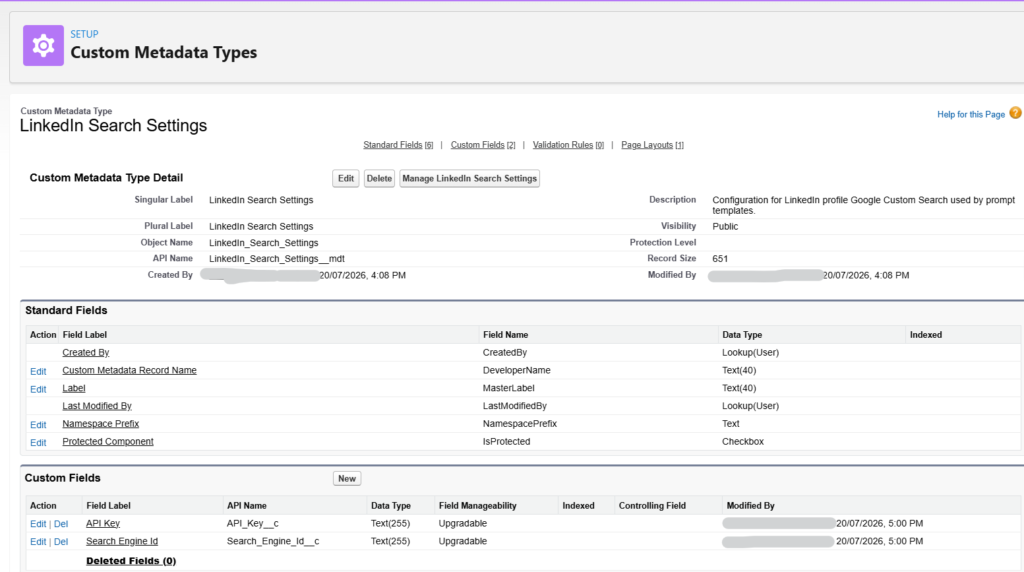
Create a record with Developer Name Default. Leave the API key empty in source control. In each sandbox, open that record in Setup and paste your own SerpAPI key. Never commit a real key.
Quick note: Custom Metadata (not hardcoded Apex) lets every sandbox use a different key, and keeps secrets out of the repo when you retrieve or deploy metadata.
Remote Site Setting
Allow callouts to the search host:
https://serpapi.com
Full Apex: helper and Invocable action
Deploy these two classes in order. The invocable action calls LinkedInSearchQueryAction.extractCompanyTokenPublic for company tokens, then calls SerpAPI and builds match flags the prompt can trust. Cover the action with Apex tests in your own org when you harden the feature; test classes are intentionally omitted here to keep the article focused on the Prompt Builder path.
LinkedInSearchQueryAction.cls
					public with sharing class LinkedInSearchQueryAction {
    public class Request {
        @InvocableVariable(required=true label='Lead Record')
        public Lead leadRecord;
    }

    public class Response {
        @InvocableVariable(label='Name Company Search Text')
        public String nameCompanySearchText;

        @InvocableVariable(label='Name Title Search Text')
        public String nameTitleSearchText;

        @InvocableVariable(label='Company Search Token')
        public String companySearchToken;
    }

    @InvocableMethod(
        label='Build LinkedIn Web Search Queries'
        description='Builds web search query strings from Lead name, company token, and title.'
        category='Salesforce'
    )
    public static List<Response> buildSearchQueries(List<Request> requests) {
        List<Response> results = new List<Response>();
        for (Request request : requests) {
            Lead leadRecord = request.leadRecord;
            Response response = new Response();
            String companyToken = extractCompanyToken(leadRecord.Company, leadRecord.Email);
            response.companySearchToken = companyToken;
            response.nameCompanySearchText = joinTokens(
                new List<String>{ leadRecord.FirstName, leadRecord.LastName, companyToken }
            );
            response.nameTitleSearchText = joinTokens(
                new List<String>{ leadRecord.FirstName, leadRecord.LastName, leadRecord.Title }
            );
            results.add(response);
        }
        return results;
    }

    private static String joinTokens(List<String> tokens) {
        List<String> cleanedTokens = new List<String>();
        for (String token : tokens) {
            if (String.isNotBlank(token)) {
                cleanedTokens.add(token.trim());
            }
        }
        return String.join(cleanedTokens, ' ');
    }

    private static String extractCompanyToken(String company, String email) {
        if (String.isNotBlank(company) && company.contains('(') && company.contains(')')) {
            Integer openParen = company.indexOf('(');
            Integer closeParen = company.indexOf(')', openParen);
            if (closeParen > openParen) {
                return company.substring(openParen + 1, closeParen).trim();
            }
        }

        if (String.isNotBlank(email) && email.contains('@')) {
            String domain = email.substringAfter('@');
            if (domain.contains('.')) {
                return domain.substringBefore('.').trim();
            }
        }

        if (String.isBlank(company)) {
            return '';
        }
        return company.length() > 30 ? company.substring(0, 30).trim() : company.trim();
    }

    @TestVisible
    public static String extractCompanyTokenPublic(String company, String email) {
        return extractCompanyToken(company, email);
    }
}
LinkedInProfileGoogleSearchAction.cls
This is the class Prompt Builder calls. The SerpAPI key is read from Custom Metadata at runtime (LinkedIn_Search_Settings__mdt Default). If the key is blank, the method returns a JSON notice instead of inventing profiles. Set your free (or paid) SerpAPI key in the org before a live Prompt Builder run.
					public without sharing class LinkedInProfileGoogleSearchAction {
    private static final String DEFAULT_ENGINE = 'google_light';

    public class Request {
        @InvocableVariable(required=true label='Lead Record')
        public Lead leadRecord;
    }

    public class Response {
        @InvocableVariable(label='Prompt')
        public String Prompt;
    }

    @InvocableMethod(
        label='SerpAPI LinkedIn Profile Search'
        description='Runs SerpAPI Google search for LinkedIn profiles matching the lead name and company.'
        category='Salesforce'
    )
    public static List<Response> searchLinkedInProfiles(List<Request> requests) {
        List<Response> results = new List<Response>();
        LinkedIn_Search_Settings__mdt settings = LinkedIn_Search_Settings__mdt.getInstance('Default');

        for (Request request : requests) {
            Response response = new Response();
            try {
                response.Prompt = buildPrompt(request == null ? null : request.leadRecord, settings);
            } catch (Exception ex) {
                response.Prompt = '{"searchResults":[],"error":"' +
                    String.escapeSingleQuotes(ex.getMessage()) +
                    '"}';
            }
            results.add(response);
        }
        return results;
    }

    @TestVisible
    private static String buildPrompt(Lead leadRecord, LinkedIn_Search_Settings__mdt settings) {
        if (leadRecord == null) {
            return '{"searchResults":[]}';
        }

        if (settings == null || String.isBlank(settings.API_Key__c)) {
            return '{"searchResults":[],"notice":"SerpAPI is not configured. Set API Key on LinkedIn Search Settings > Default."}';
        }

        String companyToken = LinkedInSearchQueryAction.extractCompanyTokenPublic(
            leadRecord.Company,
            leadRecord.Email
        );
        String nameSlug = buildNameSlug(leadRecord.FirstName, leadRecord.LastName);
        List<String> linkedInQueries = new List<String>{
            joinTokens(
                new List<String>{
                    leadRecord.FirstName,
                    leadRecord.LastName,
                    companyToken,
                    'site:linkedin.com/in'
                }
            ),
            joinTokens(
                new List<String>{
                    'site:sa.linkedin.com/in',
                    nameSlug,
                    companyToken
                }
            ),
            joinTokens(
                new List<String>{
                    'site:linkedin.com/in',
                    '"' + nameSlug + '"',
                    companyToken
                }
            ),
            joinTokens(
                new List<String>{
                    companyToken,
                    'site:linkedin.com/in'
                }
            )
        };
        String directoryQuery = joinTokens(
            new List<String>{
                leadRecord.FirstName,
                leadRecord.LastName,
                companyToken,
                'site:zoominfo.com OR site:contactout.com'
            }
        );

        List<Object> searchResults = new List<Object>();
        Set<String> seenUrls = new Set<String>();

        for (String query : linkedInQueries) {
            for (Map<String, String> item : executeSerpApiSearch(query, settings, true)) {
                String url = item.get('url');
                if (String.isBlank(url) || seenUrls.contains(url)) {
                    continue;
                }
                seenUrls.add(url);
                searchResults.add(
                    buildSearchResultItem(
                        item,
                        categorizeLinkedInResult(item, leadRecord, companyToken, nameSlug),
                        leadRecord,
                        companyToken,
                        nameSlug
                    )
                );
            }
        }

        for (Map<String, String> item : executeSerpApiSearch(directoryQuery, settings, false)) {
            String url = item.get('url');
            if (String.isBlank(url) || seenUrls.contains(url) || !isDirectoryUrl(url)) {
                continue;
            }
            seenUrls.add(url);
            searchResults.add(buildSearchResultItem(item, 'directory', leadRecord, companyToken, nameSlug));
        }

        Map<String, Object> payload = new Map<String, Object>{ 'searchResults' => searchResults };
        return JSON.serializePretty(payload);
    }

    @TestVisible
    private static List<Map<String, String>> executeSerpApiSearch(
        String query,
        LinkedIn_Search_Settings__mdt settings,
        Boolean linkedInOnly
    ) {
        List<Map<String, String>> items = new List<Map<String, String>>();
        HttpRequest request = new HttpRequest();
        request.setEndpoint(buildEndpoint(query, settings));
        request.setMethod('GET');
        request.setTimeout(20000);

        HttpResponse httpResponse = new Http().send(request);
        if (httpResponse.getStatusCode() != 200) {
            return items;
        }

        Map<String, Object> body = (Map<String, Object>) JSON.deserializeUntyped(httpResponse.getBody());
        if (!body.containsKey('organic_results')) {
            return items;
        }

        for (Object rawItem : (List<Object>) body.get('organic_results')) {
            Map<String, Object> item = (Map<String, Object>) rawItem;
            String link = (String) item.get('link');
            if (String.isBlank(link)) {
                continue;
            }
            if (linkedInOnly && !isLinkedInProfileUrl(link)) {
                continue;
            }
            items.add(
                new Map<String, String>{
                    'title' => (String) item.get('title'),
                    'url' => link,
                    'snippet' => (String) item.get('snippet')
                }
            );
        }
        return items;
    }

    @TestVisible
    private static String categorizeLinkedInResult(
        Map<String, String> item,
        Lead leadRecord,
        String companyToken,
        String nameSlug
    ) {
        if (passesNameGate(item.get('url'), nameSlug)) {
            return 'name_match_likely';
        }

        String combinedText = (
            (item.get('title') == null ? '' : item.get('title')) +
            ' ' +
            (item.get('snippet') == null ? '' : item.get('snippet'))
        ).toLowerCase();

        String firstName = leadRecord.FirstName == null ? '' : leadRecord.FirstName.trim().toLowerCase();
        String lastName = leadRecord.LastName == null ? '' : leadRecord.LastName.trim().toLowerCase();
        if (String.isNotBlank(firstName) && String.isNotBlank(lastName) &&
            combinedText.contains(firstName) &&
            combinedText.contains(lastName)) {
            return 'name_match_likely';
        }

        if (String.isNotBlank(companyToken) && combinedText.contains(companyToken.trim().toLowerCase())) {
            return 'company_colleague';
        }

        if (String.isNotBlank(firstName) && combinedText.contains(firstName) &&
            (String.isBlank(lastName) || !combinedText.contains(lastName))) {
            return 'partial_name';
        }

        return 'other';
    }

    private static String buildEndpoint(String query, LinkedIn_Search_Settings__mdt settings) {
        String engine = String.isBlank(settings.Search_Engine_Id__c)
            ? DEFAULT_ENGINE
            : settings.Search_Engine_Id__c.trim();

        // API key comes from Custom Metadata in the org (LinkedIn_Search_Settings__mdt.Default.API_Key__c).
        // Use your own key. Do not hardcode secrets in Apex or Git.
        return 'https://serpapi.com/search.json?engine=' +
            EncodingUtil.urlEncode(engine, 'UTF-8') +
            '&api_key=' +
            EncodingUtil.urlEncode(settings.API_Key__c, 'UTF-8') +
            '&num=10&q=' +
            EncodingUtil.urlEncode(query, 'UTF-8');
    }

    private static Map<String, Object> buildSearchResultItem(
        Map<String, String> item,
        String suggestionCategory,
        Lead leadRecord,
        String companyToken,
        String nameSlug
    ) {
        String url = item.get('url');
        String profileSlug = extractProfileSlug(url);
        Boolean nameMatchPassed = passesNameGate(url, nameSlug);
        Boolean companyMatchPassed = passesCompanyGate(item, companyToken);

        List<Object> fields = new List<Object>{
            fieldEntry('Title', item.get('title')),
            fieldEntry('Description', item.get('snippet')),
            fieldEntry('Chunk', item.get('snippet')),
            fieldEntry('SourceRecordId__c', url),
            fieldEntry('ProfileSlug__c', profileSlug),
            fieldEntry('NameMatchPassed__c', nameMatchPassed ? 'true' : 'false'),
            fieldEntry('CompanyMatchPassed__c', companyMatchPassed ? 'true' : 'false'),
            fieldEntry('SuggestionCategory__c', suggestionCategory)
        };
        return new Map<String, Object>{ 'result' => fields, 'citations' => new List<Object>() };
    }

    @TestVisible
    private static Boolean passesNameGate(String url, String nameSlug) {
        if (String.isBlank(url) || String.isBlank(nameSlug)) {
            return false;
        }

        String lowerUrl = url.toLowerCase();
        if (lowerUrl.contains('/in/' + nameSlug) || lowerUrl.contains('/in/' + nameSlug + '-')) {
            return true;
        }

        String profileSlug = extractProfileSlug(url);
        return String.isNotBlank(profileSlug) &&
            (profileSlug == nameSlug || profileSlug.startsWith(nameSlug + '-'));
    }

    @TestVisible
    private static Boolean passesCompanyGate(Map<String, String> item, String companyToken) {
        if (String.isBlank(companyToken)) {
            return false;
        }

        String combinedText = (
            (item.get('title') == null ? '' : item.get('title')) +
            ' ' +
            (item.get('snippet') == null ? '' : item.get('snippet'))
        ).toLowerCase();

        return combinedText.contains(companyToken.trim().toLowerCase());
    }

    @TestVisible
    private static String extractProfileSlug(String url) {
        if (String.isBlank(url)) {
            return '';
        }

        String lowerUrl = url.toLowerCase();
        Integer slugStart = lowerUrl.indexOf('/in/');
        if (slugStart < 0) {
            return '';
        }

        String slug = url.substring(slugStart + 4);
        Integer queryStart = slug.indexOf('?');
        if (queryStart >= 0) {
            slug = slug.substring(0, queryStart);
        }

        Integer slashEnd = slug.indexOf('/');
        if (slashEnd >= 0) {
            slug = slug.substring(0, slashEnd);
        }

        return slug.toLowerCase().trim();
    }

    private static Map<String, String> fieldEntry(String fieldName, String value) {
        return new Map<String, String>{
            'fieldName' => fieldName,
            'fieldApiKey' => fieldName,
            'resultFieldApiKey' => fieldName,
            'value' => value == null ? '' : value
        };
    }

    private static Boolean isLinkedInProfileUrl(String url) {
        String lowerUrl = url.toLowerCase();
        return lowerUrl.contains('linkedin.com/in/') || lowerUrl.contains('linkedin.com/in?');
    }

    private static Boolean isDirectoryUrl(String url) {
        String lowerUrl = url.toLowerCase();
        return lowerUrl.contains('zoominfo.com') || lowerUrl.contains('contactout.com');
    }

    private static String buildNameSlug(String firstName, String lastName) {
        if (String.isBlank(firstName) || String.isBlank(lastName)) {
            return '';
        }
        return firstName.trim().toLowerCase() + '-' + lastName.trim().toLowerCase();
    }

    private static String joinTokens(List<String> tokens) {
        List<String> cleanedTokens = new List<String>();
        for (String token : tokens) {
            if (String.isNotBlank(token)) {
                cleanedTokens.add(token.trim());
            }
        }
        return String.join(cleanedTokens, ' ');
    }
}
For a live Prompt Builder run, set your SerpAPI key on Custom Metadata Type → LinkedIn Search Settings → Default, then open a Lead and execute the prompt.
Connect Apex in Prompt Builder
Deploy the Apex classes, then create or edit the prompt template Recommend_LinkedIn_Profiles on Lead (type Flex / Einstein GPT, related entity Lead).
Quick note: The Apex resource is what makes the prompt grounded. Without {!$Apex:LinkedInProfileGoogleSearchAction.Prompt}, the model only sees Lead fields and will invent profile URLs when asked for research.
- Related object: Lead
- Inputs: Lead record (maps to {!$Input:Lead})
- Insert Resource → Apex → SerpAPI LinkedIn Profile Search (maps to Lead; reference name Apex:LinkedInProfileGoogleSearchAction
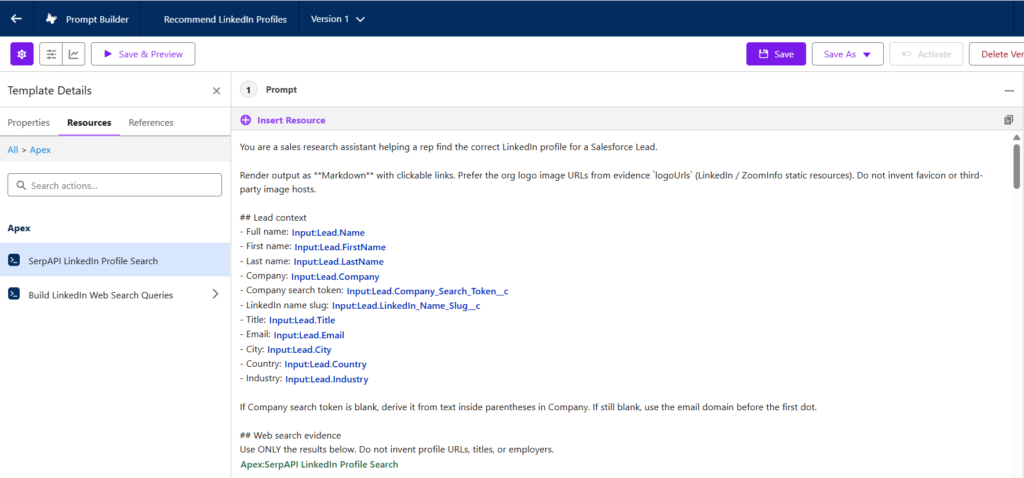
4. Paste the prompt body below into the template
Quick note: This template references optional Lead custom fields Company_Search_Token__c and LinkedIn_Name_Slug__c. If you do not have those fields yet, create them (Text) or remove those two merge lines and rely on the fallback rules already written in the prompt (parentheses in Company, email domain, Apex slug logic).
Prompt template body(`Recommend_LinkedIn_Profiles`)
This is the prompt text we run in Prompt Builder. It encodes the PII-redaction and markdown lessons: trust Apex match flags, never invent URLs, no external favicon images, and always fill Other suggestions even when Name match succeeds.
					You are a sales research assistant helping a rep find the correct LinkedIn profile for a Salesforce Lead.

Render output as **Markdown** with emoji icon prefixes and clickable links. Do NOT use external image URLs or favicon Markdown. Prompt Builder blocks them.

## Lead context
- Full name: {!$Input:Lead.Name}
- First name: {!$Input:Lead.FirstName}
- Last name: {!$Input:Lead.LastName}
- Company: {!$Input:Lead.Company}
- Company search token: {!$Input:Lead.Company_Search_Token__c}
- LinkedIn name slug: {!$Input:Lead.LinkedIn_Name_Slug__c}
- Title: {!$Input:Lead.Title}
- Email: {!$Input:Lead.Email}
- City: {!$Input:Lead.City}
- Country: {!$Input:Lead.Country}
- Industry: {!$Input:Lead.Industry}

If Company search token is blank, derive it from text inside parentheses in Company (e.g. xcompany). If still blank, use the email domain before the first dot (e.g. xcompany from @xcompany.com).

## Web search evidence
Use ONLY the results below. Do not invent profile URLs, titles, or employers.
{!$Apex:LinkedInProfileGoogleSearchAction.Prompt}

NOTE: Add Search G in Prompt Builder via Insert Resource > Apex > SerpAPI LinkedIn Profile Search (maps to Lead). Search G outranks Einstein searches when SerpAPI is configured on LinkedIn Search Settings > Default.

## How to read the search results
Each retriever returns JSON with a searchResults array. For every item extract:
- SourceRecordId__c = primary source URL
- Title, Description, Chunk = supporting text

Collect linkedin.com/in/ URLs from:
1. SourceRecordId__c when it contains linkedin.com/in/ or sa.linkedin.com/in/
2. Any linkedin.com/in/ or sa.linkedin.com/in/ URL embedded in Title, Description, or Chunk

Use these pre-computed Apex fields (most reliable; use before parsing Title text):
- `NameMatchPassed__c = true` → MUST appear in Name match section
- `CompanyMatchPassed__c = true` → company corroboration for confidence ranking
- `ProfileSlug__c` → LinkedIn URL slug (e.g. lin-john-713121221)
- `SuggestionCategory__c = name_match_likely` → MUST appear in Name match section

PII redaction warning: Prompt Builder may replace person names in Title/Description with tokens like <PERSON_0>. Do NOT reject a profile because names look redacted. Trust `NameMatchPassed__c`, `ProfileSlug__c`, and `LinkedIn name slug` from Lead context instead.

Use SuggestionCategory__c when present to help rank sections:
- `name_match_likely` → Name match (required when NameMatchPassed__c = true)
- `company_colleague` → Other suggestions (same company as lead)
- `partial_name` → Other suggestions (wrong/incomplete name)
- `directory` → Supporting sources only (zoominfo.com, contactout.com)
- `other` → Other suggestions if no better category applies

Name match signals (any ONE is sufficient for Name match):
- `NameMatchPassed__c = true`
- `SuggestionCategory__c = name_match_likely`
- SourceRecordId__c or ProfileSlug__c contains LinkedIn name slug "{!$Input:Lead.LinkedIn_Name_Slug__c}"
- sa.linkedin.com/in/ URLs are equivalent to linkedin.com/in/

## Icon prefixes (use these; no external images)
- LinkedIn profile links: 🔗 **LinkedIn:**
- ZoomInfo: 📋 **ZoomInfo:**
- ContactOut: 📇 **ContactOut:**
- Other sources: 🌐 **Source:**
- Confidence: 🟢 High | 🟡 Medium | ⚪ Partial

Format LinkedIn links as:
🔗 **LinkedIn:** [View profile](FULL_URL)

Format supporting sources as:
📋 **ZoomInfo:** [zoominfo.com](FULL_URL)

## Matching priority (follow this order strictly)
Step 1, Name gate: A profile MUST appear in Name match if ANY of these are true:
- `NameMatchPassed__c = true`
- `SuggestionCategory__c = name_match_likely`
- SourceRecordId__c or ProfileSlug__c contains slug "{!$Input:Lead.LinkedIn_Name_Slug__c}"

Do NOT require readable first/last names in Title when the above signals pass (names may be redacted as <PERSON_*>).

Only exclude from Name match when NONE of the above are true AND the profile is clearly a different person (first-name-only, different surname slug).

Step 2, Rank name matches: Among profiles passing Step 1, rank by company/title corroboration using CompanyMatchPassed__c and Description (🟢 = company + title, 🟡 = company OR title, ⚪ = slug/name only).

Step 3, Other suggestions (not Name match): Profiles that fail the name gate but appear in search evidence belong in Other suggestions, especially:
- `SuggestionCategory__c = company_colleague` (same employer as the lead)
- `SuggestionCategory__c = partial_name` (first-name-only or similar-surname profiles)
- `SuggestionCategory__c = other` (remaining LinkedIn profiles from evidence)

First-name-only profiles NEVER appear in Name match.

When directory results exist (`SuggestionCategory__c = directory`), list them under Supporting sources. Do not treat directories as LinkedIn profiles.

## Your task
1. Find all linkedin.com/in/ and sa.linkedin.com/in/ URLs from search evidence.
2. Apply Step 1 name gate first. This is the rep's primary need.
3. Rank passing profiles in Name match (up to 3).
4. Capture ZoomInfo/ContactOut/directory corroboration under Supporting sources.
5. Always populate Other suggestions with remaining LinkedIn profiles from evidence (exclude URLs already in Name match). A successful Name match does NOT mean skip Other suggestions. If any results have `SuggestionCategory__c = company_colleague`, list up to 5 of them. Rank company_colleague first, then partial_name, then other. Write None only when search evidence contains zero profiles beyond Name match.

Output sections in THIS order only:

---

### 🎯 Name match — {!$Input:Lead.FirstName} {!$Input:Lead.LastName}
This is the primary section. Include every profile where `NameMatchPassed__c = true` or `SuggestionCategory__c = name_match_likely`. Rank best first. Up to 3.

Use Lead first/last name from Lead context for the Name: field even if Title text is redacted.

For EACH name match:

Rank: [1 | 2 | 3]
Name: [value]
Company: [value or Not found]
Title: [value or Not found]
Match confidence: 🟢 High (name + company + title) | 🟡 Medium (name + company OR title) | ⚪ Name match only
LinkedIn URL: 🔗 **LinkedIn:** [View profile](FULL_URL)
Why this match: [one sentence in plain language, e.g. URL slug matches lead name, company and title align with Lead record. Never mention internal field names like NameMatchPassed__c.]

If no profile passes the name gate, write None found and nothing else in this section.

---

### 📎 Supporting sources (non-LinkedIn)
Directory corroboration for the lead identity, or None.

For EACH:

Source: [hostname]
URL: [emoji] **[Source label]:** [hostname](FULL_URL)
Evidence: [name, company, title clues]

---

### 💡 Other suggestions
Required section. Never skip because Name match succeeded.

List LinkedIn profiles from evidence that were NOT listed in Name match. Up to 5.

If search evidence includes any `SuggestionCategory__c = company_colleague` results, you must list them here (they are coworkers at the lead's company; useful for reps even when the lead match is found).

Write None only when every LinkedIn URL in evidence is already in Name match.

Rank in this order:
1. Same-company colleagues (`company_colleague` or `CompanyMatchPassed__c = true`)
2. Partial-name matches (`partial_name`)
3. Other LinkedIn profiles (`other`)

For EACH suggestion:

Name: [extract from Title; use best available name even if partially redacted]
Company: [value or Not found]
Title: [value or Not found]
LinkedIn URL: 🔗 **LinkedIn:** [View profile](FULL_URL)
Why suggested: [plain language for reps, e.g. Colleague at same company · Similar role · Not the lead]

---

### 📊 Summary
Two sentences max: State whether a Name match was found and its confidence. State how many colleague/other suggestions were listed above. Mention directory corroboration if any.

---

### 🔍 Manual search
"{!$Input:Lead.FirstName} {!$Input:Lead.LastName} {!$Input:Lead.Company_Search_Token__c}"

---

## Rules
- Write for sales reps. Never expose internal JSON field names (NameMatchPassed__c, CompanyMatchPassed__c, SuggestionCategory__c, ProfileSlug__c, SourceRecordId__c) in the output.
- LinkedIn URL fields: linkedin.com/in/ or sa.linkedin.com/in/ only, from evidence.
- Use emoji icon prefixes. Never external favicon image Markdown.
- Never put zoominfo.com or contactout.com in LinkedIn URL fields.
- Name match and Other suggestions are separate sections. Never duplicate the same URL in both.
- Never write Other suggestions: None when company_colleague results exist in evidence.
- Do not list first-name-only profiles in Name match.
- Output valid Markdown with --- between major sections.
Open a Lead in the sandbox and run the prompt. You should see the Apex block populate in preview. If the SerpAPI key is not set on LinkedIn Search Settings → Default, you should see the notice JSON, not fabricated links.
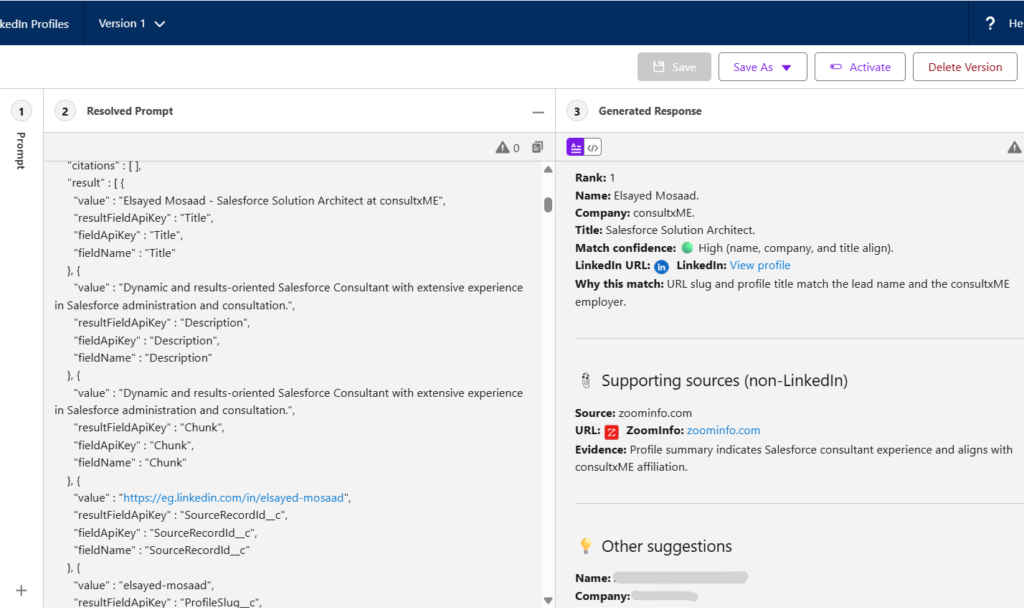
Quick note: We kept ranking rules in Apex and repeated them in the prompt so the model obeys flags even when titles are redacted. The section order (Name match, Supporting sources, Other suggestions) is intentional so reps always get the same layout.
| Practice | Why it helps |
|---|---|
| Invocable Apex + SerpAPI | Prompt Builder gets live search evidence through {!$Apex:LinkedInProfileGoogleSearchAction.Prompt} |
| Full prompt with flag-based ranking | Survives PII redaction; stops hallucinated LinkedIn URLs |
| Free SerpAPI key for sandbox proof | Reproduce the pattern quickly; scale the search plan later if volume grows |
| Custom Metadata for API keys | Set your own key per org; never commit secrets |
| Match rules in Apex | Stops the model from inventing or mis-ranking URLs |
| Explicit "use only results below" | Cuts hallucinated profile links |
Quick note: We kept ranking rules in Apex and repeated them in the prompt so the model obeys flags even when titles are redacted. The section order (Name match, Supporting sources, Other suggestions) is intentional so reps always get the same layout.
Final thoughts
Most Prompt Builder content stops at the UI. The useful part for integrators is wiring Apex as a resource: your code fetches and structures data; the prompt explains it to the user.
Start with this Lead template and LinkedInProfileGoogleSearchAction. Get typed search evidence working before you worry about agents or extra objects. Once the loop is stable, the same pattern fits enrichment, validation, or any case where the LLM needs facts you cannot store on the record.
Resources:

Elsayed Mosaad
A Salesforce Solution Architect and 7× certified Trailblazer based in Riyadh, including Agentforce Specialist and Platform Data & Sharing Architect credentials. I design Sales Cloud and AI-assisted CRM workflows with a focus on multi-sandbox delivery and grounded prompt patterns.
- This author does not have any more posts.