



Sending data from Lightning Web Components (LWC) to Apex can feel tricky when you’re new to Salesforce development. How does your JavaScript object actually make it to the backend?

In this post, I’ll share her real-world learning journey, from early confusion to finally mastering JSON.stringify() and JSON.deserializeStrict(), two simple yet powerful methods that securely and efficiently send data from LWC to Apex.

My Journey: From Confusion to Clarity

In one of my recent Salesforce projects, I needed to create both Account and Contact records from a Lightning Web Component (LWC) form. Initially, I was totally confused about how data moves from LWC (frontend) to Apex (backend). I kept asking myself:

“Why can’t I just pass the JavaScript object directly to Apex?”

I made several mistakes before I finally understood the concept of JSON serialization and deserialization, and how that acts as a bridge between JavaScript and Apex. Once it clicked, everything fell into place.

I’ll walk you through what I learned, with real examples, practical takeaways, and a working project demo.

Why We Use JSON in Salesforce

When LWC communicates with Apex, it cannot send or receive objects directly. They communicate through text, specifically in JSON (JavaScript Object Notation) format.
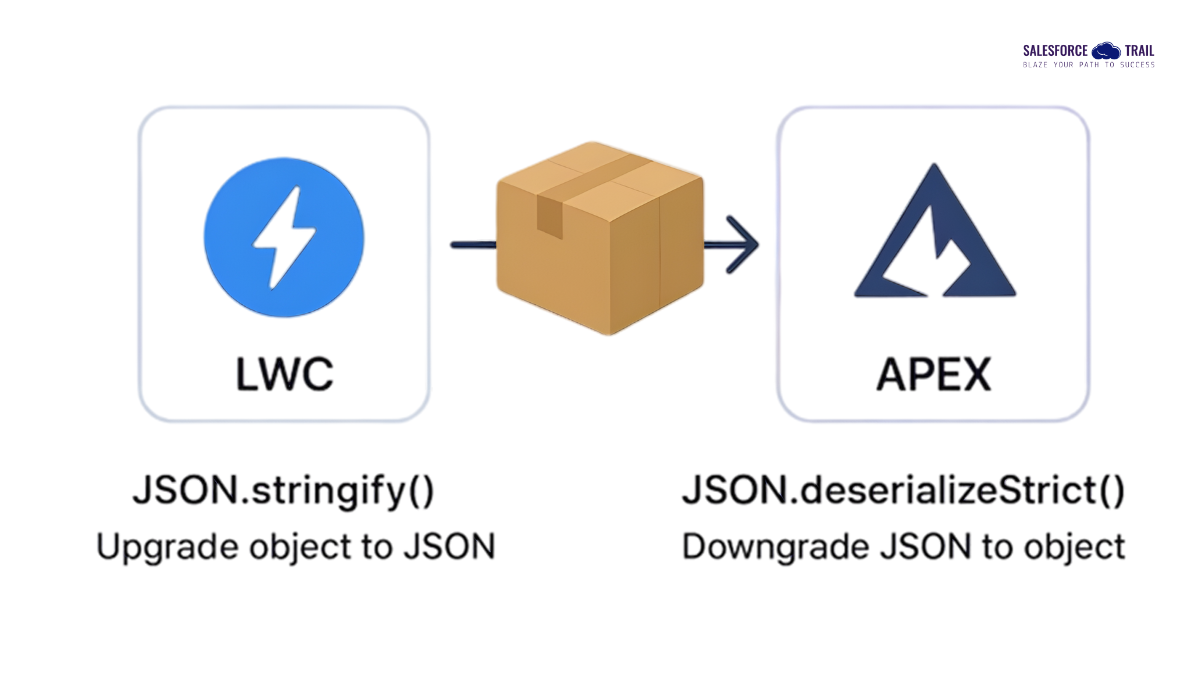
LWC to ApexThink of it like sending a parcel:

  • stringify() → packing your data before sending.
  • deserializeStrict() → unpacking it safely when it reaches Apex.

This ensures your data travels safely, and Apex knows exactly what it’s receiving.
Salesforce Learning

Example: Send Data from LWC to Apex

LWC JavaScript

				
					let formData = {
    Employer: 'ABC Corp',
    Employer_Phone: '9876543210',
    MailingCity: 'Salem'
};

submitForm({ inputVal: JSON.stringify(formData) });


Apex Controller

				
					public with sharing class FormController {
    @AuraEnabled
    public static void submitForm(String inputVal) {
        FormInput input = (FormInput) 
    JSON.deserializeStrict(inputVal, FormInput.class);
        System.debug(input.Employer); // Output: ABC Corp
    }

    public class FormInput {
        @AuraEnabled public String Employer;
        @AuraEnabled public String Employer_Phone;
        @AuraEnabled public String MailingCity;
    }
}


Picture1 1

This is my simple LWC form that collects Employer details and sends data to Apex using JSON.stringify().

Why Use JSON.deserializeStrict()?

  • It throws an error if unexpected fields appear in the input — keeping your backend clean and secure.
  • It ensures that the structure of incoming data matches your Apex class.
  • It’s a safer alternative to JSON.deserialize(), especially for production-grade integrations.

Quick Tip: Always prefer JSON.deserializeStrict() in production — it validates the incoming structure and avoids accidental data corruption.

For debugging, JSON.deserialize() can be used temporarily, but switch back to the strict version before deployment.

Why Type Casting?

JSON.deserializeStrict() returns a generic object.

By writing (FormInput), you’re telling Apex:

“Please treat this JSON as an instance of the FormInput class, so I can access its fields safely.”

Think of type casting like telling Salesforce:
“This JSON belongs to a particular shape (class). Handle it like that.”

 Without it, Apex doesn’t know how to interpret your data.

Real Project Experience: Creating Account & Contact Records Using a Wrapper Class

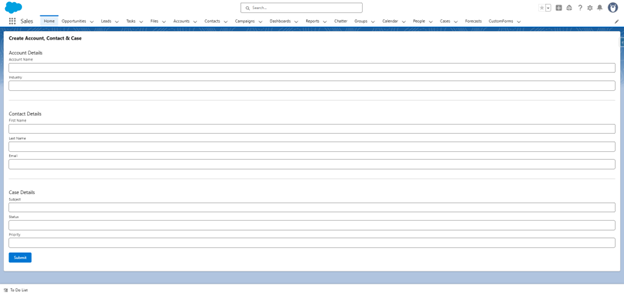
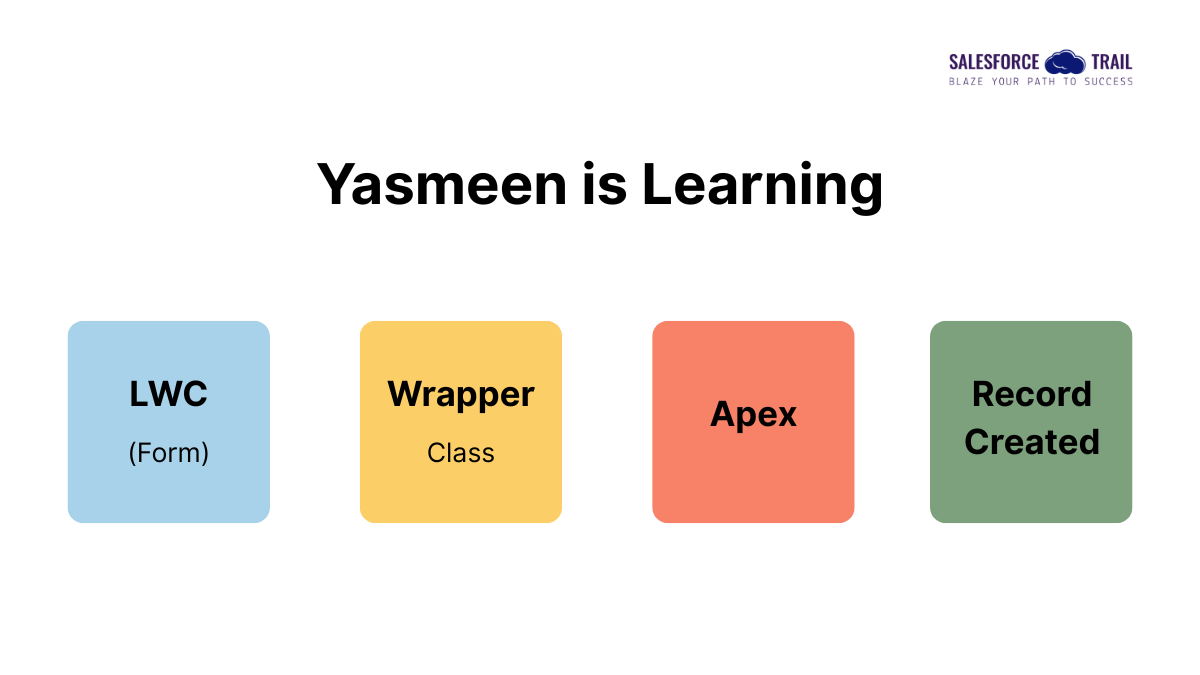
Once I became comfortable with JSON handling, I challenged myself to take it a step further. I built a single LWC form that collects Account, Contact, and Case information — and creates all three records at once using a single Apex call.

Here’s what happens behind the scenes:

  • The LWC collects all three sections of data.
  • On clicking Submit, it converts everything into one JSON string using stringify().
  • In Apex, I used a Wrapper Class to deserialize the JSON into structured objects.
  • Finally, Apex inserts all three records, linking them together properly.
  • The wrapper combined multiple SObjects into one structure.
  • JSON allowed transferring the entire form data in a single call.
  • Debugging became much simpler once I understood the data flow.
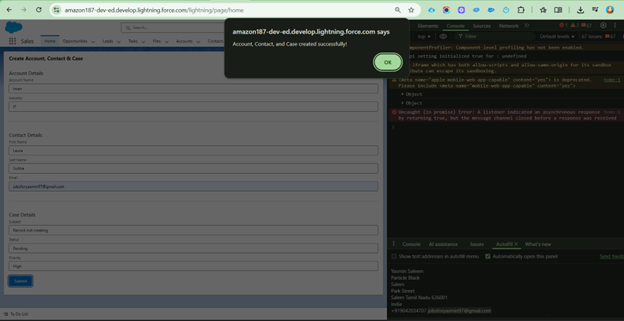
submitForm()

Once the form is submitted, the JavaScript data is converted into a JSON string and passed to the Apex method submitForm().
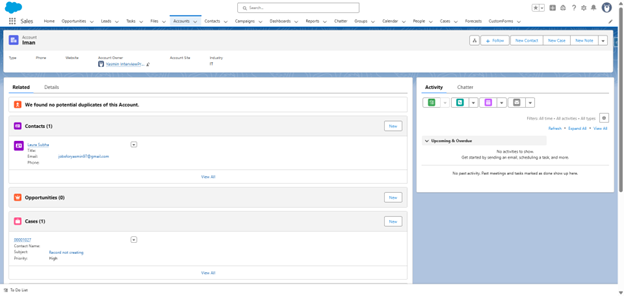
Picture2 1

Account, Contact, and Case records are created successfully.

Here’s a simplified Apex example:

				
					public with sharing class AccountContactCaseController {
    @AuraEnabled
    public static void saveData(String wrapperStr) {
        try {
            // Deserialize the incoming JSON string into the 
    WrapperData class
            WrapperData data = (WrapperData)
    JSON.deserializeStrict(wrapperStr, WrapperData.class);

            // Insert Account
            insert data.accountObj;

            // Relate Contact to the newly created Account
            data.contactObj.AccountId = data.accountObj.Id;
            insert data.contactObj;

            // Relate Case to the same Account
            data.caseObj.AccountId = data.accountObj.Id;
            insert data.caseObj;

            System.debug('Records inserted successfully: ' + 
    data);
        } catch (Exception e) {
            System.debug('Error while inserting records: ' + 
    e.getMessage());
            throw new AuraHandledException('Error: ' + 
    e.getMessage());
        }
    }

    public class WrapperData {
        @AuraEnabled public Account accountObj;
        @AuraEnabled public Contact contactObj;
        @AuraEnabled public Case caseObj;
    }
}


JavaScript:

				
					import { LightningElement, track } from 'lwc';
import saveData from 
'@salesforce/apex/AccountContactCaseController.saveData';

export default class AccountContactCaseForm extends LightningElement {
    @track account = { Name: '', Industry: '' };
    @track contact = { FirstName: '', LastName: '', Email: '' };
    @track caseObj = { Subject: '', Status: 'New', Priority: 'Medium' };

    handleChange(event) {
        const { name, value, dataset } = event.target;
        if (dataset.obj === 'account') this.account[name] = value;
        if (dataset.obj === 'contact') this.contact[name] = value;
        if (dataset.obj === 'case') this.caseObj[name] = value;
    }

    async handleSubmit() {
        const wrapper = {
            accountObj: this.account,
            contactObj: this.contact,
            caseObj: this.caseObj
        };
        try {
            await saveData({ wrapperStr: JSON.stringify(wrapper) });
            alert('Account, Contact, and Case created successfully!');
        } catch (error) {
            console.error(error);
            alert('Error: ' + error.body.message);
        }
    }
}


HTML:


View Full Source Code

You can explore the complete project and code structure here:
 👉 GitHub Repository – Salesforce LWC Form

Key Learnings

  • Serialization and deserialization are essential for LWC ↔ Apex communication.
  • Wrapper classes help structure complex data
  • deserializeStrict() ensures clean, predictable backend logic.
  • Patience and curiosity during debugging lead to faster learning and growth.

Final Thoughts

It took several attempts and errors to get this working, but I’m glad I didn’t give up. Each small breakthrough made me a more confident Salesforce developer.

For anyone starting with LWC ↔ Apex integration: don’t fear JSON or wrapper classes. Once you understand the flow, everything becomes intuitive and easier to debug.

Yasmin Saleem
Yasmin Saleem
Salesforce Developer  jobsforyasmin97@gmail.com

Yasmin Saleem is a Salesforce Developer with 3.5+ years of experience designing and deploying scalable solutions across industries such as property management, banking, healthcare, and ERP. She is skilled in Apex, Lightning Web Components (LWC), Flows, integrations (REST/SOAP), and Salesforce Order Management (SOM), with a strong track record of automating workflows, improving system performance, and handling large-scale data migrations. A resilient Trailblazer and AgentForce Champion, Yasmin is passionate about building user-centric Salesforce solutions, sharing knowledge, and continuously learning to grow both professionally and personally.

Share.

1 Comment

Leave A Reply

Exit mobile version