

When most people think about Salesforce security, they immediately picture Profiles and Permission Sets. However, the most critical security decision is made at the Organization Layer: determining who is allowed to enter the system before any specific permissions are evaluated. Security in Salesforce doesn’t start with permissions; it starts at the perimeter. And in most organizations, that perimeter is weaker than administrators think.

In this guide, we’ll walk through the 10 fundamental controls that define Salesforce’s access perimeter, along with practical insights every admin should understand.

Table of Contents

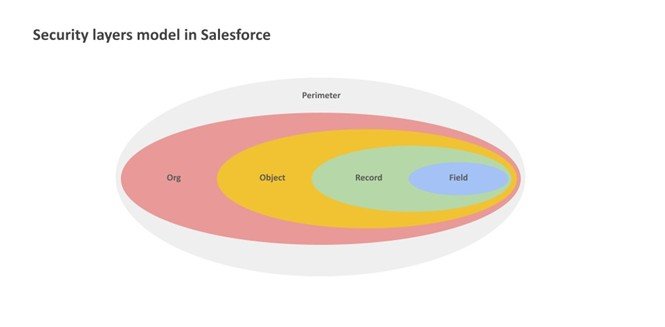
Security layers model in Salesforce
Source:Salesforce

01 — My Domain

The mandatory architectural foundation of the access perimeter. It assigns your organization a unique login URL that centralizes authentication and mitigates phishing. Without My Domain, there is no controlled perimeter – only a shared entry point. Critical milestone: support for API traffic using instanced URLs (e.g., na123.salesforce.com) will officially end in Summer ’26 (May 2026). All integrations must be updated to the My Domain URL before that date.

02 — Authentication Types

MFA is a contractual requirement for all internal users since February 2022. SSO satisfies this requirement only if the Identity Provider enforces strong verification factors. Delegated Authentication does not satisfy the MFA requirement and requires an additional native Salesforce MFA layer to remain compliant. Compliance with MFA requirements is often assumed, but not always verified.

03 — Password Policies

Sets the structural hygiene for the first authentication factor. The default is an 8-character minimum with a 90-day expiration cycle. Weak password policies are rarely the result of ignorance; they are the result of convenience. The “Minimum 1-day password lifetime” setting is vital: it prevents users from immediately cycling through their password history to reuse an old credential after a forced reset.

04 — Device Activation

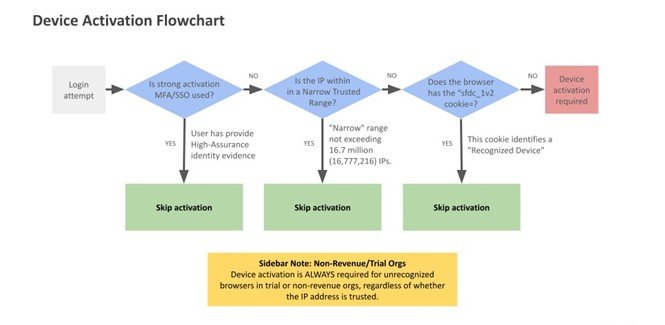
A deterministic control triggered by the absence of the sfdc_lv2 browser cookie. Activation is skipped only for narrow trusted IP ranges. Outside of those or in trial and non-revenue orgs, device activation is always required for any unrecognized browser, even if the IP is technically trusted.

Device Activation FlowChart

05 — IP Restrictions & Network Access

Two controls with fundamentally different behaviors. Network Access (org-wide) defines trusted IP ranges that reduce login friction – it never blocks, it only bypasses the identity challenge. This is one of the most common misconfigurations in Salesforce security, creating a false sense of protection while leaving the perimeter effectively open. Login IP Ranges (profile-level) are the actual hard restriction: they deny access immediately if the user’s IP is outside the defined range, with no challenge offered. As of Winter ’26, the total number of IP addresses across all org-wide ranges cannot exceed 16,777,216.
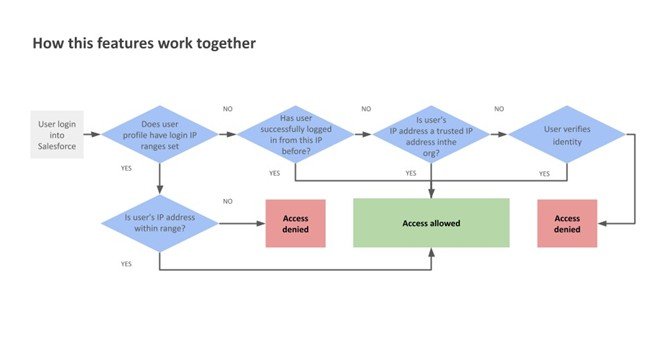
Feature workflow

06 — Login Hours

A profile-level temporal perimeter. Login attempts outside the configured window are denied immediately. This is not a soft control; it is an immediate hard stop. If a session is active when the permitted hours end, it freezes: the user can view their current page but cannot save, navigate, or edit any data. These hours are permanently locked to the org’s default time zone at the moment of configuration. Subsequent changes to the org or user time zone do not affect enforcement.

07 — Connected Apps

Governs non-browser access: mobile apps, API integrations, and third-party tools connecting via OAuth or SAML. IP Relaxation is often enabled for convenience, but every bypass of IP restrictions is a deliberate expansion of the attack surface. It allows a Connected App to bypass Profile Login IP Ranges, which is essential for mobile applications that switch between networks – but it is a deliberate security trade-off, not a default to enable carelessly. For critical integrations, access should be restricted to “Admin-approved users” to prevent self-authorization by any user in the org.

08 — Session Settings

Protects the active connection once a user has crossed the login perimeter. The default timeout is 2 hours, configurable from 15 minutes to 24 hours. Operational warning: requiring High Assurance for sensitive operations a constraint that surprises most administrators the first time they encounter it in production. It blocks asynchronous processing, including Apex @future methods, external callouts, and PDF generation via getContentAsPDF(). These are intended for synchronous UI processing only.

09 — Access Monitoring

Salesforce provides three visibility tiers. Login History tracks access for 6 months (Setup UI: 20,000 records; CSV export). Login Forensics (Shield) extends retention to 10 years for behavioral auditing. For real-time defense,

Threat Detection uses machine learning to alert on anomalies like credential stuffing, while Transaction Security Policies (TSP) act as the active layer, capable of blocking sessions or forcing MFA in real-time to neutralize threats as they occur.

10 — Audit & Diagnostics

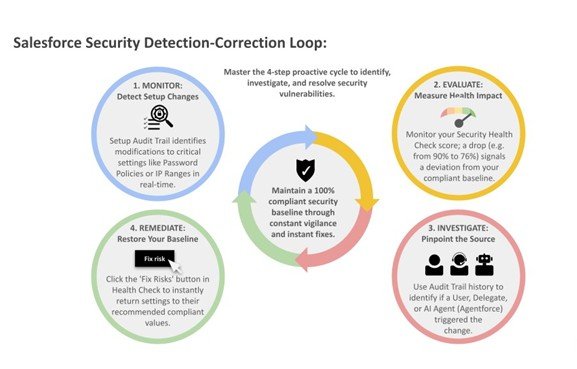
Two tools close the security loop. Security Health Check provides a 0–100% score measuring alignment with Salesforce’s security baseline, with a “Fix Risks” button that applies recommended values without navigating multiple setup menus. Setup Audit Trail tracks every configuration change, who made it, when, and what was modified – including changes made by delegated users and AI agents via Agentforce. The UI shows the last 20 changes; the full 180-day history is available via CSV download. Without these controls, security becomes invisible – and what is invisible cannot be governed.

Salesforce Security Detection Correction Loop

The Detection-Correction Loop

The perimeter is not a single feature but a continuous cycle. Security Health Check acts as your motion sensor to detect if a door has been left unlocked, while Setup Audit Trail provides the forensic evidence of who opened it. Administrators are not configuring features; they are defining the organization’s exposure to risk. Security is not a setup task. It is an ongoing responsibility.

Frequently Asked Questions (FAQ)

Salesforce access security refers to the controls that determine who can log in to your Salesforce org before any permissions are applied. It includes authentication methods, IP restrictions, device verification, and login policies that protect the system at the entry point.

The security perimeter is important because it prevents unauthorized users from accessing the system in the first place. If access is not properly controlled, even well-configured permissions cannot fully protect sensitive data.

Yes, Multi-Factor Authentication (MFA) is mandatory for internal Salesforce users. However, organizations must ensure that their implementation is properly enforced, especially when using Single Sign-On (SSO) or external identity providers.

Network Access defines trusted IP ranges that reduce login friction but do not block access. Login IP Ranges, on the other hand, are profile-level restrictions that actively prevent users from logging in outside allowed IP addresses.

My Domain provides a unique login URL for your organization, which helps centralize authentication and reduce phishing risks. It also supports modern authentication protocols and is required for future Salesforce platform updates.

Connected Apps allow external applications, mobile devices, and integrations to access Salesforce. If not properly controlled, they can expand the attack surface, so it’s important to restrict access and review permissions regularly.

When login hours are enforced, users cannot log in outside the defined time window. If a session is already active when the allowed hours end, the session becomes read-only and prevents further actions.

Security Health Check is a built-in tool that evaluates your org’s security settings against Salesforce best practices. It provides a score and actionable recommendations to improve your overall security posture.

Session settings control how long users stay logged in and how secure their sessions are. Shorter session timeouts and higher assurance levels reduce the risk of unauthorized access, especially on shared or unsecured devices.

Salesforce provides tools like Login History, Security Health Check, and Setup Audit Trail to monitor access and configuration changes. Advanced features like Threat Detection and Transaction Security Policies help identify and respond to risks in real time.

Salesforce security settings should be reviewed regularly, especially after major changes, new integrations, or user role updates. A periodic review ensures that configurations remain aligned with current security requirements.

Guillermo Delfino
Guillermo Delfino
Salesforce Administrator  guillermo.delfino@gmail.com

Guillermo Delfino is a Salesforce Administrator with 4 years of hands-on experience in Sales Cloud and Service Cloud, and a background in IT spanning over 20 years.

He focuses on automation, data management, and access security, with an interest in understanding how Salesforce behaves beyond standard configurations. His approach is practical, aiming to solve problems at their root while maintaining scalable and reliable solutions.

He has experience in fintech and consulting, and currently works on implementations for nonprofit organizations in Latin America. He has also supported professionals starting their journey in the Salesforce ecosystem
Share.
Leave A Reply

Exit mobile version