

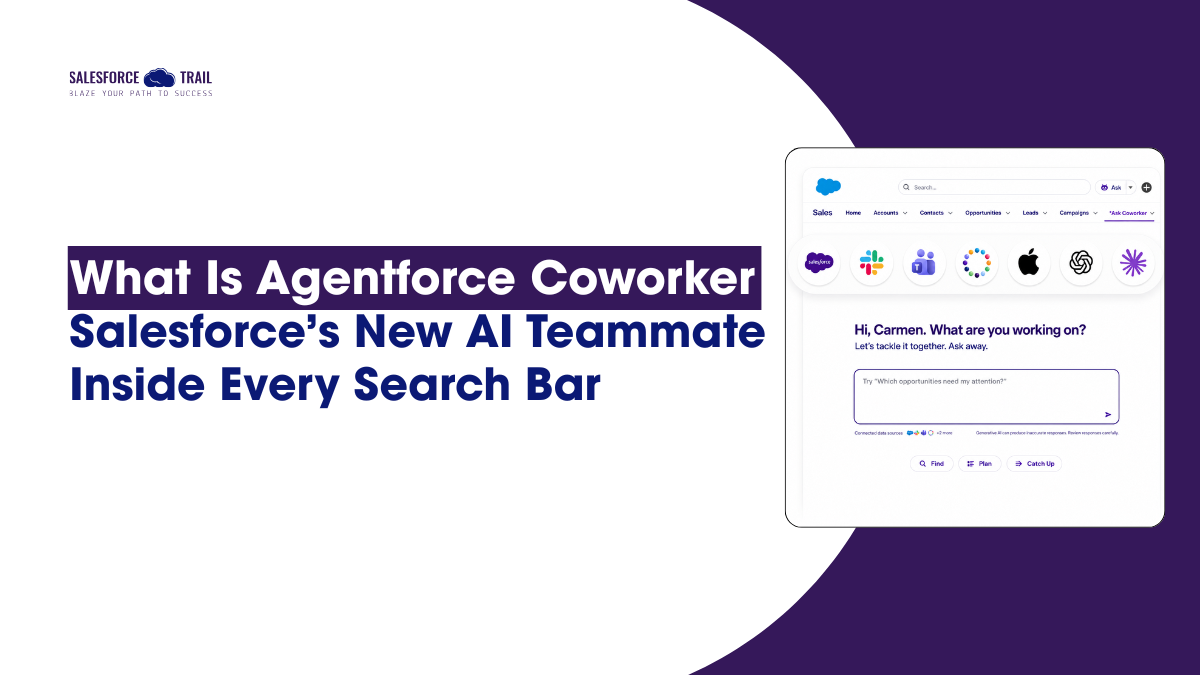
Salesforce announced Agentforce Coworker in May 2026, a new AI work assistant now in beta and embedded in the Salesforce global search bar. It connects to 300+ enterprise sources, answers plain-language questions, and routes tasks to Agentforce agents. This blog explains what Agentforce Coworker is, how it works, and how to set it up.
Table of Contents
What Is Agentforce Coworker?
Agentforce Coworker is Salesforce’s new AI-powered work assistant. Announced by CEO Marc Benioff on May 21, 2026, it is currently in beta and available to all Agentforce customers.
Instead of typing a keyword into the global search bar and scrolling through records, you type a question in plain language and get a synthesized answer pulled from your CRM data, Slack conversations, SharePoint files, knowledge bases, and any other enterprise sources you have connected.
Benioff described it this way: “Your new AI teammate is now inside every Salesforce search bar. It doesn’t just find things — it works with you.”
Welcome Agentforce Coworker. 🤝
— Marc Benioff (@Benioff) May 21, 2026
Your new AI teammate is now inside every Salesforce search bar. It doesn’t just find things — it works with you. Agentforce now instantly taps into your CRM data, workflows, customer history, opportunities, and cases… then takes action in… pic.twitter.com/EQDogzKCDF
What separates Coworker from a typical chatbot or smarter search is that last part. When it returns an answer, it does not stop there. It can route your next request to the right Agentforce agent, which then takes action: updating a record, drafting a follow-up, running a Flow, or escalating a risk.
Built natively on Data 360 (Salesforce’s unified data platform, previously called Data Cloud), Coworker inherits your existing metadata, sharing rules, and governance setup from the first prompt. No training period, no weeks of configuration before it becomes useful. That is a genuine departure from most AI features in the Salesforce ecosystem, which typically require significant preparation before delivering anything practical.
How Agentforce Coworker works
Salesforce describes Coworker in three stages: Discover, Analyze, and Act.
Discover: natural-language search across 300+ sources
Coworker replaces keyword-based search with plain-English questions. Ask “Which of my accounts have an upcoming renewal but haven’t been contacted in 30 days?” and get an actual answer, not a record list to sort through yourself.
Out of the box, it connects to Salesforce CRM and Slack. You can extend it to Google Drive, SharePoint, data lakes, and knowledge bases, with over 300 enterprise sources supported. It returns a synthesized response with citations, so you can trace exactly where each piece of information came from.
For admins: This capability will generate the most excitement from end users. The pain of jumping between tools to assemble context is one of the most consistent complaints in any org.
Analyze: insights you did not think to ask for
Coworker surfaces patterns you have not searched for, pulling signals from connected data as your business evolves. A service manager sees a spike in support tickets without realizing it started 48 hours ago. Coworker flags the trend before the manager thinks to look. Small in isolation, meaningful at scale.
Act: from answer to the next step in one conversation
This is the part that architects and developers should pay attention to. When a user is ready to act on an answer, Coworker routes the task to the right Agentforce agent, because it is connected to every agent your org has built. The “Ask” button in the global search bar becomes a single entry point to your entire agentic setup. No tab-switching, no manual record navigation, no separate trigger needed.
Where Agentforce Coworker lives
Coworker is not limited to the Salesforce UI. It runs inside Salesforce (via the Ask button next to the global search bar), Slack, Microsoft Teams, ChatGPT, and Claude. There is also a dedicated Salesforce Coworker mobile app. For enterprise teams that split time across tools, this matters. Your agents are no longer locked inside a single platform.
How to set up Agentforce Coworker: Step by Step
Setup is largely automated and takes most admins under 10 minutes. Getting the prerequisites right before you begin is what matters.
What you need before you start
- An active Agentforce license: Enterprise, Unlimited, or Agentforce 1 Edition
- Salesforce Admin or Data 360 Architect role for whoever is configuring it
- The Access_Ai_Search Permission Set Group and AI Search Permission Set License are assigned to your admin account before you click Turn On
Review the official Agentforce Coworker billing documentation before starting. There are meaningful differences across editions, and misconfigured permissions from the start can lead to billing problems later.
Turning it on
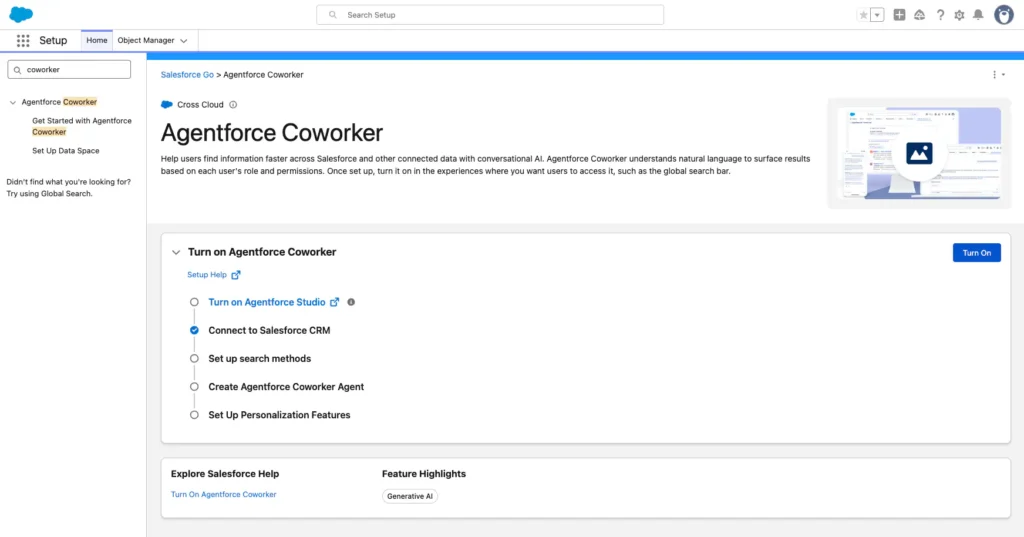
- From Setup, enter “Agentforce Coworker” in the Quick Find box
- Select Get Started with Agentforce Coworker
- Click Turn On
- When the confirmation window appears, select Confirm
Enabling the Ask button and Assigning Users
At the bottom of the Agentforce Coworker Setup page, enable the end-user experience. This adds the Ask button next to the global search bar for users with the right permissions.
To assign access: go to Manage Agentforce Coworker Users, click Manage, and assign the Access_Ai_Search permission set group to the relevant users. That same page shows how many licenses are assigned versus available, useful in larger orgs. To remove access, remove the permission set group and AI Search license from the user.
Agentforce Coworker vs. Einstein Search
Einstein Search does not go away. Both coexist in the current beta, and Einstein Search remains available for standard record lookups.
The difference is what each does with your input:
| Einstein Search | Agentforce Coworker | |
|---|---|---|
| Input type | Keywords | Natural language questions |
| Output | Record list | Synthesized answer with citations |
| Data sources | Salesforce org | 300+ enterprise sources |
| Can take action | No | Yes, via Agentforce agents |
| Available in | Salesforce only | Salesforce, Slack, Teams, mobile, ChatGPT, Claude |
| Status | Generally available | Beta (June 2026) |
What this means, depending on your Salesforce Role
Admins now own the front door to the agentic platform. Configuring Coworker correctly (permissions, data sources, user assignment) requires more than clicking a button. Leading this rollout in your org is a visible opportunity worth taking.
Developers should design agents with Coworker orchestration in mind. Coworker routes to whatever agents your org has built. If those agents are not clearly scoped or named, routing will not work as expected.
Architects need to understand the Data 360 dependency before recommending Coworker to clients. Orgs without that foundation need it first. Address this early, before someone asks why the Turn On button is greyed out.
Consultants: if clients have not asked about this yet, they will soon. Know the edition requirements and billing nuances before that call happens.
Final Thoughts
Salesforce has been building toward this for a while. Agentforce enabled orgs to deploy AI agents. Data 360 gave those agents a unified data layer. Agentforce Coworker is the interface that connects all of it to the one thing every person in your org already uses every day: the search bar.
Whether it delivers on that depends on how well the groundwork has been laid. For teams that have invested in Agentforce and Data 360, this is a meaningful step worth testing now. For everyone else, start with the foundation first.
For the official setup guide, visit the Agentforce Coworker developer documentation on Salesforce Developers. If you have already enabled it in your org, drop a comment below. I would genuinely like to know how the first few weeks have gone.
Frequently Asked Questions (FAQ)
Not yet. It requires an Agentforce license and is currently available on Enterprise, Unlimited, and Agentforce 1 Editions. Lower-tier editions do not have access during the beta period.
For Agentforce 1 Edition and Agentforce for Sales/Service/Industries users, Data 360 queries are unmetered (no Flex Credits consumed). This only applies when user-based AI permissions are correctly configured. Other editions consume credits per query.
Einstein Search returns Salesforce records based on keywords. Agentforce Coworker synthesizes answers from across your enterprise data, then routes requests to Agentforce agents to take action. Both currently coexist on the platform.
Under 10 minutes for most admins. The main variable is indexing time, which depends on the volume of data in your Data 360 environment.
Data 360 is Salesforce’s unified data platform (previously Data Cloud). Coworker is built on it, which is how it indexes and searches enterprise sources while respecting your existing governance and sharing rules. A Data 360 Admin or Architect role is required to configure it.

Priya Rastogi
Priya is a 3x Salesforce Certified who believes in the power of continuous learning and collaboration. She’s passionate about exploring how Salesforce can simplify work, boost productivity, and create better user experiences. When she’s not experimenting with new features or automating processes, Priya enjoys connecting with fellow Trailblazers and sharing insights to help others grow in their Salesforce journey.
- Priya Rastogi
- Priya Rastogi
- Priya Rastogi