If you have ever sat in a project kickoff meeting and heard someone say, “We are currently in the discovery phase,” only to hear two months later that “we are going live next Friday,” you might have wondered what actually happened in between. Most of the real work takes place during that gap, and that is also where most projects quietly go off track.
Every consulting partner has their own numbered list of implementation phases. Some call it five stages, some call it eight, and the names shift too. What one team calls Discovery, another calls Requirements Gathering.
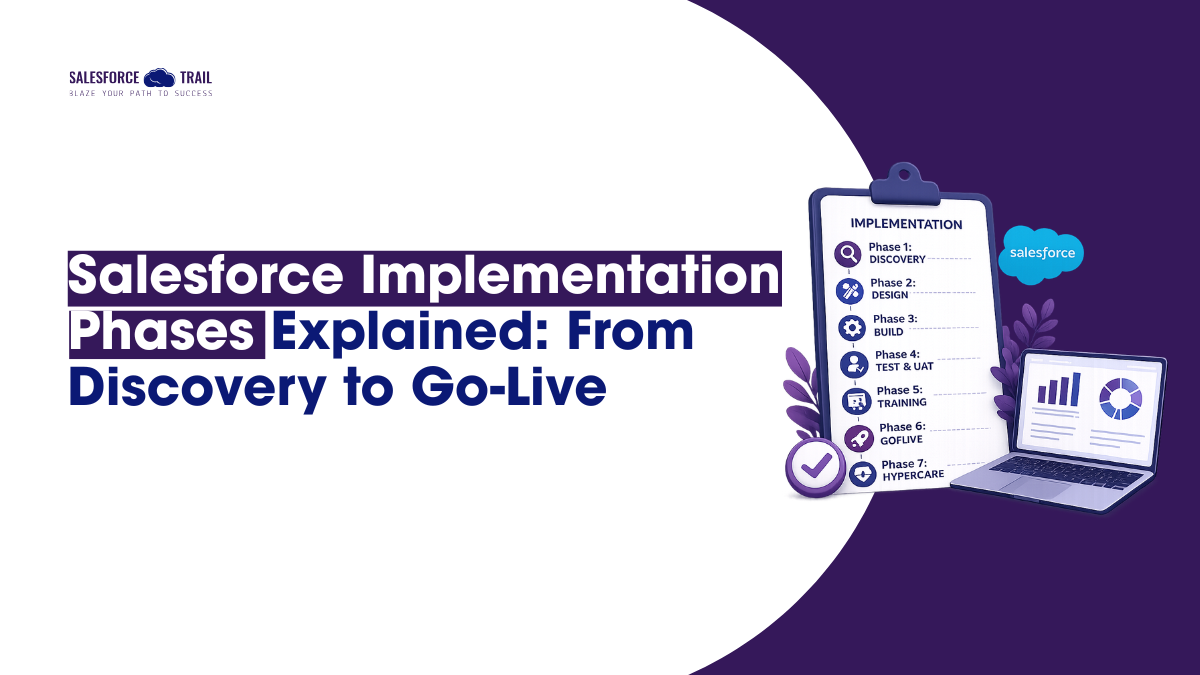
So instead of pretending there is a single “correct” model, I’ll walk you through the version that holds up across almost every real project I have seen: Discovery, Design, Build, Test, Training, Go-Live, and Hypercare. For each one, I’ll cover what happens, who’s in the room, what you walk away with, and the exact spot where things tend to break. That last part matters most, because knowing the stages of Salesforce implementation is easy. Knowing where each stage fails is what separates a smooth rollout from a painful one.
Table of Contents
Methodology behind Salesforce Implementation Phases
In practice, though, most projects use a hybrid approach. The Salesforce project lifecycle is structured into phases so leadership can approve the budget and track milestones, but actual development occurs in short sprints with regular demos. Keep that picture in mind as we go, because it explains why these phases overlap more than a tidy diagram suggests.
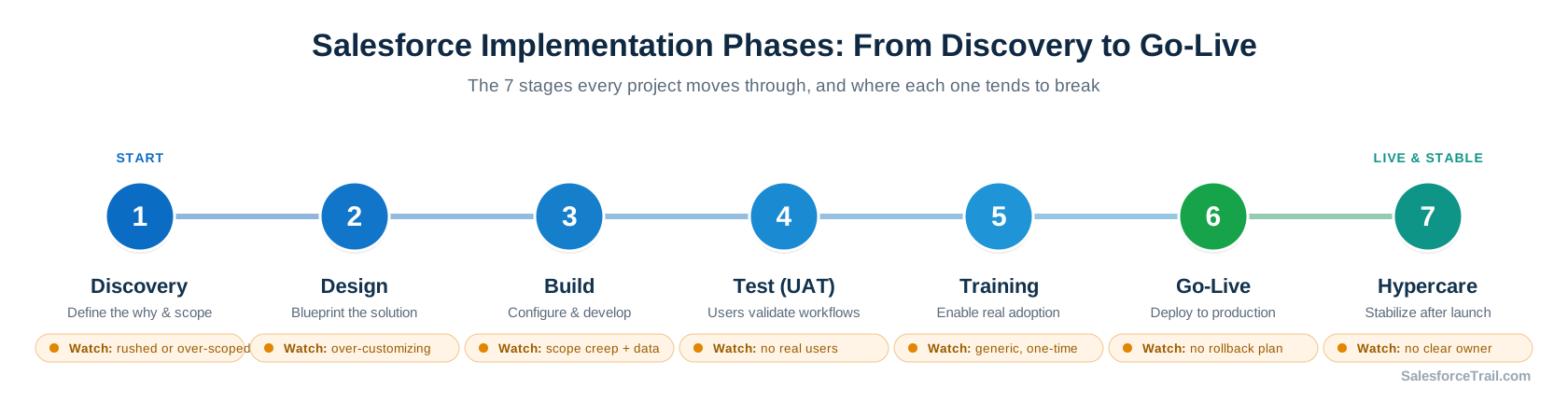
Phase 1: Discovery
Discovery is where you figure out the “why” before anyone touches an org. The team maps current processes, defines what success actually looks like, and draws a hard line around what is in scope for phase one and what is not. You also start auditing your data and listing the systems Salesforce will need to talk to.
In the room you’ll have business stakeholders, a business analyst, the solution architect, a project manager, and usually your implementation partner. The main output is a requirements document that everyone signs off on, along with process maps and a clear scope statement.
Where it breaks: Discovery fails in two opposite ways. Some teams rush it and miss something big, like an integration everyone assumed was simple that turns out to need real mapping and sync logic. Other teams make it too big, and a “configure Salesforce” project slowly turns into “redesign our entire process inside a CRM.” Both are expensive. Good discovery is thorough about what matters and ruthless about what doesn’t.
Phase 2: Design
Design turns those requirements into a build-ready blueprint. This is where the architect earns their keep. They define the data model, the security model, how automation will work, and how the pieces fit together. A good design starts with what Salesforce already does out of the box, then only customizes the gaps.
The people here are mostly technical: the solution architect, admins, and a lead developer, checking their thinking against the business stakeholders. What you get out of it is a solution design document, a data model or entity relationship diagram, and the security setup on paper.
Where it breaks: over-building. It is genuinely tempting to write custom code for everything, but every piece of custom work is something you have to maintain and retest against Salesforce’s three-yearly releases. As the folks at Gearset like to put it, hitting 80% of a requirement with standard features usually beats chasing 100% with a fully custom build. If your design leans on Apex where a Flow would do, that is a warning sign worth a second look.
Phase 3: Build
Build is the biggest phase, and the one people picture when they imagine “doing Salesforce.” Sandboxes get spun up. Objects, fields, page layouts, validation rules, and profile & permission sets get configured. Flows and approval processes get built. Developers write code only where it is actually needed, and integrations get wired up. Meanwhile, data migration usually runs in parallel in a staging environment.
This is where the Agile part really kicks in. Work happens in two- to four-week sprints, with demos at the end of each, so stakeholders see progress rather than waiting months for a big reveal. Admins, developers, a release manager, and a data migration specialist do most of the work, with business reviewers weighing in at demos.
Where it breaks: scope creep and data migration, often at the same time. New requests sneak in without any change control, and the timeline stretches a little with each one until it has quietly doubled. And data migration is never a copy-paste job. Teams that treat it as an afterthought almost always run late. A firm definition of your phase-one minimum and an actual change-control process are what keep Build honest. If you want to go deeper, our guide on Salesforce data migration is worth a read before you start loading records.
Phase 4: Test and UAT
Testing happens in layers. Developers check individual components, then the team tests how connected systems behave, then everything gets validated against the original requirements. But the part that matters most for adoption is UAT (User Acceptance Testing), where real business users run through their actual workflows using written test scripts.
The key players involved include QA, administrators, developers, and, most importantly, the end users and subject matter experts who will use the system daily. The deliverables you prepare include test scripts, defect logs, and the signed-off UAT documentation; all of these serve as quality gates before the ‘go-live’ stage.
Where it breaks: UAT that starts too late or runs without the real users. When the people who actually do the work are too busy to test, feedback trickles in after go-live instead of before, and every fix triggers another round of testing. UAT is a business sign-off, not a technical checkbox. Give it its own dedicated time and a buffer, because a rushed UAT is one of the most reliable predictors of low adoption later.
Phase 5: Training
Everyone agrees that training is essential, yet it often receives insufficient funding. Done well, it is role-based and built around what people actually do all day, not a generic tour of features. Users practice in a sandbox with realistic data, internal champions get identified, and you put reference guides and in-app guidance in place so help is there when someone forgets a step.
Typically, the training lead or change manager drives this process forward, with administrators and super-users assisting them. The deliverables include training materials, training environments, and in-app guidance available directly within Salesforce.
Where it breaks: one-and-done, feature-focused training. If you teach buttons instead of daily workflows, people forget most of it within a couple of weeks and drift back to their old spreadsheets. The other trap is letting your training materials go stale after launch, since Salesforce keeps evolving and so should your docs. Adoption is a people problem far more than a technical one, which is why our Salesforce user adoption strategies piece pairs naturally with this phase.
Phase 6: Go-Live
‘Go-live’ is the moment when everything moves into production. Metadata is deployed using change sets, the DevOps Center, or CI/CD tools. Following this, you execute the cutover plan: freezing the old system, loading final data, reconciling it, making a ‘go/no-go’ decision, and switching users to the new system. Smart teams pick a low-activity window and roll out in stages by team or region rather than flipping everyone on at once.
The cast here includes a release manager, admins, developers, the data migration lead, and an executive sponsor who owns the go-or-no-go call. Someone should also be the named point person for day-one issues.
Where it breaks: treating “go-live” as a specific date rather than a controlled change. A rollback plan is a document that almost every team overlooks until the moment they actually need it. A sloppy data freeze lets the old and new systems drift apart, so users log in convinced their records vanished, and you lose their trust on day one. Go-live is less about the calendar and more about whether you can back out cleanly if something goes wrong.
Phase 7: Hypercare
Hypercare is the stretch right after launch when support runs hot. Faster response times, daily check-ins, active monitoring, and quick fixes for whatever surfaces once real users start clicking around. The project team gradually hands things over to your regular support crew, and adoption gets tracked using tools like the Lightning Usage App.
Salesforce actually defines hypercare as the period of heightened support following a major launch, so this is not just consultant jargon. It usually runs anywhere from one to four weeks depending on project size, though the better approach is to end it on clear exit criteria rather than a fixed date. Once serious issues are back to a trickle and your support team can handle the load, you’re done.
Where it breaks: not having a hypercare plan at all, or running one with no clear owner, the hardest problems often show up after go-live, not before. When nobody owns them, tickets pile up, data quality slips, and six months later people are back in Excel. The fix is simple to say and easy to skip: assign one accountable business owner to each critical process before you ever go live.
The Four Things that quietly sink Projects
Looking at all seven stages, a few key themes consistently emerge. Change management and user acceptance are paramount and must be integral to every stage, rather than just a slide shown at the end. Data migration warrants far more importance than it is typically accorded. Scope creep is the single biggest risk affecting budgets and timelines in almost every project. And clear executive support often makes the difference between a system people actually use and one they merely tolerate.
Notice a pattern? None of these are platform problems. Salesforce works. Most failed implementations fail on process and people, which is oddly good news, because those are things you can actually control.
What’s Changed Lately
There are two key things to understand for 2026. First, DevOps Center has evolved into a more capable, AI-supported deployment tool built directly into the platform, and Salesforce is now encouraging teams to move beyond Change Sets and adopt proper DevOps practices. Second, AI has raised the stakes on your data phases. With Agentforce and the rebranding of Data Cloud (now Data 360), it is clear that you cannot build trustworthy AI on a weak data foundation; therefore, if AI is part of your roadmap, data discovery and migration have become more critical than ever.
Final Thoughts
The Salesforce implementation phases are not complicated to name. Discovery, Design, Build, Test, Training, Go-Live, Hypercare. What takes experience is knowing where each one fails and building in the buffer, the sign-offs, and the ownership to catch it early.
If you are new to this, don’t try to memorize a perfect diagram. Just remember that every phase feeds the next, that the boring phases like data migration and UAT are the ones that decide your fate, and that the goal was never a finished org. It was a system people actually use.
Frequently Asked Questions (FAQ)
Most projects move through Discovery, Design, Build, Test and UAT, Training, Go-Live, and Hypercare. Salesforce doesn’t publish one official list, so partners name and group these stages differently, but this sequence captures the full Salesforce implementation process end to end.
It depends heavily on scope. A focused single-cloud rollout can take a couple of months, while a multi-cloud or enterprise project with heavy integrations and data migration can run six months to a year or more. The Build and data migration work usually eats the most time.
Data migration and UAT tend to cause the most delays, and Hypercare is where hidden problems surface. Discovery is deceptively hard too, because a weak start quietly damages every phase after it.
Hypercare is a short period of intensive support right after go-live, usually one to four weeks. Response times are faster, the team monitors closely, and issues get fixed quickly while users settle into the new system.
Rarely because of the technology. Failures usually come from poor scope control, weak user adoption, underestimated data migration, and no clear ownership after go-live. These are process and people issues, which means they’re preventable.

- Akanksha Shukla

- Akanksha Shukla