


Close Menu

    Subscribe to Updates

    Get the latest creative news from FooBar about art, design and business.

    What's Hot

    How to Handle High-Volume API Integrations in Salesforce Without Hitting Limits

    December 19, 2025

    How to Think Like a Salesforce Architect: Mindset Shifts Every Pro Should Learn

    December 17, 2025

    Salesforce Business Rules Engine (BRE) Explained: Smarter Decisioning Beyond Apex & Custom Metadata

    December 15, 2025
    Facebook X (Twitter) Instagram
    Facebook Instagram LinkedIn WhatsApp Telegram
    Salesforce TrailSalesforce Trail
    • Home
    • Insights & Trends
    • Salesforce News
    • Specialized Career Content
      • Salesforce
      • Administrator
      • Salesforce AI
      • Developer
      • Consultant
      • Architect
      • Designer
    • Certifications Help
    • About Us
    • Contact Us
    Salesforce TrailSalesforce Trail
    Home - Consultant - 10 New Salesforce Mobile App Features You Need to Know
    Consultant

    10 New Salesforce Mobile App Features You Need to Know

    Mayank SahuBy Mayank SahuJuly 16, 2024Updated:July 22, 20243 Mins Read
    Facebook LinkedIn Telegram WhatsApp
    Salesforce mobile app
    Share
    Facebook LinkedIn Email Telegram WhatsApp Copy Link Twitter

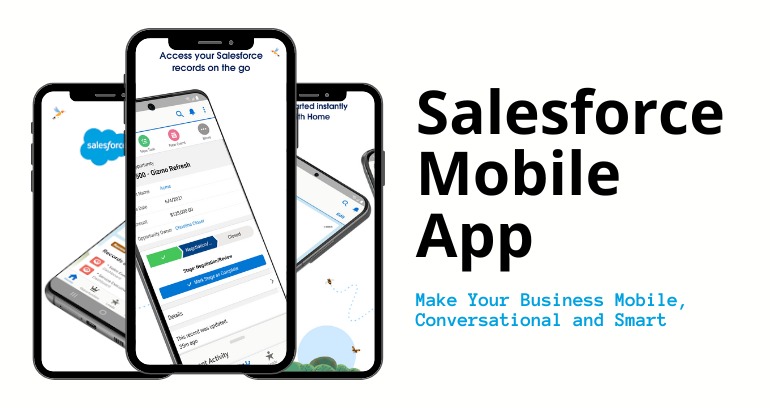
    Salesforce mobile app updates for 2024 have been made to enhance the user experience, boost productivity, and streamline workflow. As an experienced Salesforce practitioner, I thought of sharing these latest developments with you. Those are some of the features, that have been added to the new Mobile App provided by Salesforce as a developer, admin, or end-user. The top ten new Salesforce mobile app features that you need to know about are included in this blog.

    1. Mobile Dashboards Improved

    Salesforce improved Mobile Dashboards so they are more dynamic and can be viewed on mobile devices like smartphones and tablets Now users can:

    •  Customize dashboards using drag-and-drop
    •  Update data in real-time
    •  Use advanced filters for immediate information tuning

    2. Offline Mode Improvements

    The offline mode was improved with stronger support for accessing more important data even without an internet connection. Major updates include:

    • Automatic synchronization once during reconnection.
    • Improved cache resulting in speedier loading of your data.
    • Support for more offline record types

    3. Voice-Powered Commands

    In the Salesforce Mobile App, you can now use voice commands to:

    • Speak out words to create records.
    • Navigate through the app without touching anything.
    • Schedule meet-ups and set reminders verbally.
    salesforce mobile app

    4. AI-based Statistical Analysis

    Salesforce has integrated machine learning techniques into their mobile app through Einstein AI. Users can now:

    • Get predictive analysis from their phone.
    • Apply AI-advised sales and customer service ideas.
    • Reports based on their usage behavior and trends.

    5. Enhanced Security Features

    The Salesforce application update 2024 included improved security measures such as:

    • Biometrics (Fingerprints, Face recognition).
    • Stronger data protection during transportation and at rest.
    • Advanced threat detection automated response mechanism.

    6. Customizable Mobile Design

    Enhancing the mobile customization experience by admin in several ways.

    • Exclusive custom pages have been developed for mobile.
    • Mobile interfaces for different roles.
    • This includes applications such as drag and drop which enable one to arrange their screens on a mobile phone.

    7. Improvement in Task Management

    Certain features have made task management better, such as:

    • Todo lists that are more advanced with priority coding colors
    • An integrated calendar app to improve scheduling.
    • Live updates and notifications regarding tasks.
    Salesforce mobile App

    8. Third-Party Apps Integration

    Enhanced third-party app integration within Popular apps for the Salesforce mobile App These are:

    • It works with productivity tools, like Microsoft Office and Google Workspace.
    • Better Support for Custom Integration APIs
    • Less Data Synchronization Between Platforms.

    9. AR (Augmented Reality) Support

    Salesforce’s application boasts of AR support among its 2024 most thrilling updates, enabling users to:

    • Display data on real-world objects.
    • Equipment identification and diagnosis using AR for field service management.
    • AR: Ideal for Training and Onboarding.

    10. User Interface Stripping

    A more streamlined user interface provides a more natural and productive experience. The major improvements are as follows:

    • Usability-oriented navigation is made easy.
    • New themes and customization options encompass personalized looks and feel.
    • Improved application performance, and faster loading times.

    Conclusion: Salesforce Mobile App

    Salesforce Mobile App Updates in 2024, are focusing on making your mobile experience efficient, secure, and informative. These new features, once implemented can help you be more productive while keeping up with the changing Salesforce ecosystem. More such updates and improvements are expected from Salesforce soon.

    Resources

    • [Salesforce Trailhead] (https://trailhead.salesforce.com/)
    • [Salesforce Developer] (https://developer.salesforce.com/)
    • [Salesforce Success Community] (https://success.salesforce.com/)
    • [Salesforce Developer Community] (https://developer.salesforce.com/forums)
    Visit Now
    ?s=150&d=mp&r=g
    Mayank Sahu
    • Mayank Sahu
      https://salesforcetrail.com/author/mayank-sahu/
      Salesforce AI Associate Certification
      July 20, 2024
      Guide for Salesforce AI Associate Certification: Master AI with Salesforce
    • Mayank Sahu
      https://salesforcetrail.com/author/mayank-sahu/
      Salesforce DevOps Interview
      July 19, 2024
      Top Salesforce DevOps Interview Questions for 2024: What to Expect
    • Mayank Sahu
      https://salesforcetrail.com/author/mayank-sahu/
      Salesforce Marketing Associate Certification
      July 18, 2024
      Salesforce Marketing Associate Certification Tips: From Novice to Certified
    • Mayank Sahu
      https://salesforcetrail.com/author/mayank-sahu/
      Salesforce Customer 360
      July 17, 2024
      Salesforce Customer 360 Enhancements
    salesforce salesforce apps
    Share. Facebook LinkedIn Email Telegram WhatsApp Copy Link

    Related Posts

    How to Handle High-Volume API Integrations in Salesforce Without Hitting Limits

    December 19, 2025

    How to Think Like a Salesforce Architect: Mindset Shifts Every Pro Should Learn

    December 17, 2025

    Salesforce Business Rules Engine (BRE) Explained: Smarter Decisioning Beyond Apex & Custom Metadata

    December 15, 2025
    Add A Comment
    Leave A Reply Cancel Reply

    Advertise with Salesforce Trail
    Connect with Salesforce Trail Community
    Latest Post

    6 Proven Principles to Drive Faster Salesforce CRM Adoption

    November 3, 2025

    Driving Revenue Efficiency with Sales Cloud in Product Companies

    October 30, 2025

    How to Become a Salesforce Consultant: A Complete Guide to Success

    August 15, 2025

    5 Expert Tips for Salesforce Consultants and Architects to Improve Collaboration

    April 9, 2025
    Top Review
    Designer

    Customizing Salesforce: Tailor the CRM to Fit Your Business Needs

    By adminAugust 6, 20240

    Salesforce is an adaptable, powerful customer relationship management (CRM) software that businesses can customize, and…

    Sales Professional

    Unlock 10 Powerful Sales Pitches to Boost Your Revenue by 30X

    By Mayank SahuJuly 4, 20240

    Sales is a very competitive arena, and it is followed by one must have a…

    Salesforce Trail
    Facebook X (Twitter) Instagram LinkedIn WhatsApp Telegram
    • Home
    • About Us
    • Write For Us
    • Privacy Policy
    • Advertise With Us
    • Contact Us
    © 2025 SalesforceTrail.com All Right Reserved by SalesforceTrail

    Type above and press Enter to search. Press Esc to cancel.