




In Salesforce development, writing clean, modular, and scalable code isn’t just good practice; it’s essential for long-term success. If you’re working with Lightning Web Components (LWC) or transitioning from Visualforce or Aura, adopting the MVP (Model–View–Presenter) architecture can dramatically improve how you structure and maintain your applications.

In this article, you’ll learn:

  • What does MVP Architecture mean in Salesforce terms
  • How to apply it using Apex and LWC
  • Why is it better suited for modern Salesforce UI development
  • Best practices every beginner should follow
  • Plus, a simple example and a visual diagram

Table of Contents

What Is MVP Architecture in Salesforce?

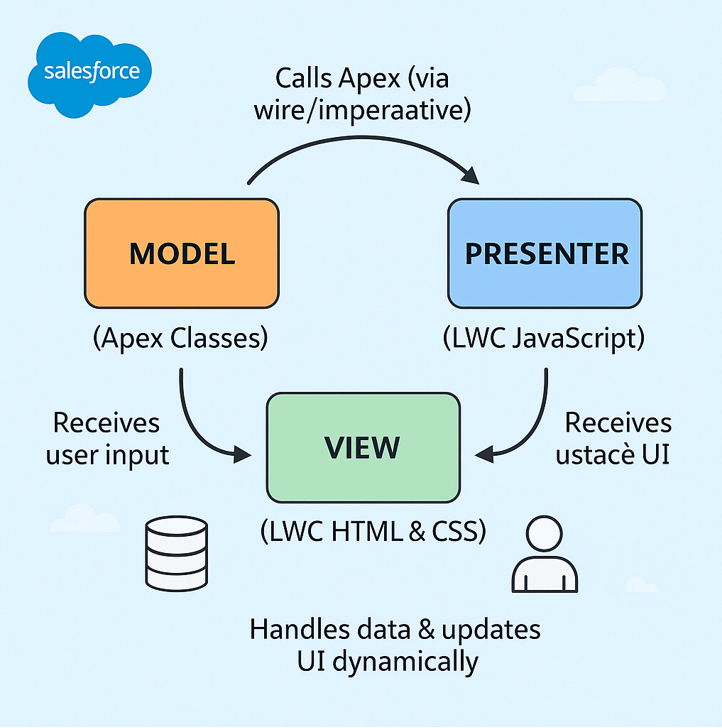
MVP (Model–View–Presenter) is a software design pattern that divides your application logic into three distinct layers — each with a specific purpose. This separation keeps your code organized, testable, and easier to maintain.

Here’s how MVP aligns with Salesforce development:

  • Model → Handles data and business logic using Apex classes, SOQL, and DML.
  • View → Represents the user interface, defined using LWC HTML and CSS.
  • Presenter → Acts as the bridge between Apex and the UI, built in the component’s JavaScript file.

This pattern ensures your LWC components remain clean and easy to scale — especially as they grow in complexity.

MVP in Salesforce Context

1. Model — The Apex Layer

The Model represents your Salesforce data and business logic. In this layer, you work with Apex classes, SOQL, and DML operations.

Example:

				
					public with sharing class AccountService {
    @AuraEnabled(cacheable=true)
    public static List getActiveAccounts() {
        return [SELECT Id, Name, Industry FROM Account WHERE IsActive__c = TRUE];
    }
}


2. View — The User Interface Layer

The View handles the user interface and presentation using LWC HTML and CSS. It’s what users see and interact with.


3. Presenter — The JavaScript Mediator

The Presenter is the core logic layer. It acts as a bridge between Apex (Model) and HTML (View).

				
					import { LightningElement, wire } from 'lwc';
import getActiveAccounts from '@salesforce/apex/AccountService.getActiveAccounts';

export default class AccountList extends LightningElement {
    accounts;
    error;

    @wire(getActiveAccounts)
    wiredAccounts({ data, error }) {
        if (data) {
            this.accounts = data.map(acc => ({
                Id: acc.Id,
                Name: acc.Name.toUpperCase(),
                Industry: acc.Industry || 'Not Specified'
            }));
            this.error = undefined;
        } else if (error) {
            this.error = error.body.message;
            this.accounts = undefined;
        }
    }
}


Why Use MVP in Salesforce Development?

Adopting the MVP pattern brings a host of advantages for Salesforce developers, especially when working with complex Lightning components or enterprise-scale applications.

Here’s why it matters:

  • Separation of Concerns: Each layer focuses on a single purpose, reducing code confusion and simplifying debugging.
  • Reusability: Reuse Apex services and JavaScript logic across multiple LWCs.
  • Testability: Test Apex logic with unit tests and LWC logic with Jest, independently.
  • Performance Optimization: The Presenter can process and filter data before rendering, improving UI performance.
  • Maintainability: Changes in UI or backend logic can be made independently without breaking the entire component.

This approach helps teams collaborate efficiently while keeping code modular and adaptable to Salesforce’s evolving UI framework.

MVP vs. MVC: What’s the Difference?

While MVC (Model–View–Controller) is more common in traditional web apps, Salesforce developers often benefit more from MVP’s structure when building Lightning Web Components.

The presenter in MVP has greater control over data flow to the View. In contrast, MVC’s Controller often manages both business and presentation logic, which can lead to complexity in large projects.

In short, MVP provides cleaner boundaries between logic and presentation, making it ideal for client-heavy, component-based Salesforce development.

Best Practices for Implementing MVP in LWC

Here are a few practical tips to make the most of MVP in your Salesforce projects:

  1. Keep Apex methods cacheable where applicable to improve performance.
  2. Use a service layer (like AccountService) for all SOQL and DML operations.
  3. Avoid putting logic in the HTML file; delegate it to JS.
  4. Create reusable JS utility files for common transformations.
  5. Write Jest tests for your JS logic and Apex test classes for the backend.
  6. Document your layers. This makes onboarding new developers easier.

Final Thoughts

The MVP pattern is not just an architectural choice; it’s a mindset shift for Salesforce developers. It helps you build components that are modular, testable, and future-ready, especially as Salesforce continues to evolve toward metadata-driven and client-heavy architectures.

Kiran Sreeram Prathi
Sr. Salesforce Developer  kiransreeram8@live.com

I’m Kiran Sreeram Prathi, a Salesforce Developer dedicated to building scalable, intelligent, and user-focused CRM solutions. Over the past five years, I’ve delivered Salesforce implementations across healthcare, finance, and service industries—focusing on both technical precision and user experience. My expertise spans Lightning Web Components (LWC), Apex, OmniStudio, and Experience Cloud, along with CI/CD automation using GitHub Actions and integrations with platforms such as DocuSign, Conga, and Zpaper. I take pride in transforming complex workflows into seamless digital journeys and implementing clean DevOps strategies that reduce downtime and accelerate delivery. Recognized by organizations like Novartis, WILCO, and Deloitte, I enjoy solving problems that make Salesforce work smarter and scale better. I’m always open to connecting with professionals who are passionate about process transformation, architecture design, and continuous innovation in the Salesforce ecosystem.

Share.
Leave A Reply

Exit mobile version